Samsung started the Jelly Bean update roll out for a host of devices back in September last year. The Galaxy Note 2 was the first device from the manufacturer to be released with Android Jelly Bean firmware out of the box. The OEM later pushed the new version of the OS to the Galaxy S3. At that time very few of us expected that the update will hit the old best-sellers like the Galaxy S2 and Note. The Facebook page of Samsung Sweden was the first to leak the news that these two phones would be getting the JB update. The news was taken merely as a rumor but it was confirmed later when Samsung released the details of the Android 4.1 Jelly Bean update. Droidviews.com was the first to leak the details of the firmware update for the Galaxy Note.
The release date for the new update was postponed several times and the wait seemed to be perpetual. But now all anxiety has finally been put to an end as Samsung has started pushing the Android 4.1.2 Jelly Bean update for the Galaxy Note International version with model number GT-N7000.
The Android 4.1.2 Jelly Bean OTA update has already started rolling out via Kies and on-device-software update feature. The Galaxy Note users in Hong Kong, Germany, and Mexico have reported getting the new update. 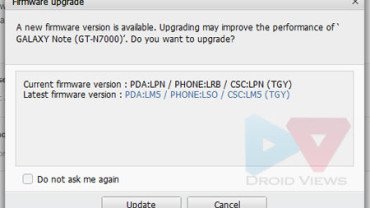 But if you do not belong to the countries mentioned above, you can still update your Galaxy Note GT-N7000 manually via Odin flasher. Only make sure is phone is not locked to a network provider/carrier.
Galaxy Note Android 4.1.2 Features:
The Android 4.1.2 update for the Galaxy Note GT-N7000 contains all the features of Samsung’s Premium Suite Upgrade. Below is a list of all known new features:
OS Upgrade to Android 4.1 Jelly Bean:
- Google Now, Smoother UI (Project Butter), New Notifications Panel
Easy Tasking in One View:
- Multi Window: ChatOn, E-Mail, Gallery, Gmail, Internet, Maps, s-Note, Talk, Video-Player, YouTube
- Popup Note, Popup Video, Popup Browser
S Pen Experience:
- S Note, Photo Note/Photo Frame, Handwriting on S Planner/Email
- More S Pen Gestures, Signature Unlock, Easy Clip
Enhanced Multimedia Tools:
- New Samsung Gallery, Tag Buddy, Paper Artist
Easy MotionWiz:
- Smart Stay, Direct Call, Shake Panning, Camera Unlock
Rich Content Services:
- Video Hub, Learning Hub, Cloud Sync, Allshare Play, Group Cast
More Upgrades:
- News and Face Ticker on Lockscreen, S Note Widgets, TalkBack Setup Wizard, Blocking Mode
Galaxy Note Android 4.1.2 Screenshots:
Download Galaxy Note Android 4.1.2 Firmware:
Below are the links of all available currently available and it will be updated as new firmwares arrive. If you want English as your phone language, download the German firmware. In case, you see any German text anywhere, open Settings> Language and Input> Language and select English.
Download the zip and extract on your desktop. Inside the extracted folder you will find two files:
- KIES_HOME_N7000XXLSZ_N7000OXALSZ_906407_REV02_user _low_ship.tar.md5
- ss_dl.dll
While flashing with Odin tool, click on PDA and select the file with .tar.md5 extension (detailed tutorial below).
How to Install:
Installing an Official firmware on a Samsung Galaxy device is very easy and if you have ever done it, you can do it easily within a few minutes. If you belong to the countries mentioned above, the installation via Odin should take around three minutes. But if it is not so, it might take about 5 minutes. We’ll recommend a data factory reset via Stock Recovery after the firmware is installed, otherwise you might confront minor issues like connectivity, lagginess, etc. If you phone is rooted, it will be a good idea to backup all your apps using Titanium Backup or Koush’s Carbon app.
Before proceeding to install the firmware, do these things:
- Charge your GalaxyNote to at least 60% of battery level.
- Installing the new firmware will not wipe any data stored on your Galaxy Note. We still recommend that you backup you contacts, messages, call-log, settings, apps, etc. These nice free backup apps will help you do that.
- Turn on the USB Debugging mode on your phone: Settings> Developer Options> USB Debugging
Having made the preparations instructed above, follow the following steps:
- Download the appropriate firmware file from above and extract the zip on your desktop.
- Download and install the Samsung USB Drivers on your computer and restart PC when it is installed. If you have already installed Kies on your computer, you can skip this step.
- Download Odin3_v3.04.zip and extract it on you desktop.
- Put your Galaxy Note in Download Mode: turn off the phone, press and hold Volume Down+Home buttons and then long press the Power key for a few seconds till the screen turns up and you see a screen asking you to press the Volume Up key to continue. Press it.
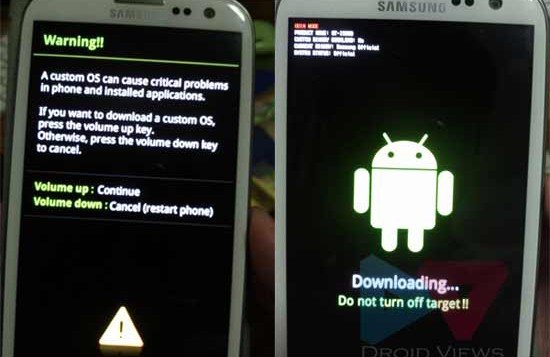
- Run the Odin program by double clicking the Odin3_v3.04.exe.
- Connect you phone to computer using the USB Cable.
- The ID:COM port at Odin turns blue and you can see “Added!!’ text at the message box below. This show that the connection between phone and Odin has been established.
- Make sure that only the “Auto Reboot” and “F Reset Time” options are checked on Odin.
- Click on PDA button and select the file with .tar.md5 extension inside the firmware folder.
- Finally hit the “Start” button and wait for a few minutes till the installation is finished.
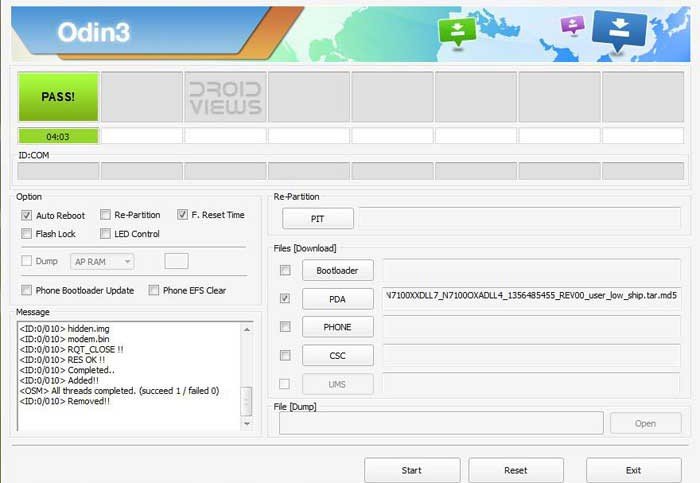
- When it is done, you will see a “PASS!” message at the ID:COM and the device will reboot automatically. You can now disconnect the USB cable and close the Odin window.
The first boot will take a little longer time that usual so you need to be patient till your phone gets ready to b used. In case, your phone id caught into a bootloop and it does not start, do as directed here. If you do not like the new Android 4.1.2 Jelly Bean firmware and wish to downgrade the firmware, follow this tutorial.
Fix for Slow Performance, Battery Drain & Bootloop:
The Jelly Bean firmware is much bigger in size than the Ice Cream Sandwich ROM. It is possible that after installing the ROM your will experience a little lagginess. You might also feel that you phone is heating up and the battery is draining fast. Battery drain is a natural process whenever you install a new ROM. When the battery completes 3-4 charge and discharge cycles, you should notice improvement in battery performance. To get better battery on your Galaxy Note, read the following articles:
How to Improve Battery Performance on Android Phones
To fix the slow or laggy performance and recover the phone from a bootloop (if your phone does not start after installing the new firmware, follow Method 1 given on the following tutorial:
How to Recover from Bootloop on Android Phones
Do not forget to share with us how the official Jelly tastes! If you have a question related to the topic, drop us a comment! Cheers!
Root Galaxy Note on Android 4.1.2:
How to Root Samsung Galaxy Note GT-N7000 on Android 4.1.2 Jelly Bean Firmware [divider_1px]
Do Not Miss !
Best Custom ROMs for Samsung Galaxy Note


After flash, Samsung Shv-e160s.
no signal and messsage is upper “” Limited service”” how to solve this problem ? my country is Tanzania
Samsung Galaxy Note 1 N7000 4.1.2 jelly bean update for Pakistan has
come now How to update ( with 4.03 ICS connect to wifi and try update
then you able to update to 4.1.2 jelly bean Pakistan region
helo i want a upgrad our n7000 in pakistan .how do it.plz help
Hi, I am trying to upgrade my Note but it does not seem like the XFA-N7000XXLSZ-1360774314.zip for South Africa is available.
You can install any unbranded firmware.
If I do a factory reset after installing Jelly Bean, do I get downgraded to the previous version? If yes, how do I wipe the phone without loosing Jelly Bean
Wiping the device does not wipe the OS or its version. Just go to Settings> Backup and reset and you can wipe all data and settings to factory state.
Hi sir,
I bought new Samsung SIII and it was on the Android Jelly Bean v4.3. I rooted it and downgrade to the v4.1.2 but after that my wifi direct doesnt work. When I want to connect my S3 with Sony Bravia TV it connects and after few seconds connection brokes. Is it possible to fix that somehow?Thanks a lot.
Try a factory reset and try this app for remote: https://play.google.com/store/apps/details?id=com.sony.tvsideview.phone
Thanks for quick reply. This app isnt for that what I need, because it cant show my mobs desktop on the tv like Allshare and its not for the mirroring.I will try factory reset and see if it will help.
lokesh2228 Follow this guide: https://www.droidviews.com/how-to-downgrade-firmware-on-samsung-galaxy-devices/
Hi lokesh is here I’m alrready using note gt n7000 and its working on android 4.1.2 but in this my phone battery is draining very baldly so I want to come back to 4.0.4 so please help me
Hi lokesh is here I’m alrready using note gt n7000 and its working on android 4.1.2 but in this my phone battery is draining very baldly so I want to come back to 4.0.4 so please help me
Hi..sir when our note gt n7000 will get update of 4.3?
There are no news or rumors about it.
Hi Mr Rakesh,
Good day. I’m using Samsung GT-N7000 from Malaysia. My phone works very well. Thanks for your guidance. Unfortunately, only 1 problem I’m facing – the network signal not stable. People cant get me when they call my number. The condition is fluctuate. Please help…thanks
Try reinserting the SIM and then a factory reset.
Hi Mr Rakesh,
Already tried. become worst. Mobile data also cannot be used. FYI, I exchange my phone with my wife, so new sim card & already do factory reset before. Still cannot. Should I downgrade?
Then re-install the firmware. Is you phone SIM-locked? If yes, give me the carrier name so that I can find a ROM for you.
I’m not sure whether my phone is SIM-locked or not. How to check? I use DiGi. How to downgrade? Can teach me?
Put another SIM and if it works, your phone is not SIM-locked.
hi.. i am using Galaxy Note Model No SHV-E160l based on korea….right now i’m in india..my current firmware is 4.1.2..is it possible to upgrade this version upto 4.2.2 or upper in this model…plz reply..thnx
No, you will not get update on a Korean model in India.
Is there any option to update this….or is it possible to upload Indian android version in this model????
No way. Doing this forcibly will brick the device.
i have galaxy note N7000 when i update afer certain percantage the update process automatically stops…my recent update version is 2.3.6
from nepal
hello,
i just rooted my galaxy note N7000 using odin… but i forgot to install the zip file first. Now, it only shows the yellow triangle screen and then screen goes blank….
can anyone help please???
Use this guide and install it all over again: http://droidviews.com/2013/root-samsung-galaxy-note-gt-n7000-on-android-4-1-2-jelly-bean-firmware/
If it does not help, install a new firmware from above.
HI there. I’m currently using Galaxy Note 1 and after my recent update of the new Jellybean firmware the device keeps shuts down automatically every few minutes I turn it on. I’ve even changed a new battery for it and the problem is still occurring. I’m using a Samsung galaxy Note 1 Vodafone Australia model.
Hi, sorry for the late reply! Have you updated the device via OTA or Kies?
OTA…
Hmm. Try the Steps given under Method 1 from here: http://droidviews.com/2012/how-to-recover-when-your-android-device-is-caught-in-bootloop/
Hi Kjetil, sorry for the late reply. My internet connection is very crappy nowadays. Fast battery drain is a normal thing with any new device and firmware. Like others, I’ll suggest you do a data/factory reset via recovery. But remember that backup all your data first.
Wait for some days and it should be fine.
Thank you so Much for the help:). It’s all sone and the phone works perfecto:)
Hi I’ve just got a galaxy note today and I live in Norway when I connected to my wifi network at home I got a ? If I wanna update my system and I haven’t done it yet but I don’t have a lap top only a iPad and I wonder if it is ok to update with my wifi network? I had the first galaxy three years ago but then I had a laptop too.. Anyway I don’t have it now and I can’t take a back up on kies or something like that… I can write down my contacts on a piece of paper and I don’t care about the apps that are on my phone it’s only Swype I love that one but I can live without it.. My ? ;is it safe to update with only wifi? Thanks for any help:)
Hi Kjetil, your questions show that you are really new to Android. I think it is safe to receive OTA updates either via Kies or directly on the device. So do not worry about that. Next, official updates do not wipe data so you need not worry about losing apps contacts and apps etc. too.
However, it is always good to keep things backed up. You need not note down the contacts and lose apps. The best way to backup contacts automatically is to sign in your Gmail account and enable sync from Settings> Accounts> Google. You can also backup all your data manually. Read these articles for detailed tutorials:
http://droidviews.com/2013/backup-apps-contacts-logs-messages-and-settings-without-rooting-your-android-phone/
http://droidviews.com/2013/how-to-remove-duplicate-entries-from-phone-contacts-on-android-and-gmail/
Hope it helps and welcome to Android! 🙂
Hi, XXLT5 installed and working fine ….seems really good and stable. battery backup is awesome….must try for all users and root it its still better. Things are smooth, no bugs so far, no crashing, camera and bluetooth fine, music good and so internet surfing…i feel more speed with this version, though i am trying to convince myself from different methods like Wifi, 2g and 3g. Overall a thumbs up for this firmware….Good one.
Thanks for the speedy, quick and apt review! You could be a good reviewer. 🙂
Heard XXLT5 is up already, and websites already ready with XXLT6 version for Note. Can you advice why so many versions in such a short time….do these firmwares have issues even now ?
In fact such updates keep coming, fixing old bugs reported by users and new app updates such a Samsung and Google apps. This just normal. They usually come in 10MB to 200MB OTA sizes but it falls heavy on users who install full firmwares using Odin. This is just usual. If you are not happy with your current firmware, install the latest.
Thanks. Also how exactly do we understand the change logs, is there any link having these details. Most of the websites only speak about better battery and smooth performance so really curious to know.
Yes, these are the fill-words we often use when we do not know exactly about the changes. Even if you install and try the firmware, you will hardly discover any. OEMs do not disclose such things especially in case of minor updates.
thanks. Anyways installing the XXLT5 and root. Will keep you posted if found anything unusual 🙂
Rakesh, one more question, i have changed the battery as said now thought about managing this battery with proper care- especially charging. There are several things discussed about cycle time, deep discharge and stuffs. So how exactly the first few days of a new battery should be like – Your steps will really help to all as note I users its time that people are going to change battery. Can you add an article on this.
Thanks for suggesting the topic! I’ll try to add to the site when I get time. You know time is a big issue when you have to take care of so many things. I have a job, then family and this blog. Together they make life so stuffed!
hey no issues…take your time. Your articles are really worth reading and you put it in simple manner which makes things easier. Will wait.
Hi Rakesh want to share this information hope it helps Samsung users who are with Vodafone in India. There is a bug which can cause users with Vodafone to restart phones at random occasions- especially while answering and ending calls. Issue was resolved by setting the option under – Mobile networks- Mobile Network to “GSM”. By default auto is selected which caused this issue, post this change restart has stopped. Vodafone has to say all Samsung notes face this issue though i disagree.
Hi, thanks for sharing. I agree that all Galaxy Notes cannot have the the same issue. It might be an issue related to firmware or Kernel.
Hi, found the main issue. Battery!!!! Just brought a new one and it worked. All the unusual restarts and problems were due to battery. So now working fine….Thanks for your advice and help.
Still same issue. I want to know if a Sim card can cause this issue. Strange that phone restarts only while a call is ended. Do you have any advice on how to troubleshoot such issues. I spoke to Vodafone says Sim card needs to be replaced. Not sure.
You can check it by inserting another SIM in the device. If the issue still persists, try a data/factory reset from recovery. Warning- this will delete your phone’s data and apps.
You have a rooted device! Why not try a custom ROM to see if it helps: http://droidviews.com/2013/best-custom-roms-for-samsung-galaxy-note-gt-n7000-2013-edition/
I want to know if there is any issue with the latest firmware where the phone will restart. I am from India but installed the German version, by the way also would like to know if there is any differnences in the versions available for different countries, and can this cause an issue. Thanks for your advice.
I have never seen any such issue on my device. There is no or little difference between firmwares except for CSC code. With Indian firmware installed on your Note you’ll be able to get the OTA update.
Download and install this: http://www.hotfile.com/dl/198869296/d11183c/N7000DDLSC_N7000ODDLSC_INU.zip.html
Thanks for your help. It seems i must have made a mistake while rooting. I had the latest Philz 4.9version for XXLZ version which i installed not sure if a version could make an impact, but noticed your recommendation for PhilZ-cwm6-XXLSZ-OXA-4.63-signed.zip. I have done a clean installation with PhilZ-cwm6-XXLSZ-OXA-4.63-signed.zip will check the outcome. Once again thanks for your help.
Rakesh, you are a God send. This tutorial is amazing. I am an absolute newbie and I was able to get through the whole upgrade process. Right now, I am restoring my backup files and settings from Kies.
One suggestion though: In Odin, the tutorial says to wait for a blue light and a message on COM. I never got a blue light, just a yellow one, but i got the message on COM, so I proceeded. I was using odin3 v1.85 on Windows 7.
One More: Please clarify to your readers that they don’t need to download the samsung drivers if they have Kies installed. saves precious bandwidth.
Now, I’ll see how the battery lasts and if I encounter any problems. Will be sure to check in more of your site. Who knows, maybe I tire out of the official version and try a custom mod next time.
Many thanks for instructions that are easy to read and follow. God Bless!
Thanks for liking it. In fact the color of ID COM depends on the version of Odin. I tested it On Odin 3.04 that shows blue. As for the Kies part, I will update it when I come back from outdoors.
i personally did not install jellybean but a friend did it for me (im
technically challenged)… he just installed it with no restoring of
factory settings (no apps/pics/docs/settings etc were wiped out), not
sure if that is right since its pretty slow… my major problem is that
when i put my sim in, it does not register it but the please insert sim
message disappears… btw im in south africa with mtn as my network
provider…
JB update does makes device like S2 and Note slower. As for network problem, I guess it is due to flashing wrong firmware. Install the right firmware and it should be fixed. You can also try pulling out the SIM and reinserting it and turning the device OFF and ON.
Can you tell me your phone’s CSC code? To find out CSC, connect device to computer via Kies.
tried pulling out the SIM and reinserting it and turning the phone off and on but it still did not work.
CSC is LT4
There is no CSC code like that. Unless the code is correct, you’ll not be to find right firmware to fix the problem.
Is your Phone’s model is GT-n7000?
yeah im sure thats my phone model, it shows up when i switch it on and when i connect to kies.
thats the csc number kies shows.
is it possible that the person who did the jb update for me completely screwed it up? and should my service provider be able to fix it?
I believe it’s a case of wrong firmware installation. Your network provider can surely fix it but I am afraid they’ll charge for it.
ahh its ok… i dont think i would be able to fix it myself nor do i have the time… thanks for your help though!
This ‘long awaited’ update has trashed my Samsung Note. Buggy, laggy, battery destroying piece of crap. Oh yeah . . . I want the decent agenda and memo tools that the previous version had.
This is a DISASTER. since “upgrading” to 4.1.2, my samsung note hangs, turns off, and generally plays up. I’ve had it on for about 3 days, and it has just started endlessly rebooting. Do NOT apply this “upgrade” without copious backups. I’m going to try to go back to my old version (4.0.4) which worked fine.
These are the most common issues with the 4.1.2 update for Note and S2 both. The most awaited update has turned out be a nightmarish experience for many. By the way, my case was (so not have my Note now) pretty different. It ran fine and nicely. I had to perform data factory reset from recovery thrice and it was much better.
Try this first and if it doesn’t help, go back to ICS.
http://droidviews.com/2013/how-to-downgrade-firmware-on-samsung-galaxy-devices/
Another alternative will be to install a custom ROM: http://droidviews.com/2013/best-custom-roms-for-samsung-galaxy-note-gt-n7000-2013-edition/
All I mean is- there is no wisdom in using ICS when JB is there!
I mean, even the phone app is taking around 5 seconds to load, and sometimes after a call is disconnected the phone dial pad is shown broken, battery backup is reduced now. Black clipping issue still there and for me it looks like it has even become worse now. The back button has become too unrespinsive compared to working on ICS, I mean the back button takes effect after nearly 2 seconds after pressing which was not there in ICS
i have just tried installing jb to n7000 via odin.i followed the steps given above.but when i hit start. odin shows fail. ..please help. and also please guide me step by step the process of “a data factory reset via Stock Recovery ” how to go throught.like pressing hold keyes etc..
Possible solutions- Reinstall drivers, close Kies, check usb cable connection, reboot device, turn USB Debugging.
As for recovery part, follow steps 10-14 from here: http://droidviews.com/2013/how-to-downgrade-firmware-on-samsung-galaxy-devices/
hi i am using GALAXY note N7000 India model. I am getting the charging symbol for my mobile even if i unplug the charger.after restarting also i am getting the same..
It will be fixed. Perform steps 10 to 14 from here- http://droidviews.com/2013/how-to-downgrade-firmware-on-samsung-galaxy-devices/
hi i am using GALAXY note N7000 India model. I am getting the charging symbol for my mobile even if i unplug the charger.after restarting also i am getting the same..
Thank u very much for the tutorial and making the download available from torrent. It really revived my Samsung Note gt n7000. My phone was dead after i installed cloworkmode patch and installed a custom ROM.
However, I successfully updated my n7000 to jelly bean and its pretty cool.. So, Would it be necessary to do root in jelly bean? Will that make any difference?
Rooting is a mandatory thing. It does make a difference but depends on your preference. Read this: http://droidviews.com/2013/to-root-or-not-to-root-thats-the-question/
Thanks
Hi Rakesh
I have found an update for Galaxy note N7000B but this firmware is of Thailand…My phone is Vodafone Australia’s variant…If i install this JB firmware of thailand then would it void my warranty..
Thanks in advance.
First of all, make sure your device is not carrier branded, or at least unlocked. You can then flash the firmware. As for warranty, it should be void if you flash a firmware for another country. However, you can get it back by flashing official firmware for Australia when it is released.
Also.does jb has s voice? If i face bugs and want to go back ics.then how can i do it. to install jb i need rooting? regards
Yes, it’s S Voice and you do not need rooting as these are official firmwares.You can go back anytime using this tutorial: http://droidviews.com/tag/downgrade-from-jelly-bean-to-ics/
Hello.i am living in uk.still using n7000 on ics.well after installing new room.will it connect to kies?will it get updats from kies (if samsung does release)? Regards.
Install the German or Indian version from above. You will be able to use Kies but not get the OTA. You can install the updates via Odin. When the UK firmware arrives, install it and you will get the OTA too.
I live in US, just received a GT-N7000 from Hong Kong that don’t seem to have any system files or any other files on it . I have Tmobile service and can make a telephone call but cannot connect to data nor read my SD card? Can you help me. right now all I can do is make phone calls. thanks
Hi Sharon, I have just added the latest version of the Hong Kong firmware. I would recommend you to update the firmware manually using the tutorial above. You problems would be fixed. Cheers!
Fantastic guide. Thank you!
Hi Rakesh
I have a Galaxy Note N7000B Vodafone Australia Variant . I havent received the JB update yet and still on ICS. If I install above JB thru ODIN, will void the phone’s Warranty??
Pls suggest.
Thank you.
Well this only for N7000. You have a different variant and I guess it is network-locked too so it will void the warranty certainly but might also void your phone itself. I will not recommend it to you. Wait seems to a safe alternative.
Can someone explain this part, “data factory reset via Stock Recovery”
When you upgrade firmware, sometimes the mixture of older and newer files make them clash, affecting functionality of certain features such as connectivity, slow performance and battery life. As a solution we wipe the phone to delete the older files. Doing this fixes many such issues.
It is always recommended to install a fresh firmware for better experience.
If you want to do that, follow steps given under Method 1 here: http://droidviews.com/2012/how-to-recover-when-your-android-device-is-caught-in-bootloop/
Will this wipe my downloaded apps?
Yes it will. You should backup all apps, contacts, call-log, messages etc. This will help you: http://droidviews.com/2013/backup-apps-contacts-logs-messages-and-settings-without-rooting-your-android-phone/
after i flashed the offcial firmware rom
how can i get it if any future firmware is released?
do i have to do it manually?
If you have installed a firmware meant for your country, you will get the OTA. If not, install it when the firmware for your region is available (keep checking this post). In case of a different country firmware or root, you will have install it manually.
Do not expect Android 4.2 (the last update) for Note before June.
hello sir im update my gt n 7000 with german fw but my phones battery drains very fast please tell me the solution plz plz….help me….
If you have installed it recently, wait for a few days and it will get better. If it still does not, root your phone and install the Ultimate ROM. You will find all links at the end of this tutorial.
Just upgraded my UK galaxy note using the above tutorial and the german firmware i got of Sammobile, worked an absolute dream. Followed every step exactly and when the phone started it worked start away, no need to even re-install apps or anything. Also has Google Now 😀 Thank you for this tutorial
will it removes all the data and application from my phone………??
i have to take backup…???
No, it will not wipe any data yet we recommend a backup as precaution: http://droidviews.com/2013/backup-apps-contacts-logs-messages-and-settings-without-rooting-your-android-phone/
you only need to moved your contact to sim card no need to backup
I updated my UAE version of galaxy note with the German firmware and is working with no problems. If there is any future firmware updates , will I get it via OTA or I have to do it manually? Thanks
You will have to do it manually.
Sir can you please provide me torrent like germany and italy for india please becoz i tried 39 times to download through mirror link every time its take lots of time please upload a torrent for india rom please
Ok.
Hi, the torrent for Indian firmware has been added.
Thanks so much it is so smooth… Waited from 5 months and finally got it… Enjoying it
harloo… This is what I notice after installing the GERMAN firmware and has been using it for a few days.
The interface is fast and smooth however sometimes it lags. I also notice my spen abit wired. the alignment is slightly off. When using the spen shortcut like double tap to get the snote to appear, its either take a while to load or it won’t load at all. When trying to crop (press spen button down while making a circle) it automatically goes back to the previous page as it detects this shape “<" while trying to make a circle.
There was nothing wrong while on ICS.
admin i want to root my note onceagain rght now m using indian firmware .. i also try ur root method but its not wrk on my phne plz suggest 🙂
Root the same way as you rooted the previous ROM.
admin i want to root my note onceagain rght now m using indian firmware .. i also try ur root method but its not wrk on my phne plz suggest 🙂
indian update give one new feature shortcut in lockscreen..yahooo 🙂
dear admin why i alz get [ acess to this is there for only users try again later ] and downloading the the firmware from your ste stoped after 167 mb total size is 700 mb and through kies it stuck at 35 % m from nepal plz do help me out i need jelly bean …..
Hi, it is a connection problem. You should try with a faster internet connection. You can use Internet Download Manager for much faster download.
Popup Note, Popup Video, Popup Browser (air view function ) is not working INDIA UPDATE ………….
Air view id definitely not there but according to the official papers it should be there. I am not sure:
http://droidviews.com/2013/samsungs-official-document-of-galaxy-note-details-the-android-4-1-2-premium-suite-upgrade-features/
Hi! Yesterday i downloaded the Indian Mirror link of JB in my galaxy note its working very good with out any probs……thanks a lot
Hello admin, I’m using Samsung Galaxy Note GT-N7000. I upgraded my note from ICS 4.0.4 to JB 4.1.2 (German version) few days back from above download link. It’s working fine for my INDIAN galaxy note. Just to confirm few things as below…
1. Since i upgraded to 4.1.2 JB i have not got icons on lock screen. Is it any problem or German version don’t have icons on lock screen. I checked in settings there no such options enable the same.
2. The link provided above to download JB 4.1.2 JB for India is official release? If yes, What will be procedure to upgraded my Indian Note to JB 4.1.2 German version to 4.1.2 Indian version.?
Please Help me. Thank you in Advance.
Hi.
I am not pretty sure if the lockscreen shorts features in the JB update or not. You can check it from Settings> Locscreen> Shortcuts, enable it and tap on the “Shortcuts” text itself. If you can see the option it is there. As I remember, the feature is not there.
To install the Indian firmware over German, use the following tutorial: http://droidviews.com/2013/how-to-downgrade-firmware-on-samsung-galaxy-devices/
The important point is to wipe data/factory reset after flashing the new ROM.
Yes, as you mentioned there is no such settings available.
I had one more query after reading upgrading tutorial is that “Do i first required to downgrade my Note from JB 4.1.2 German version to 4.0.4 ICS & then upgrade it to 4.1.2 INDIAN firmware” OR “Do I directly upgrade it to INDIAN firmware via Odin?” (Little bit confused)
If you have any video tutorial link pls share. Thanks you.
The tutorial I recommended you is basically for downgrading firmwares but you can use it in this case too. You need not go to ICS and then install JB. You can do it directly but after installation you will get a bootloop. To avoid that, uncheck the Auto Reboot option on Odin while installing the new firmware And when you get the PASS message, disconnect the cable, pull out the battery, boot in recovery ans wipe data factory reset.
Detailed description on the tutorial.
As you mentioned in your previous comment “The important point is to wipe data/factory reset after flashing the new ROM.” & In tutorial on 13th point it’s said “wipe cache partition” after wipe data/factory reset. So is really required to do it or not?
Just wipe data/factory reset and reboot. It will delete all data on the internal storage so do not forget to backup your data:
http://droidviews.com/2013/backup-apps-contacts-logs-messages-and-settings-without-rooting-your-android-phone/
I updated my Note from JB 4.1.2 (German version) to JB 4.1.2 INDIAN Firmware its working fine & smooth. Thank you for your support. 🙂
Nice, keep visiting!
Updated my mobile with Indian Firmware last night thru samsung kie….It is smooth as silk….I luv it..!!
is it the official firmware all the features??
Yes, it is official firmware.
Sir can you please upload torrent for N7000DDLSC_N7000ODDLSC_INU.zip please thankyou.
SIR CAN YOU PLEASE UPLOAD TORRENT FOR N7000DDLSC_N7000ODDLSC_INU.zip please
Sir can you please upload torrent for N7000DDLSC_N7000ODDLSC_INU.zip please.
Hi,
I have added a resumable mirror link for India version. Use Internet Download Manager for faster download. Later I will try to add a Torrent too. Cheers!
im already installed German firmware ..but now in india updates are available . .can u tell have any difference In indian firmware and german firmware?
There is no difference. If you wish, you can install the India FW, otherwise ignore it.
Please let us know how do i install Indian Firmware over German Firmware
India has started getting the official update as I am posting this comment. I am updating thru samsung kies.
Very Happy Finally a update
Nice! The post has already been updated with all new firmwares including India.
can’t extract with winRar always error…
The downloaded zip is corrupt because it was not downloaded properly. Download again!
Anyone experienced their contacts always crashes when trying to delete a contact?
Wipe Data factory reset. It and all other bugs will be fixed.
Do method 1 Given here:
http://droidviews.com/2012/how-to-recover-when-your-android-device-is-caught-in-bootloop/
Hey,
I currently have [ROM][4.1.2 JB]Ultimate N7000 XXLSZ JellyBean 4.1.2 v5.2 on my indian GT N7000, and would like to get on an official rom. i just had a couple of questions with this like:
1) Can i install this ROM though CWM recovery insted of Odin?
2) Is this ROM as the same as the one i am currently using?
3) My phone is rooted, will i loose my root in this ROM? Coz if i do i will not be able to use titanium backup to restore all my apps..!!!
Please help and guide as to whether i should go with the official ROM or [ROM][4.1.2 JB]Ultimate N7000 XXLSZ JellyBean 4.1.2 v5.2???
Hi,
It’s an official ROM so it can’t be installed via a custom recovery like CWM or TWRP. Yes, the ROM version is the same. Having installed an official firmware, you will certainly loose the root. However, you can root it again. I would recommend you to stay with your custom ROM if you are happy with it.
Yeah this ROM working pretty great right now…. thanks man 🙂
How to root Galaxy Note running Jellybean then? Same process?
Yes, if you able to root with Exynos Abuse apk, it will work again.
Otherwise, method 1 (I prefer method 2 but you got all anti-Google stuff like Mac & Yahooo!!!)
http://droidviews.com/2013/root-samsung-galaxy-note-gt-n7000-on-android-4-1-2-jelly-bean-firmware/
I uninstalled Supersu and Exynos Abuse. I then realized Mobile Odin app still inside. Now I cannot even delete it. Any idea how to remove the app? When I reinstalled the Supersu and Exynos app I can’t go to root mode anymore.
I already solved it. Thanks. 🙂 GOOGLE!!!
Read the tutorial and the lag and battery issue will fixed to a great extent. For extra lag reduction, use this: http://droidviews.com/2013/boost-performance-and-reduce-lag-delays-on-your-android-phone-with-seeder-app/
i have galaxy note 2 N7100… not galaxy note N7000….
is this the problem for not installing firmware . firmware (german) that you given is it compatible for galaxy note 2 N-7100 ????
If you have a note 2, why did you put a comment in this post?
http://droidviews.com/2013/exynos-vulnerability-bug-fix-firmware-rolls-out-for-samsung-galaxy-note-2-n7100/
sorry…. i thought it was for galaxy note 2 too……
please suggest me the firmware and some helpful material link…
Hi there, i have installed this firmware successfully, that is downloaded from HK “N7000ZSLM5_N7000OZSLM5_TGY.zip”. Everything seems fine, however whenever i tried to go into apps / google play, it gives an error “Google Play have stopped” –> meaning crashed.
Anyone have a solution to this?
Im from Malaysia btw 🙂
Hi, I have just installed this firmware and downloaded from N7000ZSLM5_N7000OZSLM5_TGY.zip. All are working fine. However, whenever i tried to go into google play… it keeps give me an error Google play have stopped. Any solutions for this?
im from malaysia btw
Download the play store app from here: http://droidviews.com/2012/download-google-apps-gapps-for-your-android-device-on-gbicsjb/
restart phone and try again. Make sure you phone is in syncing mode.
Can u share how to do it in mac? using heimdall?
Use mobile Odin to install the ROM with your phone itself.
Download this file to root phone: http://d-h.st/vhu
then find an app called mobile Odin: http://droidviews.com/2012/odin3-v3-04-mobile-odin-for-galaxy-s3-released/
then follow this tutorial:
http://droidviews.com/2012/download-and-install-latest-stock-firmware-on-samsung-galaxy-s3/
The guide is common to all Galaxy S phones. try it and let me know.
I am using Galaxy Note. Can I still follow these steps that you provided? I can’t wait any for the firmware to reach Singapore.. 🙂
Yes, you can. Just be careful and stick to rules. I had tested the method once on my dear old Note. First install the apk from the first link, then install the Mobile Odin.
to root the phone just run the apk is it? then start the mobile odin?
install the ExynosAbuse apk, then Mobile Odin and run the app. It will ask for root permission, grant it. the copy the .tar.md5 firmware file to external SD and flash it as instructed. Let me know if you can see the SuperSU app after installing the ExynosAbuse or not.
when I ran the mobile odin, it says “SuperUser access is needed, but could not be acquired. Are you rooted and did you give permission?” and an OK button. that is all
Okay, follow the method 1 from this tutorial: http://droidviews.com/2013/root-samsung-galaxy-note-gt-n7000-on-android-4-1-2-jelly-bean-firmware/
when the phone is rooted Mobile Odin will work.
This is what I did.
I followed your instructions.
1. Download ExynosAbuse.apk to root phone: http://d-h.st/vhu
2. Then find an app called mobile Odin: http://droidviews.com/2012/odi…
3. Open ExynosAbuse app and root the phone.
4. Followed the instructions “Install a Firmware Using Mobile Odin” which can be found here http://droidviews.com/2012/download-and-install-latest-stock-firmware-on-samsung-galaxy-s3/
5. IT WORKED! HERE COME THE JELLYBEAN!!!! Yahoooo!!!… Thanks a million!
“Yahoooo!!!” ? , say at least “Goooogle!!!” LOL.
Nice to here that. Enjoy! For more tips see these articles: http://droidviews.com/tag/tips-and-tricks/
And join us on FB, Twitter, G+ etc.
hahaha!!! one more time!!! GOOOOOOOGLE!!! hahaha.. thanks for the fast response. I even hardly get it this fast in xda! thumbs up! your the best! Thanks again!
We are trying to be the best, but it will take some time. 🙂
or, try to install this zip using the recovery mode: http://download.chainfire.eu/315/SuperSU/UPDATE-SuperSU-v1.25.zip
DroidViews!! please help me.. i was upgrading my galaxy note 2 from jelly bean 4.1.1 to 4.1.2 (german version) after reading your procedure.. but i have done a mistake. i did not check the usb debugging mode before start the upgradation..i reboot my device in downloading mode and starts upgradation. now my device is stop while upgrading…
i switched off my device and then switched on but an error mesage appears that “firmware upgrade encountered an issue. please select recovery mode in kies and try again”…
now please tell me what should i do ???
please please reply me and tell me how can i sattle down this issue ? (plz tell me in detail)
DroidViews!! please help me.. i was upgrading my galaxy note 2 from jelly bean 4.1.1 to 4.1.2 (german version) after reading your procedure.. but i have done a mistake. i did not check the usb debugging mode before start the upgradation..i reboot my device in downloading mode and starts upgradation. now my device is stop while upgrading…
i switched off my device and then switched on but an error mesage appears that “firmware upgrade encountered an issue. please select recovery mode in kies and try again”…
now please tell me what should i do ???
please please reply me and tell me how can i sattle down this issue ? (plz tell me in detail)
Okay, pull out the battery and place it back after a minute. Enter download mode again and try to install. Also make sure that you have either Kies or USB drivers installed on your phone and Kies is closed while you install the firmware via Odin.
i have done these things many times.. but nothing happened..
if i switched my phone in download mode and update software then it will stop after 5 sec and then nothing happens…
if a switched on normally then an error message is diplay “firmware upgrade encountered an issue. please select recovery mode in kies and try again”… 🙁
now what shoud i do ?
Hi, I would suggest you to try another firmware. I remember facing this issue once myself and when I investigated, I discovered that the firmware file was corrupt because I used a download manager application for that. Sometimes small mistakes make us pay.
Before trying another firmware, perform the Steps given under Method 1 from here. When you have wiped the data/factory reset and cache partition, pull out the battery again and put back after 1 minute. Then enter download mode and try to install the firmware again.
If this does not help you download another firmware.
when i press volume up key + home + power keys then my device is not going it that mode… and erroe message is displayed that is “firmware upgrade encountered an issue. please select recovery mode in kies and try again”….
it only goes to download mode….
do i use kies ??????
Uninstall Kies if you have it an and install the USB Drivers only. Then keep trying with ODIN.
i want to install but little fear its safe or not i did not have warranty
It will not affect the warranty because its an official firmware. Just be careful in following the instructions.
Is there a need to backup all my personal data (eg. whatsapp messages). this update works for unrooted n7000 right?
Actually the update will not delete any data but the mixture of some ICS files with the JB ones might give you a laggy performance. In that case you will need to wipe data factory reset which will delete all data from phone. I will, therefore, recommend you to keep yourself ready for that. I much as I know the WhatApp data are stored on a folder by same name on the internal sd card. You should copy that folder to PC or transfer it to external SD. You can later put the folder back.
You will find a solution here: http://droidviews.com/2013/top-30-free-android-apps-that-you-must-have-on-your-phone/
Thanks a lot 🙂 appreciate the quick reply, CHEERS!
At DroidViews, we never let any valid comment go unattended and try be quick.
Also see these articles: http://droidviews.com/tag/tips-and-tricks/
I Want to install official Jb through odin because i cannot wait anymore for it to arrive india.SO all i need suggestions on-
1.Out of all the countries that got their official JB ota (germany,Hongkong,Taiwan,Italy,Algeria,russia etc)Best Stable Smooth Official Jelly bean is of which country till now so provide me with the best and fastest download link of that official complete rom to flash through Odin.
2.I want full Airview,Smart Rotation,Svoice etc Note 2 features and butter smooth perfomance without lag and better battry standby without rooting my phone is there any download link and instructions to install them.because airview is not available in official jellybean of any country till now i guess and is there any fix etc thn give download links.
3.After Flashing it through odin would i still be eligible to get Ota updates for my country and that would not void my warranty?
4.would i lose all my installed games and apps and data images videos etc after installing this Jb.or any of my application like camera wifi etc wont work properly?
5.after installing this official Jb Rom is any danger or risk for bricking?and when update is later available for my country India,can i shift to Ota update for same even after installing through Odin >
Help me please i know there are lots of experts and developers here.i would follow your instructions properly.give the answer in single comment as lots of people want this as i have gone through so many forums on different websites and have these as frequently asked questions.this would help and benefit all.
Hi Atul,
Nice to see you taking pains to write so much about your doubts and requirement, but at the same time they seem a little contradictory.
1. All firmwares are the same except a few localization but I would recommend you the German firmware (tested).
2. I have listed all the features that come with the update and you would not get anything more in an official firmware. If you are so keen to have these features, you will have to root your phone and lose warranty, etc. and then install a third-party ROM that has these features. I am currently testing some nice ROMs and writing an article/tutorial on the topic. It should be published by tomorrow.
3. These are official firmwares so you would not loose warranty.
4. No you would not lose any app or game but if you want to have smoother performance and better battery, I’ll recommend you to do a factory data reset (read the full article above) and then all the data on the internal memory will be wiped. For that, download the app backup and restore: http://droidviews.com/2013/top-30-free-android-apps-that-you-must-have-on-your-phone/
5. The danger is always there even if you install nothing. Just drop your note on the floor and it might brick. If you say, you will follow the instruction carefully, nothing wrong will go. No, you will not get the OTA and will have to update the device manually.
Hope it helps you, stay tuned and cheers!
is it no task manager in jelly bean?
Yes, there is. Press and hold the Home button.
thank you very much..
network mobile data really work with this rom? any bugs? if im install this rom, than i cant get warranty from samsung?
Yes, everything is working fine but you will need to wipe factory data reset after it is installed.
All firmwares are official so the warranty is untouched.
Tell About This Plz ..
[ROM][4.1.2 JB]Ultimate N7000 XXLSZ JellyBean 4.1.2 v5.2
That is a custom ROM. Better stay with the official ROM.
can i Install this ..?
On my Note
Give me the link to the ROM , before I say yes.
Plz send Me this Link and Method plz
Yes you can.
Thanks Alot Brother ..
U r really Awesome.. Thank u for Your help..
I need ur Help One More Time Plz Tell me simple Method to install this rom
Rom Installing Done
works Very Good And Smooth..Thanks
Hi Bro,
is there any problem with my mobile data or network if i install this rom?my country malaysia..thankx..pray for sabah
No, you will get any issue. Go with it and you will like it.
Yeh!!! everything work very good, no data and wifi problem..thank u for your help bro..
Thanx i will try to fix it sir can you upload the some ics apk file which are missing in it just like movie maker,photo editor.
Thanx for this update my issue is that s memo is missing in it how can i get back my smemo please help me and i see screenshot no5 their is all smemo notes are in it like dog and etc so how can i get back that smemo pls help me.
Hi,
I think something went wrong with your installation as the S Note is already there. You might need to wipe data factory reset via recovery to fix this.
yes sure…..
thanks sir finally im update my note gtn7000 …with german firmware and its working smoothly….thnk u…..
Nice! Keep visiting and do not forget to see all posts for Galaxy Note:
http://droidviews.com/tag/tips-and-tricks/
http://droidviews.com/tag/samsung-galaxy-note-gt-n7000/
now only logo show no boting :(:(
all the application has stoped wrking no touch wiz no goolgle andriod procees acore memo note .everytime badge provider message … m not njoying dis jelly bean plz help me ..
wen booting everythng stop like s note s memo alsi badge provider has stoped, voice search stoped andriod .process .acore error plz help me
If I updateto German firmware for ny Indian phone… Will I loose my warranty…. My phone is just 5 months old.. shouldvi wait or Go with German version… Plz reply
As long as you are on official firmware, you will be able to claim warranty. The firmware for India will be arriving anytime (about 10-15 days). The decision is yours.
If i update to German Firmware now and later reupdate to Indian version when it is launched… Will the warranty be valid then and is it also possible to change from german to indian version
Yes, it will.
Before to updated my galaxy note to jellybean i have eight default smemo n snote in it which is locate in my file with extension name .sbn can u provide me that default drawings
Thankyou sir finally i upadetd my galaxy note to jelly bean but i forget to take backup of data.Sir i need smemo default drawing sbn type extension file which is missing on jelly bean update can u prove me all default smemo file pls help me…
Hi,
I did not get what you mean to say. Be clear!
I have installed jelly bean to my galaxy note 1..but there is no air view which i wanted the most… from where i can get that fix..??
It is not available with the official update but you can get it if you root your device. However, I am not sure it will work on the new JB firmware or not. The procedure is risky too.
its work awesome on my galaxy note… Thank u sir
Nice! Enjoy and keep visiting. Do not forget to browse all topic for your device:
http://droidviews.com/tag/samsung-galaxy-note-gt-n7000/
Sure why not…
hello sir I am from India..
I want to up to date My Galaxy Note N7000 ..
To jelly bean..
Plz tell Me This Jelly Bean 4.1.2 working On my Note Mobile..?
Hi Simer Jeet,
You can surely install this firmware though it’s not for India. I have tested it and it works fine. I would recommend you to install either the German or Italian ROM. Just follow the steps and you are done! Cheers!
Thanks alot Big Brother…
yeahhh…!!! Everything z alryt in GERMAN firmware,,,my indian galaxy note is running very gud 🙂 🙂 not even aa single prblm 🙂 🙂 thnx a lot admin 🙂
Nice! Enjoy and keep visiting!
Hey i have been trying to connect my phone to ODIN. but it dos not detect the phone in download mode, when the phone is on it works, is there any solution for this issue? i have tried this in 3 laptops and same issue..i have no clue on what to do next? please help me
i have installed drivers, Kies is not running and original samsung cable..
Base band version N7000XXLRK
running 4.0.4
Weird! Everything seems to be fine. It must be some little issue. Okay, pull out the battery from device and put is back. Start the device and check for the USB Debugging. uninstall Kies temporarily and also restart the computer. It is a connection/drivers issue for sure. One thing, make sure that either of the two- USB Drivers or Kies is installed- not both at the same time or drivers might clash.
Let me know what happens.
hey when will italy receive its update
Hi,
The update has already been rolling out and it might hit your phone anytime. Meanwhile, you can install the German firmware from this post as it is running very fine without any issue.
hello, question
are this a update for the note i ore note ii?
you write note ii but the number 7000 are the note i.
thanks
henk
Hi,
As the title indicates the tutorial is about Note GT-N7000. We write several tutorials everyday and some times such mistakes occur. Thanks for notifying us.
Morning! I was able to update to jelly bean without any problem. It is running perfect and I love the array of options jelly bean comes with. Now, I have the unlocked note version gt-n7000 and my question is…does this upgrade lock my phone?
Hi Gato,
Nice to here you are enjoying the new firmware. If you have downloaded and installed from this post, your phone will not get back to locked status. All firmwares posted here are for unlocked device. However, you can check it by inserting another SIM card.
hellooo…sir i m new to this stuff…plzz Help me…i belongs to india city bt i hv unrooted galaxy note wid 4.0.4 firmware…will this JB update work for me if i flashed it? and one more thing..i m indian bt my phn is not indian..i dnt knw it come from which city…so plzz help me dear…thank u..sry 4 my bad english
Yes it will work. Install the German firmware from above. Read this: http://droidviews.com/2012/how-to-change-csc-in-samsung-galaxy-phones/
It help you find the country.
sir i wana ask one more thing…the wifi feature will work on it or not ?? and can i take backup of my current 4.0.4 firmware without root ????
No you will not be able to backup the whole ROM without rooting and installing CWM or TWRP recovery
Thanks a lot dear,,,i hv installed the 4.1.2 to my galaxy note nd its running very smoothly yeaaaaaahhhhhhhhhhhhh… bt is there any prblem in WIFI hotspot feature ???
Enter recovery mode and try a “wipe data factory reset” and then reboot phone. It might fix the issue.
How to is given here: http://droidviews.com/2012/how-to-recover-when-your-android-device-is-caught-in-bootloop/
Hey Dude I am from India.I want to update my n7000 unrooted.Which Country’s Firmware I need to use?
Go with Germany (DBT) version.
Thank Dude..BDW When This Version will be launched in india..is there any chances of changes in update like Air-View,Smart Rotation? (This all features doesn’t contain by this three countries os.)
The firmware is already rolling out and might be available anytime. Can’t say. The feature you get is same to all firmwares India or Germany. As for the features you are talking about, please stop dreaming about it. Do not forget that it is a software update. Airview feature is a special thing about Note 2 S Pen that is much advanced to one that you have with Note. Old hardware restrictions will not let you enjoy these new features.
http://droidviews.com/2013/samsungs-official-document-of-galaxy-note-details-the-android-4-1-2-premium-suite-upgrade-features/
hey,when i click start i wait like 10 secs then i get a fail message,any help ?
ok i managed to fix it,the problem was with the usb debugging mode i should turn it off not on,please edit that part in ur guide
Hi, after I updated my Note. The auto rotate screen and the page buddy are not working. Please help me to solve this problem….
Try a factory reset from settings> backup and reset>factory data reset. It should work.
HI, after factory reset, it is working but the reaction very slow. I need to wait almost a minute.
Do it one or more times. and if it is still there, boot in recovery and “wipe data factory reset”:
press volume up+Home+power keys for about 5 seconds till you see a black screen with blue text and scroll to ‘wipe data factory reset” and then reboot phone. Use volume keys to scroll and power key to select an option.
Im still waiting for step 6… nothing happens..
Seems you have not installed Samsung USB drivers on your computer. Anyways, I have updated the post with the images of download mode. You can download the USB Drivers from here: http://droidviews.com/2012/android-usb-drivers-samsung-motorola-sony-lg-zte-htc-asus-huawei-acer/
It worked! tyvm! I luv it soo much!!
I am happy for you ShiHoo, enjoy and keep visiting!
Hello…I’m from Kuwait and my Galaxy Note baseband version is N7000XXLRK. Can I be able to update my Note safely to jellybean 4.1.2 with Germany version firmware ? Thank you!
Yayyy…updated my note and working like a charm…thanks
thanks a ton!
Thank you for the easy update…
Only question, the notification bar isnt pitch black anymore, is that ok?
Also the phone is a little laggy even after factory reset.
With JB update Samsung has changed the color of the status bar so that is normal. As for the lagginess, it is an expected issue. Actually the JB firmware is almost the double-sized than the ICS one. Since Note’s configuration is still the same it might be a little tougher for it to handle.
Try to do a Data factory reset via Recovery.
Try to get rid of the apps and functions that you do not use. The keep eating the RAM unnecessarily. This might also help you:
http://droidviews.com/2013/how-to-deleteremove-unwanted-stock-apps-or-bloatwares-from-android-phones/
http://droidviews.com/2013/easily-remove-stock-appsbloatware-from-your-android-phone-without-rooting-it/
Thanks mate…
All good now…!
Updating this Firmware does it come with an OS or after loading the firmware can I load a custom ROM afterwards.
This is an official firmware (it self an OS). To install a custom Rom, you will have to root it.
I downloaded the update from HK…after the installation…my GT-N7000 keep shutting down on its own…help…
It is called bootloop. Here is the solution: http://droidviews.com/2012/how-to-recover-when-your-android-device-is-caught-in-bootloop/
Follow method 1.