The Galaxy Note is the first device of its kind. I still remember the ads of this device that hyped it a new hybrid avatar possessing the capability of both, a phone and tablet. It was the first device that gave rise to a new term that we know as “phablet”. It has been about a year and half since its launch and quite surprisingly the Galaxy Note has managed to survive itself in the market. The device had just begun to loose its charm but the latest Android 4.1.2 Jelly update revived it and gave users a sound reason to stay with it.
While most users are happy with the Jelly Bean gift hamper from Samsung, there are some who are unhappy because of the absence of the Air View and a few other S Pen related features. Some folks reported that having updated to the new firmware, their Note became slow in performance and fast in battery drain. So, what is the solution?
When you install a new firmware over an older one, most old system files are replaced by new ones. But there still remain some files from the old firmware that intend to interfere with the new files and therefore your becomes slow. To improve the performance of your phone, perform a “wipe data/factory reset” via Stock recovery. As for the battery drain issue, you should not be hasty in concluding about its poor performance. When you install a new ROM, you phones battery needs some to sync with the new software. After 3-4 charge and discharge cycles, you will notice significant improvement in battery performance.
Why Go for a Custom ROM?
If you want to have some more fun with your Galaxy Note 2 and would like to enjoy faster performance, better battery life, features not found in official ROM, ability to use themes and mods for your device, you should consider installing a custom ROM. Galaxy Note is an old but popular phone and therefore you can find hundreds of custom ROMs for it. Such a variety might confuse you. The present article attempts to help you with choosing a good custom ROM for yourself. We have tested about 13 most popular custom ROMs for the Galaxy Note and picked some really best ones. The parameters for the selection of the ROMs are performance, features and battery backup. I did a best custom ROMs article for Samsung Galaxy Note GT-N7000 last year, but it seems that it’s a high time now for another such article. You can see the old post below-
Best Custom ROMs for Galaxy Note 2 GT-N7000
Also Take a Tour of Our Best Custom ROMs Series
Disclaimer:
All ROMs listed below belong to their respective developers, so all credits and props to them for the hard work time they invested for us. Flashing third-party custom ROMs or any mod might harm your phone. Do not proceed with it unless you are sure what it is all about. All ROMs have been tested and found to be working fine but if a make any mistake, it might turn into a nightmarish experience. Be careful and stick to the rules!
Root your Galaxy Note:
To be able to install a custom ROM on your Galaxy Note, you need to have it rooted first. Besides, a custom ROM requires a custom recovery, so make sure you have a installed either ClockworkMod or TWRP Recovery on your phone. You have not yet rooted your Note, follow the steps in our easy tutorial on the topic.
Root & Install CWM Recovery on Samsung Galaxy Note N7000
How to Install Custom ROMs on Galaxy Note GT-N7000:
Download the preferred ROM and Google Apps (if applicable) from below and follow the instruction below carefully. But as I said above, your phone must be rooted and CWM Recovery installed on it. Read our detailed tutorial that sheds light on all aspects of installing custom ROMs and precautions to be taken before and after doing so:
- Download the preferred ROM file. Also download the Google Apps zip package if you are going to install an AOSP or CM based ROM. Copy both the zip (without extracting) to your device by connecting it to computer using a USB cable.
- Turn on USB Debugging Mode on your Galaxy Note: Settings> Developer Options.
- Make sure your phone has a good battery level, if not charge it now.
- IMPORTANT: Backup all important data stored on the internal storage of your phone. Backup or sync all important data such as contacts, messages and apps present on your Galaxy Tab. Backup your contacts, call-logs, messages, APNs, bookmarks, calendar, apps & games Using these Nice Free Apps.
- Download and install a root file explorer from the Play Store, open the app and look for a folder called “efs”. Backup this folder to the external SD card of your phone. In fact, this folder contains your phone’s IMEI number. In case you loose your IMEI (a rare case), you can restore it later.
- Turn off your phone and reboot your phone into ClockworkMod Recovery mode. If you do not now how to do it, here it is: press and hold the Volume Up+Home (center) keys simultaneously and then hold the Power key. Keep the three buttons pressed till the screen turns up, the Samsung logo blinks for two times. Just as you see a green Android bot, release the power key but keep other two keys pressed till you see a list of options in blue text on black background.
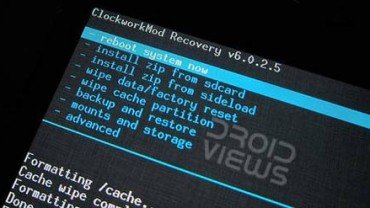
- In the Recovery the touch mode does not work, so you will have to use the Volume up and down keys to scroll and highlight and the Power button to select an option.
- IMPORTANT: The most important rule of the game is to evade any uncomfortable situation. First of all, backup your current ROM so that you can restore it in case you do not like the new ROM. Scroll down to “backup and restore” option and select “backup”. It might take a few minutes for the backup to complete.
- When it is done select go back option and choose “wipe data/factory reset” option and wipe it.
- Then go to “wipe cache partition” and wipe it.
- Finally go to “advanced” option and “wipe dalvik cache”.
- Return back to the main menu and select “install zip from sd card> choose zip from sd card” and select the ROM file that you copied to your phone in Step 1.
- This step is required only if have installed an AOSP or CM based ROM. When the ROM is installed, go back and install the Google Apps zip package the same way you installed the ROM in Step 12.
- Finally, go back to the main menu in Recovery and select ”reboot system now”.
The first boot after installing a new ROM takes much longer time (up to 3-7 minutes) than an usual boot. In case your phone does not boot properly and you are stuck on bootanimation remove the back cover, pull out the battery, wait for a minute and reinsert the battery. Boot phone into Recovery again and “wipe data/factory reset”. Reboot device and things should go fine.
1. ParanoidAndroid ROM 3+ JB 4.2
Developer: beerbong (Donate)
ROM Review:
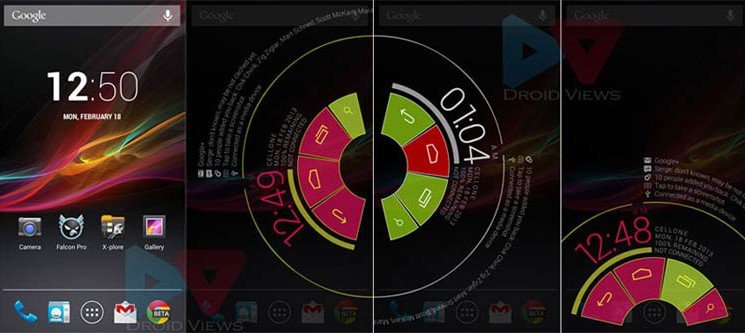
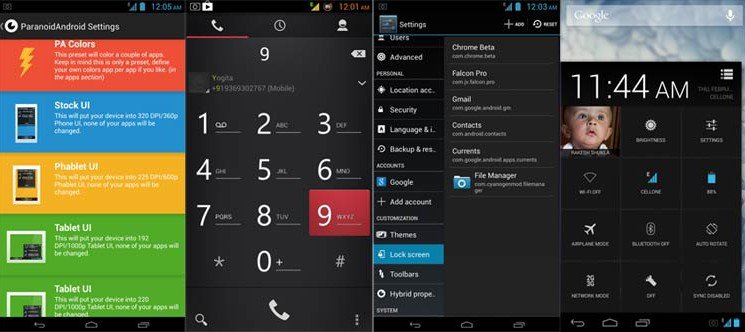
The ParanoidAndroid ROM is one of the most popular custom ROMs among Android users. This AOSP based ROM lets you enjoy the latest version of Android. Its hybrid look and feel, smooth and fast performance and decent battery backup, all make it a nice option for those who love custom ROMs. I used this ROM for two days and it was a whole new experience due to its flexibility, capability of customization and, most of all, the expanded desktop mode with that beautiful Pie thing (see the screenshot).
I have written a detailed article that reveals all the aspect of this new avatar of the ParanoidAndroid ROM. It is based on AOSP 4.2.2 and also supports themes made for CyanogenMod 10.1.The ROM is almost bugless but the PA Team will have to focus on improving the battery performance a little. If you want to have a fresh new experience with beautiful looks, the PA3 ROM is just for you.
[source]
2. Team Union ROM JB 4.1.2
Developer: Chrack
ROM Review:
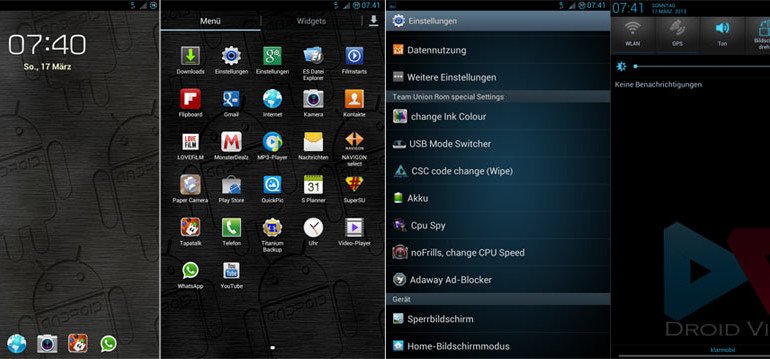
Team Union ROM is a feature-packed, performance and customization focused custom ROM for the Galaxy Note. It is based on the latest official Android 4.1.2 Jelly Bean firmware for the device. The ROM is very new yet it displays the maturity of the developer who has added all possible features in this ROM by amalgamating various nice features like Ripple lockscreen with Ink Effect, Air View, Multi-Window with unlimited apps, transparent weather widget, Android 4.2 keyboard, Awesome Beats Audio, LMT Launcher, call recording, DPI change capability, and lots more.
The whole ROM is themed in blue and thus it also provides a diversion from the well-familiar TouchWiz theme. Besides, you can also download a couple of themes made for this ROM. The Team Union ROM is installed via Aroma Installer where you can choose from small, full or custom ROM installation modes. In custom mode, you will be free to select what elements you want to have on your Galaxy Note GT-N7000. As for the performance of the ROM, it is much faster than the stock firmware and has a good battery life too.
Themes:
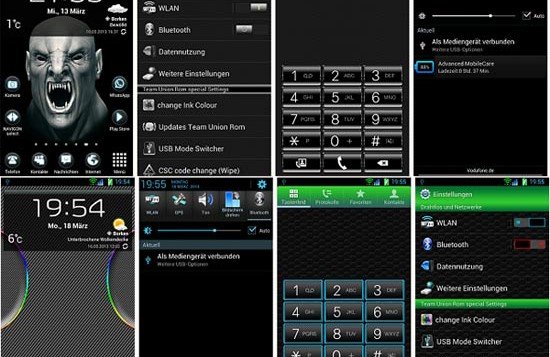
Below you can download the themes for the ROM. To install a theme, boot in CWM recovery, select “install zip from sd card”, install theme and then reboot device. You can have one theme at a time. Do not forget to backup the ROM before installing the themes.
3. Alliance ROM N7000 JB 4.1.2
Developer: Robbie Hood
ROM Review:
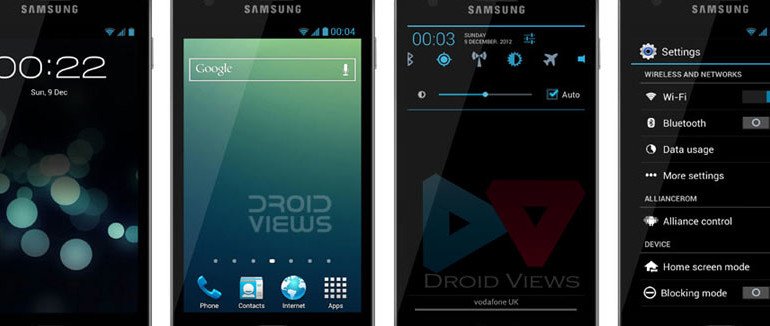
This is a very popular ROM that is available for a range of Galaxy phones. The Alliance ROM has been developed by Robbie Hood from XDA. It is based on the latest XXLSZ Android 4.1.2 official firmware for Galaxy Note. The ROM includes all the features of the JB update and has been tweaked to improves the performance of your device. It looks elegant and lets you choose features and apps during installation. Needless to say, with Alliance ROM installed on your Galaxy Note, you will experience a much better performance and decent battery-life.
How to Install: Download the ROM Customizer app from the Google Play Store and install the AllianceROM via this app. Open the app and select Flash File option, choose the ROM file and yes, do not forget to select Wipe before installing.
4. Ultimate N7000 ROM JB 4.1.2
Developer: joosh3
ROM Review:
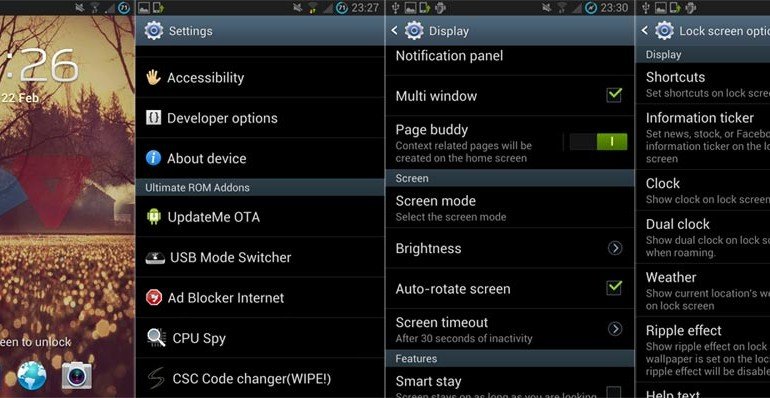
If you love the look and feel of the stock TouchWiz interface and want to have a faster and richer experience on your Samsung Galaxy Note, Ultimate N7000 ROM is what you should go for. The ROM manager has left no stone untouched to make it a fully-loaded package. Like other ROMs listed above, the Ultimate ROM too is based on the XXLSZ build of the latest Android 4.1.2 firmware for Galaxy Note. It is a fully deodexed and Zipaligned ROM that contains nominal bloats, only the useful ones. It features lockscreen shortcuts, Air View (in Gallery), working S Note with productivity tools, S Voice, Ink Effect at Ripple lockscreen, Multi-Window with unlimited apps, call Recording and many others. The ROM is fast in performance, full of features and battery-friendly.
5. Carbon ROM
Developer: Carbon Team
ROM Review:
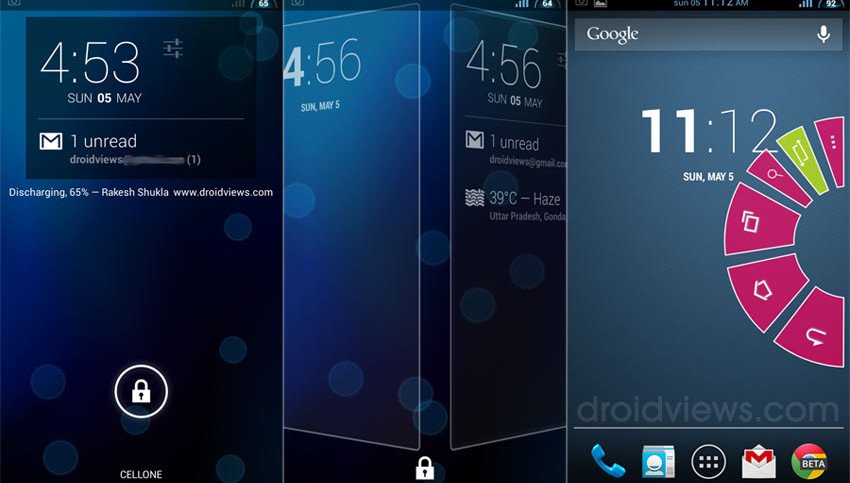
Forgive me if I sound a little prejudiced in my review of the Carbon ROM. I do not know to what extent you would like it but I can say that you love AOSP feel and speed, this ROM is sure to captivate you too. I always keep it on one of my Galaxy devices and use it as daily driver. Fast performance, feature-stuffed and battery-friendly- these are the things that we look for while considering to switch to a custom ROM, and the Carbon ROM has them all.
Read my detailed review of this ROM here: Link
Downloads:
Like CyanogenMod ROMs, Carbon is available as regular/stable and nightly/experimental builds. I would recommend you to install the stable version.
Have you a good ROM in mind that deserves this empty place? Share with us!



Stable carbon rom link isn’t working again
But when I tried to flash a new ROM from your above list – I always get the error message – Cannot open the zip file and aborts installation.
Please help me how to get this fix how to get back to my original ROM. And get my phone working.
can you please tell me which kind of rom wil be most suitable for saving battery power
hi there, do you have any idea or come across any link where i can install a kitkat 4.4 firmware with a samsung galaxy s5 software for gt-n7000?
current version info:
MODEL NUMBER GT-N7000B
PDA: n7000XXLT9
PHONE: N7000XXLT3
CSC: N7000XXLT3
ANDROID VER: 4.1.2
BASEBAND VER: N7000XXLT3
SOFTWARE: Samsung Galaxy s5
carbon rom link is not working
carbon rom link is not working..
Updated!
Hi Rakesh, thanks for the post. I am new to rooting and need help. I rooted my Galaxy Note N7000 – JB 4.1.2 – DXLSE using the Philz..4.93.6 Zip file and later tried some apks for rooted devices (Root explorer, Greenify…) which all worked fine. But when I tried to flash a new ROM from your above list – I always get the error message – Cannot open the zip file (Bad) and aborts installation. My restore of original stock ROM also has problems as it keeps hanging after reboot. I am stuck – please help.
Hi Rakesh, i am novice here with my GT-N7000 still at Android 4.0.4. I started by rooting with PhilZ Kernel with CWM Touch Recovery zip via stock recovery. Now i want to try Kitkat ROMs. Is there any specific/optimised one which works for me ?Thanks.
hey rakesh..sry to disturb you again.. i ws thinkin of what kernel will be the best for my phone.? usin note 1..n7000 with paranoid 3.99 and sometimes supernexus m1..
For CM and AOSP ROMs, NX is the best: http://www.mediafire.com/?0p1do44rqfur5
hey rakesh..cn yu solve this..
m using supernexus rom now..bt ders a issue with camera.. its not showin me the storage place..also once i select camera frm the lock screen pages..i mean right to main lock screen page.. the icons of camera keep appearing on lock screen main page…even after turnin amera down
hey rakesh..can yu send me the exact link for stable carbon rom..cnt figure out from the given links.. nd how can i transfer data from the old rom to new carbon rom ?? also if ders any better rom..send me the link if possible..
http://goo.im/devs/carbon/n7000/release/CARBON-JB-v1.7-n7000.zip
one mre query..is ultimate rom mentioned here is stable??
Yes
one mre thing.. i dint get music player after installin carbon Rom
Did you install the Google Apps?
yes..
Download Google Music app and install it manually: https://www.droidviews.com/download-google-apps-gapps-for-your-android-device-on-gbicsjb/
thanks 😀
Dear Rakesh I have installed Paranoid android v 4.3 on my samsung galaxy note GT-N7000.Its really nice ROM but I cannot see FM Radio in my apps.How can I install it?
Hello Rakesh, Your’s tutorials is simple & sweet steps. Now, I have installed ParanoidAndroid ROM 3+ JB 4.2 in Samsung Galaxy GT N 7000., previously i have taken backups of my messages through kies., how to import those messages now. Is KIES can be installed. Let me know. Thanks in advance., Hhaaris
Hi Rakesh,I have rooted my samsung galaxy note 1 and tried to install ultimate and cyanogen custom roms (compatible with my phone) using TWRP BUT it gives error message “failed” during installation.where should be a problem?
There might be some issue with TWRP. Install CWM and try again: https://www.droidviews.com/root-samsung-galaxy-note-gt-n7000-on-android-4-1-2-jelly-bean-firmware/
Rakesh sir i want to ask…
I dialed *#1234# and My
PDA is N7000ZSLR1
PHONE : N7000XXLT3
CSC: N7000OZSLR1
BUILD INFO : Mon Jun 24 19:06:11 KST 2013
Problem is Battery Drain fast…plz suggest any kind of ROM…other update…
i m asking bcoz i dnt know anything abt kernals,CWM, ROM etc
My email id: manoj_thk@rediffmail.com
Any suggestion frpm urside very imp. to me.
How to download CWM recovery???
Root your phone using this guide: http://droidviews.com/tag/root-samsung-galaxy-note/
Then install a good custom ROM like Ultimate from above.
i tried carbon ROM but unfortunately i have problem with Android Keyboard (AOSP). it could not lunch it. so am trying my slimbean now. Have you had similar problem ? and hav you tried slimbean before??
thanks.. your instructions worked like a charm.. rooted and installed sweet rom.. easily.. thanks !!
I am using Revolt JB 4.2.2, my battery is draining much faster now
Try Paranoid Android. It’s better.
admin I need your help. i installed the Paranoid ROM but after rebooting it said gapps stopped and setup wizard stopped. what will i do?
Wipe cache partition and reinstall the Gapps: http://goo.im/devs/paranoidandroid/roms/gapps/pa_gapps-full-4.2-20130719-signed.zip
The Ultimate rom, I’ve found to be quite slow and in many cases so slow in fact that I have to reboot. Any advice for speeding it up? I do like the rom…
Thanks!!!
i want to know which rom works best on galaxy note n-7000?
Try ultima or Carbon.
Hi Rakesh! Can I use Ultimate ROM on my DXLSE N7000? As stated in your post, Ultimate ROM is based on XXLSZ build.
TIA
Hi, builf number
Thanks! Do you know a link to where I can find instructions, guides, tips & tricks for Ultimate ROM?
I think I have already provided the instructions and a link to the official page.
Does any of the ROMs listed here support the importing of S-Note and S-Memo data made with stock ROM?
If you install a Samsung’s TW based ROM, it should import the S-Note and Memo data.
Just wondering, how should I activate the Airview? I can’t figure it out?
Also when I flash the Ultimate ROM, does that mean that my kernel is already replaced by a new one?
Air View has not yet been ported to Note. Some ROMs contain kernel and thus they replace the older one. Ultimate ROM has it too.
Thanks for the reply. Ultimate ROM’s changelog actually shows Airview inclusion, but I can’t figure it out to make it work.
Oh, sorry I took it for the new Air View found in S4. To use Air View for to settings S Pen and enable it first. Then take out the S Pen, open Gallery, press S Pen button and hover it on an image thumbnail.
The feature works only in Gallery app.
Wow now I get it. Could have been better if the complete Airview feature of S4 has been ported to the Note.
Thanks man for the help, appreciate it a lot.
Hi, I have installed ultimate jellybean rom v 5.2.. Battery life with 3g is less than 10 hours 🙁 with k5-5 kernel..
Should I update to v 6.0?
Also, when I turn on 3g I get ‘Refreshing sim data’ message frequently. This has been happening from quite a long time. I use a vodafone sim. I had even changed my sim but nothing worked. When I was using paranoid rom I did not have this problem and also battery life was pretty good.
Please help.
Try changing the Kernel or ROM, it should be fixed. If you device is old, you should also consider getting a new battery.
Hi there. As I have posted yesterday in your rooting topic, I have now rooted my Note running on 4.1.2 JB. Just a little question: can I simply go over and flash any of these roms via CWM or do I need to flash stock 4.2 first? Say for example I want to try Paranoidandroid?
No, you need not do anything but directly flash the ROM you like. Do not forget to backup the current ROM before doing anything.
Thanks sir for your guide. Just flashed the Ultimate ROM on my Note. Hopefully it will give me a good battery life and superb user experience as it is my first custom ROM in this phone.
Just a little suggestion, maybe you could feature MIUI ROMs next time in this series? And also add “how’s the gaming experience” in your ROMs reviews since this is also one important aspect I believe.
Thanks anyway for the good work.
hello i installed Sweet rom on my n7000 by your install instruction’s i know Sweet is not in your list my issue is that the battery drain is huge it went from 100-80 in 1 hr just idle i know battery calibration is needed i did tht but same thing huge drain is there a good rom in this list i am in two minds now to install a custom rom or not
if there is 1 which one should i go through with thnks for the help in advance
Hi Zein, sorry for the late reply. There was some error with the loading of comment system for hours.
With every new ROM the problem of heating and drain is commonplace. You can try it for some more time and see if the problem persists. Also, if your Note is old, the battery performance will naturally be bad.
You can also try try some other ROM from above. Try Ultimate or Carbon!
Using the above mentioned steps I installed Paranoid Rom. Now I want to change to Alliance ROM.. How do I do that? Please let me know.. Thanks
Download ROM customizer and install Alliance ROM via this app. You should wipe data/factory reset, cache partition and dalvik cache before installing another ROM.
I am using a Galaxy note GTN7000 and i have upgraded to JB recently and
couple of week back i have rooted my phone using Odin and installed CW
receovery. Couple of days back i got a software update from
Samsung(around 2 MB) and i started installing that. But after few
minutes when i noticed i can see that the installation thing is keep on
going and waitied till 6-7 hours. But it is having the same issue again.
And i rebooted my phone and still that installation thing is keep on
coming and i am even unable to go to the recovery mode also(vol
up+power+home). The only thing i can do is the download mode(vol
down+power+home) and even Odin also i can connect and its showing yellow
status bar.please help me to resolve this issue. Atleast provide me
some custom ROM for note which is compatible with Odin.Please help..
You can install any custom using the steps given at the beginning of this post.
like no need to downgrade to ics and all??? simply after getting Clock Work Mode, i can flash any rom i want???
Yes, if you have root and cwm, you can flash any Rom.
So bro which rom should i flash first???/ any suggestion?????
Try Ultimate or Carbon ROM.
thanx mate…. 🙂
yes the ultimate v6 rom seems to drain battery a lot … try the previous version of ultimate rom v5.2 ….and after flashing the rom you can flash speedmod kernel k5-3 or k5-5 … good battery life with this kernel … the v6 drain battery a lot on WI-FI … hope it help.
Moved from ultimate ROM to Paranoid Rom 3….great ROM but camera not working after installing paranoid rom 3v. full wipe/clean installation as per steps, gapps installed. Everything working fine except for camera. Also bluetooth keeps loosing connectivity…any suggestions.
Why not try the Carbon ROM: http://droidviews.com/2013/want-a-fully-customizable-aosp-rom-for-your-android-try-carbon-rom/
Hi droidviews in your opinion which is best aosp or touchwiz? and if touchwiz which rom? pls reply thanks.
If you want an AOSP ROM, install this : http://droidviews.com/2013/want-a-fully-customizable-aosp-rom-for-your-android-try-carbon-rom/
If TW, go for Ultimate ROM.
You Guys are forgetting JellyBam ROM
dear admin u can add sweet rom version 6 in 5 row .. really a nice n smooth rom..:)
We’ll check that soon.
dear admin u can add sweet rom version 6 in 5 rom .. really a nice n smooth rom ..:)
when i have installed ultimate rom on my note i have received a message like ‘your software has modified and you can not update your software via OTA’ is this happened because i have root my phone and installed a custom rom?? but i have not received this message when i installed paranoid android rom.
Because PA is based on AOSP and Ultimate on Samsung TW.
does this mean that it is normal for ultimate rom and when i revert back to stock rom (which i have backed up) i get OTA update
Never dream of OTA with a custom or rooted phone. You will only get update notification but will not receive it.
hi i m on ultimate rom and i want to change the battery display in status bar from number to icon?? i could not find any thing any settings but in video i saw battery icon in status bar..
Look under Display settings to change it.
sir, i m talking about battery icon not about battery percentage display.
If you uncheck the percent icon, it should show icon instead. In case that battery icon has been modded by the developer, you will be able to change it.
sir i think battery icon has been modded by the developer how can i change it?? i love battery icon instead of number?? also i could not find call recording.. thanks for your quick reply..
Sorry you can’t do that unless the developers changes that or releases a patch. The call recording should be there when you call some one. Additionally, if the ROM has any customized settings menu, you might have to activate it from there. I do not remember that now. I tested the ROMs on a borrowed device.
Thanks for the information… i think this is the best customized rom with all samsung touchwiz and looks…
U will have to change the system UI apk to change it back to the stock icon
hi sir..i am on jellybam 7 rom..i want to instal ultimate rom since i miss my s notes and multiwindow.can you pls compare the benefits of jellybam over ultimate?what are the potential benefit of jb 4.2.2 over 4.1.2?
For a Samsung phone stock based ROMs are best.
thank u sir..but can you elaborate a little more.because going back to 4.1.2 from 4.2.2 is a difficult decision
Difficult, why? Just backup the current ROM, install Ultimate ROM. If you find it better, stick with it. All features have been explained above.
ok..after backing up can i wipe data dalvik and system? or should i go to abyss again and install..it was the first time i did it..so not sure of procedure.
also,after going to recovery,do i have to select back up and restore or is there any option to backup rom separately..pls give a safe method.
I think you have already read this: http://droidviews.com/2013/things-to-do-before-and-after-installing-a-rom-troubleshooter/
Backup the current ROM to external sd, then do all wipe steps needed before installing the new ROM.
does the Ultimate ROM support Project butter on GTN7000?
how is it compared to the latest cm10.1nightly?
CM 10 is a very light ROM with AOSP feel. With CM, you will not be able to use S Pen and Samsung stock features, while the Ultimate ROM is a customized version of stock JB firmware for Note with all features (and more) of the official JB.
As for Project Butter, it is found on all ROMs with JB.
How about the 4.2.2 carbon ROM compared to the Ultimate ROM? Does the carbon ROM skipped all the S pen & stuff features like CM10 did as well?
Any AOSP or CM ROM will not give you S Pen features. If you want enhanced stock and S Pen features, go for Ultimate ROM.
ok i know my choice now thank you very much!
hi admin,after going through your post i am still unable to decide which is the best battery performance ROM for my note..please tell me which is the best..
Go for Ultimate ROM
admin after download custom rom my ph wrk gud den suddenly its off n showinh samsung booting logo continuiosly… i used again go recvry mode wipe factry ..but problem remains .. wat i do plz help …
If you had backed up the ROM, restore it or go to Mounts and Storage and wipe cache, system and flash the ROM again.
dear admin i want to flash a custom rom …how can i do it… wat is safe kernel how can i save … can i install custom rom via mobile odin.. wat is the procedure wen i will do frm mobile odin
where is the link n procedure of ultimate jellybean n7000
why keep fail?
What do you mean?
Help !!! admin plz help me
Help with what?
hello sir i need ur help …actually i hv 2 phones,,note and galaxy y s5360…i want to ask something about galaxy y 🙁 plz help me
What is this?
dear admin which googleplay zip is suitable for ultimate n7000 rom… 🙂
This ROM does not need GApps installation.