The Xperia Z is regarded as the best smartphone from Sony till date. The handset was introduced at CES 2013 and was able to steal the spotlight and and force acclamation from tech pundits. Among many new things, the Xperia Z also houses Sony’s new revamped home launcher and more intuitive multimedia apps like Walkman, Albums and Movies. I have had the opportunity to spend a couple of days with the Xperia Z and could not stop myself from being impressed with it.
The Xperia Z launcher has already been ported to other non-Xperia phones and now the Sony Walkman, Album and Movies apps have been ported to run on all android phones with Ice Cream Sandwich and Jelly Bean. All credits for bringing these apps to our disposal goes to XDA member Rizal Lovins. All three apps are available as flashable zips and therefore require a rooted Android phone with a custom recovery installed on it.
The Xperia Z has one of the best sound engines found on any smartphone and by flashing the provided zip from below, you can enjoy the same experience on your non-Xperia phone. Having installed it, I also discovered louder system sound on my Galaxy S3. Among major features of the Walkman app are:
- Album background color animation
- Music control on Notification
- Visualizer
- New Walkman From Xperia Z
- New Soundenhancement Xperia Z
- Clear Audio+, Clear Bass , Clear Stereo, ClearPhase
- Dynamic Normalizer
- xLoud
- Surround Sound VPT
- Walkman Music Widget
- Music Extension for find info on internet
- Audio+ Sound Enhancements
The Album app from Xperia Z is an eye-treat. It is a feature rich gallery app that shows all your images and videos at one place. I like the way you can change the thumbnail layout in the gallery by simply swiping the fingers from left to right and vice versa. Besides image viewing, the Album also shows your images from Facebook, Picasa and shows their geo-location on map and a beautiful 3D globe.
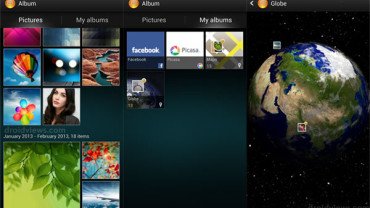
All three apps are nice and run beautifully. You can download all zips from our links below and flash them using CWM Recovery. Just make sure your phone is rooted and running on Android 4.0 or higher. When I tested the apps on Android 4.2.2 (CM 10.1), the music app gave FC error, but with Android 4.1.2 they run fine.
Also Install These:
Xperia Z Launcher and Widgets (no root)
How to Install:
To install the Sony Walkman, Movies and Album Apps from Xperia Z on your Android phone, follow the following steps:
- Boot your phone into CloclworkMod recovery mode (the method differ from phone to phone).
- Do not forget to backup your current ROM before flashing anything on your phone. Use the “backup and restore” option.
- Scroll to “wipe cache partition” and wipe it.
- “Wipe cache partition” from “advanced” menu
- Go to “install zip from sdcard> choose zip from sdcard” and select the file you want to install.
- When the installation is done, go to “advanced” and “wipe dalvik cache”.
- Finally reboot device using “reboot system now” option.
When the phone boots, open the app drawer on your phone and you should see the newly installed apps there. Check them and do not forget to share with us how they work for you. Cheers!
You might also like these:
Download Launcher Apps from other Android phones
- Sony Xperia Z Launcher
- Sony Xperia Arc Launcher
- Motorola Razr M Launcher with Circle Widget
- Touchwiz UX Launcher
Stock Wallpapers Collection: Link
Tips and Tricks for Android: Link



hi will these software work gud on android 2.3.6 (ROOTED)
I recently installed the app. The audio settings tab shows 2 things “Clearaudio+” and “sound enhancements”. i am unable to see “Clear Bass , Clear Stereo, ClearPhase, Dynamic Normalizer, xLoud” settings. where do i need to go for these settings? OR i have made some mistake in installation?
Clear Audio+ has Clear Bass and ClearPhase inbuilt. As for options like Clear Stereo, Dynamic Normalizer and VPT Surround, you can find them by tapping Settings tab under Sound Enhancements.
xCloud is a default settings of the Walkman app that boosts the sound a little.
i am using wt19i(lww) and i have installed cm9 cococut .when i install walkman through cwm recovery i cant see the app in the drawer..help me!!
i have performed every step to install it like adding code in the build.prop and wipe cache partition and wipe dalvik cache before installing but still not working
On some devices, it has problems with CM installed.
any solution?
or any other link for walkman app which could work on cm9?
I just installed the walkman and album! Album and walkman both seem to be installed successfully but when i open walkman and play a song, the sound just comes for second and then it doesnt produce any sound, even though it shows that they song is playing!
Help please!
Reboot in recovery, wipe cache partition and dalvik cache and reboot the phone.
Hi im using my s4 i9505 tried to install it but it stuck up on opening applications even though i follow carefully the instructions..i have done this in my note 2 and s4 i9500 no problem at all why am i encountering this in my i9505 what could be the problem?
Try clearing the dalvik cache.
i also done it its just going in the “Android OS upgrading” when all apps are scan it just stay on opening applications..it’s stays forever there.
is there anything that can i make it work on my i9505..
Restore the previous Rom and try reinstalling. I have tested it on GT-I9500.
i9500 and i9505 ahave diffrent firmware right?i have tested it on i9500 and its all running good thats why im thinking why in my i9505 it doesnt work does it require root or can be installed even not rooted cause i didnt try to install it on a non rooted official rom
It is meant only for rooted firmwares. It might be the difference of Processor used in the device that it is not running. There are various mods that do not work on the Snapdragon variants.
Oh i see there would be a 30-70% chance that it would still not run if i reset the phone root it then install thenapp via cwm?
Yes, you got it right. Does your phone not have CWM or root now?
Yes my phone is rooted now i always does that cause i use titanium back up..it has a stock rom but i install cwm for the installation of walkman apps
is there anything that can i make it work on my i9505..?
Is presenting an error, so I want to uninstall. How Do I? Already formatted the device and no avail
Restore the previous ROM.
My devide is the Nexus 4, which is the 4.3. How do I restore the previous ROM in case Android 4.2? Is to leave the link with step by step?
I installed the walkman player and it seems to work fine but sound enchantments fc. I’m on a gs3 on a touch wiz ROM with 4.12. Any help?
Hi, I have been using it on Galaxy S3 and S4 both. It works perfectly. Boot in recovery, wipe cache partition and reflash the zip. Have you installed only the Walkman?
ok i reflash the zip again with this steps just like the first time: reboot into recovery,wipe cache, flash zip then wipe cache and dalvik and reboot and still sound enchantments fc :/ and yes i did only instal the walkman zip
Install both the zips but on a clean phone. I mean restore your previous ROM and install the 2 files.
There are 3 zips up there so I’m assuming is the walkman and the album and movies one also or the track I’d?
Install all of them. The TackID is optional but recommended.
All the apps work but sound enchantments still fc. I have flashed so many xperia ports on my phone and none of them has been able to make sound enchantment work. Maybe its just because Samsung phones don’t support it?
can i get this in my galaxy ace with (cm9 based) Xperiance Ace v4 Lite rom?
coz the said rom doesnt have the album/movie app.
im getting e:signature verification failed when attemp to install… any ideas?
It is because your device does not seem to have a custom recovery.
I have a Sony Xperia L and the walkman app came with it. But my problem is that after I put in the information of a song it saves it and it works but when I switch off the phone I lose all the information I would have added. Is there a solution? Thank you
I have had this issue on my Xperia Arc too and it seems to be a common issue. Since I do not have that phone, I am unable to dig into the problem currently. Sorry for that!
Thanks anyway!
Hello there…I am using HTC HD2 CM10 (4.1.2) Mod. I tried the following:
*Downloaded the Walkman file from your site and copied to sd card
*Opened CWM and first wiped cache partition
*Then wiped dalvik cache from advanced menu
*Then installed the zip file with zip file installer (NOT UPDATER)
*After installation, wiped dalvik cache again from advanced menu and rebooted system
But no Xperia walkman or album app is shown in my app drawer! Only the Xperia Launcher is working! I checked in the apps menu in System settings and found walkman, album, devices and other sony xperia apps shown there, but I can’t find them in apps drawer! I reflashed using the same process but nothing new happened! I also tried to open mp3 files from file manager but walkman player isn’t shown on “Open file using” list! Please help me out with this author…
Wipe cache partition and dalvik cache and flash it again.
Yep, this time it worked…but only one small problem, I can’t control the volume of the player! When I change the volume down with the volume key, system shows volume is being changed, but player keeps on playing music in the fullest volume! Same goes with the movie player. 🙁
Thanks for your support author, but I wish you had helped me out with this… :-
i dont like it, you cant even make your own albums, i am using galaxy S4.
Walkman started playing. I have reset device to factory settings and now is ok. Thank you.
Unfortunately Walkman is not working on Xperia Tipo. Widget is not reacting despite the app itself is installed.
album and movies not working .
Which device do you have?
Walkman works fine , but album and movies doesn’t!
CM10.
How do I uninstall them?
Install a root browser and go to system/app folder. Find the files and delete them. What phone do you have, by the way? I am currently using the apps on my S3 with PA.
Xperia Live with walkman!
CM 10 (JB 4.1.2)
Hmm, try the Album-movies file from here: http://droidviews.com/2013/how-to-install-albums-movies-and-walkman-apps-on-galaxy-s4/
hey this is a bit of a stuff around but i’ve flashed CM10 (JB 4.2.2) onto my xperia Z and really miss the Walkman app, especially the “SenseMe” channels. I understand these aren’t working with these files at the moment? is there a workaround on it’s way or would perhaps installing the stock APK fix things? also is there a way to update this app in the future via the Play store?
Hi Michael, since this is an unofficial port, it should not be any good to expect much from it. It is not possible to either update or overwrite the app using official app or method. New features might be introduced and when they arrive, the post will be updated immediately. I have been using it on my S3 and it runs fine.
When I try to launch walkman .it shows walkmn stop working
Please help me sir
What device and OS/ROM you have?
Hi Im Adarsh,
Im using Galaxy S2 4.1.2 JB ROM with CWM Recovery & Siyah Kernel v6.0beta5
i tried installing with below procedure…
1) Wiped cache partition
2) Install_from_sd_card option…
install 3 zip files back to back i,e trackid zip…walkman zip…n album/movies zip…
3) wiped dalvik cache…
4) Rebooted system….
but i still couldnt find any sony apps installed in app drawer…
sm1 help me out to install walkman app…what could have been gone wrong..???
Install a root file browser, go to “system/app” folder and check if you can any of those apk files there.
I Checked in system/app….i dont find any sony apps installed there 🙁
Try reflashing it. This time, also wipe cache partition in CWM along with dalvik cache.
thats not required
Try mounting the system instead
why my timescape and camera not working after i installed it… can u fix it
The apps are working fine?
can i flash on xperia arc s with stock rom ics 4.0.4?
The device must be rooted.
I use p3100 jb stock rom, I just install walkman and movies, walkman runs perfectly, but when i open album movies always forceclose..
The screen resolution might be a reason for FC. Anyways, try clearing app data and cache from Settings> Application Manager> All
can it run on 2.3.6 ?
No.
can you make the tracks playing continuous without a gap plz?
It can be made like that but it don’t you think it will sound odd?
I use on CM10 with 4.2.2, the player can’t scan for media? I can play it by open in file explore but can’t see all the media file in the player. so sad.
Yes, that’s is a known issue with 4.2.2. Try installing a media player that has codecs for most video types and try again. The apps work on all non-AOSP Roms that have a inbuilt media player with multi-codec support.
I did install ttpod, it can scan all the mp3 file out. Reboot the phone then come to walkman and movie album again, nothing else happened… 🙁 can you give me a detail for solve this?
Thank you.
Hi, sorry for the late response. The Walkman and movies apps will not function properly until Xperia Z is updated to 4.2 and the apps are ported to other phones. They;ll run fine if you try on ICS or JB (4.1.2).
Thanks will wait then 🙂
Already done 3 dáy ago :)) so *ucking hard that I đin’t quit =))
But still have problem: no sound effect! If I have sound effect of Sony or DPS Manager on Roms, it will be mute :((
Anyway, this work well without sound effect.
Still thinking why some of nedia files can be scaned.
I already clarified that it’ll not work perfectly with 4.2.2.
Small query, these downloads cannot be used on android 4.2.2 based roms.
Not sure, I have not tested it on 4.2.2. You can try it and let us know.
Alright will try it out and update this weekend
hi there, i got samsung note with 4.1.2. i have tried many times but i couldnt get it. even I gonr threw the same process. so please guide me. my email id is guruloveu@gmail.com
I have tested it on S2, S3, Note and Note 2 and it is working fine. What error are you getting?
With clockworkmod is there any rhyme or reason the file names it gives your backed up ROMs?
Hi, I did not get what you said.
i have download and install both the files on my note and two widgets also there but when i opened its say unfortunate download music info has stop and in album also shows error message download stop.. what to do?? i have done all the step as per tutorial..
Hi, we have updated the post with the latest version that runs without problem, Check it now.
does not work on my arc s,running cm9.only album and video appers.the video app does not play ANY video,and the photo app does work,but the widget does not appear,and the mp3 app does not appear as well
It works only up to Android 4.1.2
up to?i a said i am on cm9..that means 4.04..is it because i am using custom firmware that its not working on my phone?
I have tested andi it is not working on AOSP and CM.
i install on my galaxy s2 4.1.2 but its not working unfortunate download music info has stop and in album also shows error message download stop what to do plz help
In that case, restore the ROM and wait for a fix to come.
It will now work beautifully. Just updated the post.
All errors fixed now, give it a try!