
Samsung has started rolling out Android 4.1.1 Jelly Bean Firmware update for Galaxy Tab 2 10.1 WiFi GT-P5110. The update is scheduled to be pushed in several phases across the globe but the users of this tablet in United Kingdom happen to be the first to receive it. The Jelly Bean update with baseband version P5110XXCLK7 will add several new features like improved TouchWiz, better and smooth performance (Project Butter), Google Now and many other improvements to your Galaxy Tab 2 10.1 WiFi GT-P5110.
The Android 4.1.1 Jelly Bean update package is now available via Kies and Over-the-Air. To download and install the update directly on your device, just open Settings> About> Software Update. If you still do not see an update for your device, you can download the whole firmware and flash it manually.
Update Galaxy Tab 2 10.1 GT-P5110 to Android 4.1.2
Android 4.1.2 Firmware for Tab 2 10.1 WiFi GT-P5110 is now available. You can download the firmware here.
User Review:
Here is a short review by one of our visitors from Australia:
- Noticeably more responsive, there is much less lagginess overall. It’s not perfect but a decent improvement.
- The keyboard has changed, the keys are now more spaced out, this is great thing for me since i always used to bump other keys near the spacebar like ‘V’ when I went to put a space between words! It drove me nuts, typing is now much easier!
- Noticed a new “power saving” mode that wasn’t there before (unless I am blind (a possibility)).
- Uses at least 150MB more of your main RAM right off the bat! When I used to fire up the tablet on 4.03, it would sit around 300 MB. Now when I fire up the tablet, 450 MB is in use before I have even opened an application.
Download and How to Install:
Here is a short but easy tutorial to help you flash Android 4.1.1 Jelly Bean firmware to your Samsung Galaxy Tab 2 10.1 WiFi GT-P5110 . Just follow the procedure and you will be able to install the new firmware easily.
- Download Android 4.1.1 Jelly Bean firmware in zip and extract to your desktop. Inside the extracted folder, you will see a file with .tar.md5 extension.
- Download Odin3_v3.04.zip and extract to your desktop.
- Make sure you have either Samsung USB Drivers or Kies installed on your computer. If not, download it and install now.
- Charge your Galaxy Tab 2 10.1 WiFi’s battery to at least 80% level.
- Turn on USB Debugging on your device: Settings> Developer Options> USB Debugging
- Backup your contacts, messages and other important data.
- Turn off your device and boot it into Download Mode: press and hold Volume Up+Power buttons together for a few seconds and press the Volume Down key when prompted to continue to Download Mode.
- Open Odin folder and run the Odin3 v3.04.exe program.
- Connect your Galaxy Tab to the computer via the USB cable that came with your device.
- Wait till you see the ID:COM port turn blue and “Added!!” text on Odin’s message box.
- Now click on PDA and select the .tar.md5 file found inside the extracted firmware zip package.
- Ensure that only “F. Reset Time” and “Auto Reboot” options are enabled on the Odin.
- Finally hit the Start button and wait for the installation to finish.
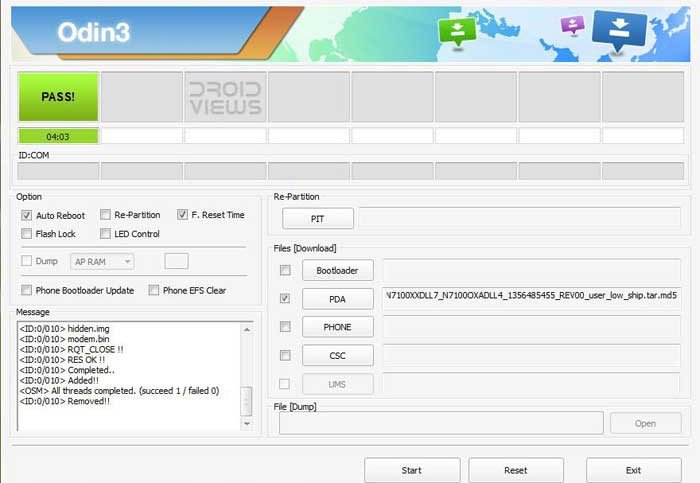
- When installation is done, you will see a PASS! message at Odin your device will reboot automatically.
On rebooting you will have the new Jelly Bean firmware on your Samsung Galaxy Tab 2 10.1 WiFi. Enjoy and let us know how it works for you.
Some Other Firmwares:
Apart from the UK firmware given above, there are some more for a few countries. Download what suits you most.
Also Read:
How to Root Galaxy Tab 2 10.1 WiFi GT-P5110 on Android 4.1.1 JB


hello I’m from philippines what firmware would you prefer for my gt-p5110? thnx
Is your tab carrier branded?
None of this works for me, followed the instructions but the problem seems to be with the zipped files. After I have unzipped them to my desktop, my device dosen’t seem to recognise them. My tablet is at ‘Downloading….do not turn off target” but does not appear to be engaging with the unzipped files. Please advise. Thanks
Show me the odin screenshot.
When I attempt to open the programme I am face with this
You making some mistake. Use some other zip archiver.
Ok here is a copy of the extracted files.What mistake am I making? Cheers
Yes. You are doing a mistake. Extract the downloaded zip just once to get a file with .tar.md5 extension. Select this file in Odin by clicking PDA/AP button.
You ended up with those many files because you extracted even the .tar file! You have to extract only the .zip you downloaded.
Ok, I started again from scratch, had to disable my anti virus before I could download Odin, but eventually got it and have now updated my tablet. Thanks so much for your help…
Glad to know!
Hi
At present i am in Saudi Arabia and will move to India soon.I have samsung galaxy tab 2 10.1 (3G), model GT-P5100 , android
4.0.3… i want to upgrade it to android 4.1 . which country firmware
should i use??
Install 4.1.2 firmware for India from here: https://www.droidviews.com/samsung-galaxy-tab-2-10-1-gt-p5100-3g-wifi-gets-android-4-1-2-jelly-bean-update/
IS THIS FOR 3G OR WIFI
The current page is only for GT-P5110 WiFi.
For 3G+WiFi, see this: https://www.droidviews.com/samsung-galaxy-tab-2-10-1-gt-p5100-3g-wifi-gets-android-4-1-2-jelly-bean-update/
Works perfect 🙂 Thank you so much
SIR,, i m from pakistan and i have samsung galaxy tab 2 10.1 (wifi), model GT-P5110 , android 4.0.3… i want to upgrade it to android 4.1 . which country firmware should i use?? i have tried china firmwarebut it does not work.
Okay, try this firmware instead: http://hotfile.com/dl/225499353/7584f8e/XEF-P5110XXDMC2-20130415120033.zip.html
Added!!
Removed!!
Added!!
Enter CS for MD5..
Check MD5.. Do not unplug the cable..
Please wait..
P5100XXDMC3_P5100ODDMC3_P5100DDDMC3_HOME.tar.md5 is valid.
Checking MD5 finished Sucessfully..
Leave CS..
Odin v.3 engine (ID:11)..
File analysis..
SetupConnection..
Can’t open the serial(COM) port.
Added!!
All threads completed. (succeed 0 / failed 1)
I am Unable to Up grade the above message is self
Restart pc and device, reinstall the drivers and try with this Odin: http://d-h.st/dFb
Hi Areef, sorry for extending the 15 Minute thing to 2 days. We are having struggling with flood-like situation due to which the electricity and broadband connections are not good for a few days.
As for you question regarding the factory reset, you can do it easily from Settings or device recovery which you can boot into by pressing a key combination while your device is turned off. We recommend this for smooth performance. Installing a firmware meant for different country might void the warranty but you can regain it after installing the official firmware for your region when it arrives.
Just like you, I am also a lecturer but I teach English literature at a government college here. I do tech blogging just to satisfy my passion and gain the peace of mind! All of us do our jobs to the best of our capacity so there is no space for any sense of guilt.
Hope this helps! 🙂
thanks man superb and excellent
Thank you for your guide. Worked like a charm. Done after a couple of minutes. Was on 4.0.1 before and can see some great improvement (speed, some controls etc). Very good site you have. I will be checking for some updates regularly.
Thanks for the compliment!
Hi,
I have the GT-P5110 which i bought in Germany and currently i live in India. i tried checking for the update to jelly bean but i guess samsung has not released yet it India. i wanted to know if i flash it with the siberian firmware will i be able to use the tab normally and can i subsequently perform a FOTA when it is released in India ??
Yes, you can install that. I would recommend you to install the Hong Kong version as I have tested it personally. It’s working fine.
As for FOTA, you’ll not receive it but you can install the Indian firmware using Odin, anytime and then you’ll start getting OTA.
thx a lot for your wonderful blog / help ..my upgrade to 4.1.2 went through seamlessly
Nice!
i am in singapore…can i download hongkong version.i use tab2 p5100 3g,pls reply me sir
Yes it will. Install the 4.1.2 firmware for your P5100 from here: http://droidviews.com/2013/samsung-galaxy-tab-2-10-1-gt-p5100-3g-wifi-gets-android-4-1-2-jelly-bean-update/
Hie,
I read your instructions and looks simple. Thanks. I bought my Tab 2 GT-P5110 in China. I live in Brazil, but I prefer to “speak” to my tablet in english.
Which firmware recommend for the Tab 2 GT-P5110 with the CHN firmware… I really like to get rid of it!
I’ve already downloaded and installed google play and since them I can install software from google play without a problem, and I have all the apps I need. But, any time I upgrade (via Kies) I lose everything as Chinese firmware block services from google…
In the past I tried to install an un-official Android version in a LG phone and bricked 🙁
thus I am a little scared about flashing firmwares…
thank you for your great job!
If you can do with 4.1.1, install the UK version but even the 4.1.2 Hong Kong firmware will work fine.
Hello :-).
First of all – thanks for the article above :-).
I live in Serbia, but I bought my GT-P5110 in Italy. I used a firmware for Serbia and nothing has changed. All my apps are here. When I start it a message appears “Unfortunately Gallery has stopped working”. I cannot use my Gallery at all. I followed your instructions “to the letter”. The only thing that is changed is that in “about” section now says “Android version 4.1.2”, but it was 4.0.4 before. That’s it.
Oh, and there was one little difference in the steps. In step 6) I was prompted to press “volume down” to proceed to “Download Mode”, and not the “power button” like you wrote.
Is there anything I should have done before starting with your instruction, like rooting or wiping my GT-P5110?
Thanks in advance 🙂
Backup your data, then ‘wipe data factory reset” from recovery. It will be solved.
http://droidviews.com/2013/backup-apps-contacts-logs-messages-and-settings-without-rooting-your-android-phone/
Thanks a lot. It looks like that worked. Finished with the factory reset, and now my Gallery works and it still says “android version 4.1.2”, so I guess that’s it :-).
And now the fun part – testing :-). I’ll post my insights about this upgrade in a few days.
Thanks once again.
hello ….
thank you for every thing
you are the best ….thanks ..
but …this firmware support arabic or no ?
thanks
i am from north africa from algeria
will it work with me ?
The firmware will work but I am not sure about Arabic.
Hello. Thanks for providing the updates. Unfortunately upon installing my device is stuck on loading screen (the samsung logo reappears) It has been doing that for over 15 minutes now. I followed all steps, debbuging was allowed. Odin returned Pass. U used the 4.1.1 UK version. There seem to be problem with certificates and permissions.
Please see the link with log from Eclipse. https://www.dropbox.com/s/hxl7dvrbb1gp6oe/log%20original%20OS.txt
Thanks a lot for your help.
Hi Petr,
Seen the log and I did not find anything strange. Ignore that and do what I say. Turn off your tab any how. You can also try doing it by holding the Power button for some time. When the device is off, hold Volume Down+Power keys for a few seconds till you enter Recovery Mode. Using the volume keys scroll down to “Wipe data/factory reset” and select it using the Power button. When it is done, reboot the device.
Briliant. Thanks for your help!
Did your Tab boot normally?
Mmmm. Just followed all the steps above for upgrading my Galaxy tab 2 10.1 and everything did what it was supposed to do until the tablet rebooted and was completely unchanged. Same OS and everything still in place. I did notice that the .md5 file name was slightly different…could this have been the issue????
Which firmware did you download?
Jellybean 4.1.1 as per the URL
http://droidviews.com/2012/update-samsung-galaxy-tab-2-10-1-wifi-with-official-android-4-1-1-jelly-bean-firmware/
As I say, it went through the whole process and rebooted the tablet but nothing was changed. All my apps etc. were still in place and the OS was the old one. The only other thing is that I was unable to check the USB debugging box as all the developer tools were greyed out in the menu…
That’s okay but you did not tell which country FW did you flash?
sorry – UK
Well the firmware page says it is Android 4.1.1. Anyways, try the Android 4.1.2 firmware. It has just arrived today:
http://www.hotfile.com/dl/191328123/c9bdda7/P5110XXCMA2_P5110OXXCMA4_SMO.zip.html
THANKS. that worked. I am struggling to see the difference between the two but it is updated and didn’t lose any apps/data either. Thanks again
Enjoy and cheers! I do not have Tab 2 or I will have posted the changelog.
i’ve stored everything in my 32 gb sd card..so before updating the firmware should i remove my sd card?one more doubt sir…if the upgrading is not working i’ll be getting the previous version or not?or i’ve to take my tab to service centre that i dont prefer
Do not worry, it will work. If it does not, you can go back to previous version anytime: http://droidviews.com/2013/how-to-downgrade-firmware-on-samsung-galaxy-devices/
Af for Service center, I do not like them too. 🙂
hello sir,i’ve got my samsung p5100 wifi + 3g from india..is it possible to upgrade the firmware?plz tell me the procedures
Go here: http://droidviews.com/2013/update-samsung-galaxy-tab-2-10-1-gt-p5100-with-android-4-1-1-jelly-bean-official-firmware/
And download the firmware for Singapore, or Indonesia. Installation guide here: http://droidviews.com/2012/update-samsung-galaxy-tab-2-10-1-wifi-with-official-android-4-1-1-jelly-bean-firmware/
im from maldives and i have the 3g version of the p5100 will this update work for me, since my region is not stated from what i read i can download the one without any carrier…mine is an unlocked one it works flawlessly for the two service providers in my country!!
Yes, you can update your Tab 2 by flashing any unbranded firmware made for your device model number from here: http://droidviews.com/2013/update-samsung-galaxy-tab-2-10-1-gt-p5100-with-android-4-1-1-jelly-bean-official-firmware/
U fucking basterd it is the root method , where is upgrade method
Hello, I bought my p5110 in Chile and i would like to know what version suits me best
Go with Brazil or Argentina.
Is there a possibility of breaking my device if I use either of those countries? I don’t understand why there’s no “official download”, is there any difference?
Yes, the possibility is there if you drop the tab. These are official firmwares and if you follow the rules, nothing wrong will happen. I am always at this end to help you out.
It does not actually make any difference if you install a firmware meant for another country. I have four Galaxy device all with different country firmwares.
Just download and install it. Cheers!
Excellent! I still don’t understand why I can’t upload via tablet though hehe. Thanks!
PS: I meant bricking haha
LOL.
Just added the UK version, you can try that too.
how can install in samsung p5100 plz tell me
Follow the step given here: http://droidviews.com/2013/update-samsung-galaxy-tab-2-10-1-gt-p5100-with-android-4-1-1-jelly-bean-official-firmware/
supurb!!! great job.
Hi Mr. Rakesh, would just like to tell you I followed everything like you described, I’m stuck on the reboot screen, its been about 10 minutes, I would like to know if I should wait, and for how long, or is there anything else I should do? Did I do anything wrong? Model gt-p5100
Removed!!
Added!!
Enter CS for MD5..
Check MD5.. Do not unplug the cable..
Please wait..
P5110XXCLK7_P5110OXACLK7_HOME.tar.md5 is valid.
Checking MD5 finished Sucessfully..
Leave CS..
Odin v.3 engine (ID:5)..
File analysis..
SetupConnection..
Can’t open the serial(COM) port.
Added!!
All threads completed. (succeed 0 / failed 1)
What am i doing wrong?
Possible reasons-
USB Debugging not enabled
Kies running in background
USB cable connection, not plugged properly
Device in not in Download Mode.
Show me the image of the download mode.
dang my model is 113 not 110
Android 4.1.1 is not yet available yet.
i have the US version will it this firmware still work?
Yes, it will if your Tab is not not carrier branded.
Also do not forget to match the device model number- GT-P5110.
does your tab have to be rooted?
Definitely NOT. You need not root your Tab to install an official firmware.
power on & volume UP worked for me, many thanks!
What am i doing wrong?
Already activated usb debuging..
Installed Kies
Downloaded P5110XXCLK7_P5110OXACLK7_BTU (4.1.1)
extracted md5
Turned off device.. on Power on + volume down instead of accessing the download mode it access a restore mode…
Any help?
press and hold the volume down first and then press the power key for a few second.
getting error
Added!!
Enter CS for MD5..
Check MD5.. Do not unplug the cable..
Please wait..
P5110XXCLK7_P5110OXACLK7_HOME.tar.md5 is valid.
Checking MD5 finished Sucessfully..
Leave CS..
Odin v.3 engine (ID:9)..
File analysis..
SetupConnection..
Initialzation..
Get PIT for mapping..
Firmware update start..
Sbl.bin
NAND Write Start!!
Complete(Write) operation failed.
Added!!
All threads completed. (succeed 0 / failed 1)
Check if the USB Debugging has been enabled and the cable inserted properly. Restart pc and reboot phone. Then try again.
Enter download mode by pressing: Volume Down+Power
This worked perfectly in Belgium for upgrading 4.0 to 4.1. Many thanks !
downloaded firmware. installed on tab but when I connect to kies it says it KOR build and not BTU (United Kingdom).I assume this build is Korean only???
We got this firmware as an UK Build. Anyways if you get no issues, build doesn’t matter.
I am downloading Jelly Bean Update right now in my samsung Tab 2 GT3100 3G version..not sure about the version though…may b its 4.1..
God waited so long..finallyy:)
Yes it’s 4.1.1
is it working on the 3g version?..even i’m planning to upgrade my tab