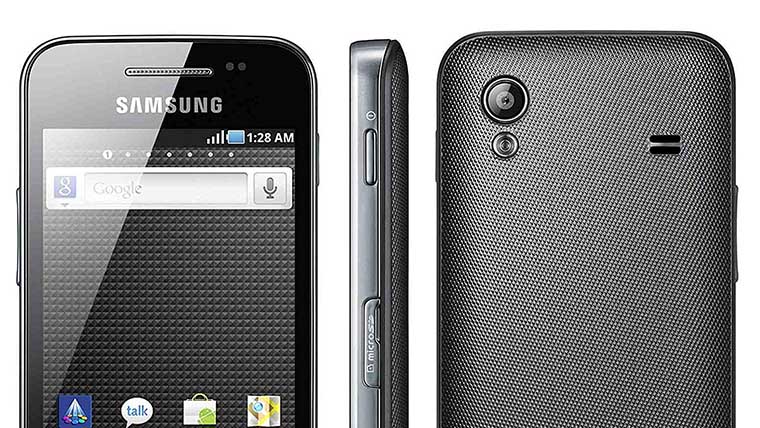
Are you a lover of the iPhone but own a Samsung Galaxy Ace GT-S5830? If you are looking for an awesome custom ROM for your device, we have something for you. The “iPhone-style-CM7” ROM for the Galaxy Ace GT-S5830 is a powerful custom firmware that turns your Android device into an iPhone 5, at least in terms of look. It is one of the best ROMs for your device.
The “iOS 5 Style ROM for Ace GT-S5830” has been cooked by a group of developers who call themselves “Angeeks Devs”. The ROM is based on CyanogenMod 7.2 (Android 2.3.7). It has been modded very minutely to give you a perfect iOS feel on your Android device. It has a very nice user interface. The ROM is fast and smooth and the notification bar looks just awesome!!!
Looking for Best ROMs for Galaxy Ace S5830i? Click Below:
Best Custom ROMs for Samsung Galaxy Ace S5830i
Drawbacks:
The iOS perfection of this ROM comes with a few drawbacks. You will have to compromise with some third-party apps for browsing web and playing music. You can download any free app from the Play Store to fulfill these tasks. If you can ignore such shortcomings, you can proceed to install this ROM on your device.
Video:
The following screenshots of this iOS style ROM will be enough to give you a clear idea as to how it looks on the Galaxy Ace S5830.
Requirements:
If you want to install this ROM to your device you must have a rooted Galaxy Ace S5830 on Android Gingerbread 2.3.X. If you have not rooted your phone, do it now. Read our easy guide to Root Samsung Galaxy Ace S5830.
Among the other things you need to do before installing this ROM are:
- Charge your device’s battery to at least 70% level.
- Backup all your contacts, call log, messages and other important data to the external SD Card.
- Turn on the USB Debugging Mode on your device. Go to Settings> Applications>> Development>> USB Debugging On.
Note: Though the procedure given here is tested, flashing a custom ROM on your device might prove fatal for your device. Flash it at your own risk. Droidviews shall not be responsible for any damage done to your device.
How to Install iOS 5 Style ROM on Galaxy Ace S5830:
Just follow the simple steps given below to install this iOS style ROM on your device:
- Copy the ROM file in zip to the main directory of your device’s SD card by connecting it to the computer via USB cable.
- Now boot your device into CWM Recovery Mode. There are three methods to do this. If you can see a utility called CWM Manager on your device, open it and select “Reboot into ClockWorkMod Recovery”. Another way is to download the ROM Manager app from the Google Play Store and use “Reboot into Recovery” option. You can also boot your device in the Recovery mode by this way: switch off the device, and keep pressed the Home+Power keys simultaneously till the start-up screen with “Samsung Galaxy Ace GT-S5830” logo blinks for two times.
- In the Recovery Mode, use Volume, Home and Power keys to navigate between the options and select them.
- The first thing you should do is to go to “Backup and restore” option and backup your current ROM, so that you might come back to it in case anything goes wrong.
- When you enter the Recovery Mode, go to “wipe data factory reset” option and select “Yes”.
- Then to “wipe cache partition” and confirm by selecting “Yes”.
- Then come back to the main menu and select “install zip from sdcard> choose zip from sdcard”. Now browse to the ROM file and select it.
- This will start the installation process and will take a few minutes to complete.
- When it is done, go back to the main menu again and select “reboot system now”.
- It might take a few minutes before your device reboots. Just wait patiently.
The iOS 5 Style ROM should now be installed on your Samsung Galaxy Ace GT-S5830. Cheers!!!
How to Install GApps:
The iOS ROM for the Samsung Galaxy Ace is one of those ROMs that do not come with pre-installed Google Apps. So you will have to flash them separately if you want to use Gmail, Google Search, Maps, Navigation, PlayStore, etc on your device. This is how you can download Google Apps on your Galaxy Ace.
- Download Gapps-mdpi-20110501-signed.zip (do not extract) and copy it to the root of your device’s SD Card.
- Boot your device into CWM Recovery mode as described above.
- Select “install zip from sdcard> choose zip from sdcard” option and locate the GApps.zip file that you copied in Step 1.
- Confirm your choice by selecting “yes”. It will be installed on your device in a few seconds.
- When it is finished, go back to the main menu and select “reboot system now”. Done!
If you have any doubts or problem relating to this post, please drop a comment and feel free to share your experience with us.
Change the Device Language from Chinese to English:
The ROM supports only Chinese and English languages. The iPhone style ROM for the Galaxy Ace has been made by a group of Chinese developers. So the default language of the ROM is Chinese. However, you can easily change the language to English. The first boot after flashing the ROM will be in Chinese. To switch to English, do this:
- Open device settings
- You will see an icon called “A.I”.
- Tap it and select the first option and choose English.
- Reboot the device and done!



Can this for Samsung Galaxy Ace S5830i ???
no. don’t try.
My phone is hang on android and not start plz give me a solution to start my phone.
return custom via odin.
hello, please advise if its normal that after installing the ios5, when rebooting my phone it is taking nearly 2hrs stuck on the ‘Samsung’ logo. Thanks.
No, it’s not normal. Boot the device into recovery mode and restore the backup.
i hav to convert my device from kitkat to ios5 …….
nice one….now i cn feel my phn as iphone…thanx vry much for dis app…. 😀
Can I install IOS 5 Black Rom on Samsung Galaxy ace GT-S6802 .? If yes then whereto i download ?
No
does this work also on the
gt-s5830i galaxy ace?
how to get the old rom, need immediate reply
Read this: https://www.droidviews.com/things-to-do-before-and-after-installing-a-rom-troubleshooter/
hi brother , i installed this rom yesterday, before this i was using windows-8 custom rom. I am unable to instal gapps for this ROM . . may you suggest something ? will be waiting
The Gapps file and instructions both have been given on the page above.
Bluetooth is not working can u help me ???
“the application google play store has stopped unexpectedly. please try again” and “server error” what can i do??
i installed the gapps but i think it doesnt work because theres no play storeee >.<
it is not translated into French
No, it is not.
just installed this ios5 firmware on my galaxy ace yesterday. i enjoy it a lot but just now i noticed that my bluetooth isnt working what can i do to resolve it.thank you
i can’t access my wifi..
how can i make it work?
Can I install IOS 5 Black Rom on Samsung Galaxy ace GT-S5830i?
do you know about some ROM like this but with an spanish option for the language? thank you 🙂
hi this rom is amazing… but pls tell me how can i install gapps.
Gapps-mdpi-20110501-signed.zip is not working 🙁
Download and install them manually then.
thanks dude, still i can’t able to open play store, map is working fine
even my play store doesn’t open…..
Can’t v play subway surfer or temple run on the rom…?
its a good rom but still some notification and app uses chinese language. Annoyed
plz,….find a way to download google play for dis! because the given link is not working! and my internet is not working too
!!!
Download this file-
gapps-mdpi-20110501-signed.zip
from http://droidviews.com/2012/download-google-apps-gapps-for-your-android-device-on-gbicsjb/
and install it via recovery. If it still doesn’t work, extract the zip, find the apk files inside, copy to phone and install manually.
Thanx,,,yar…really helped…
bt how to turn on internet…last help…plzzzzz.
What do you mean when you say “internet is not working”? Is it the network or the web browser app?
i got the solution for internet …but i discovered later tht my bluetooth aint working…can we pair this with normal phones or with just apple??
any solutions with the bluetooth…..?
Not now.
find it fast..plzz..cause im not able to share my files…and my google play does’t start
theres no prob…wid the sofware…its gud..bt How can i download apps for the phone….it doesnt connect wid the computer….pllzzz help…
i want to download watassp
hey if i want to rollback to gingerbread…then…?
http://droidviews.com/2012/how-to-install-the-official-stock-firmware-on-samsung-galaxy-ace-s5830-using-odin/
ur gaaaps is not available….any help….?
It worked…bt whn i type it come in japanese…..any help???
Go to Settings>Language and input>Language and change to English,
You can also do this. Tap on the settings icon the keyboard and select English as input language.
Hey my phone is stuck on the android word screen and I’ve tried to reboot it but nothing works. Can you pls help ????
ya same here
hotspot and usb thetering is not working. the big mesh is we get unfunctionalbe bluetooth…
Hey, does this work on Samsung Galaxy Ace Plus too? And also if one day I’ll want to get back on Android, how would I do that? Thanks 🙂 Looks great !
No it does not woks with Ace Plus. If you want to upgrade or downgrade firmware, see here: http://droidviews.com/2013/how-to-downgrade-firmware-on-samsung-galaxy-devices/
Hey Sir , Can You plz give a ios rom for Kabonn a21
Hey Will this work on Karbonn A21 Rooted and with custom recovery
Plz Reply
No, it will certainly not.
I’ve done it in android recovery mode and now it’s stuck on the android word screen
I have no computer at the minute can you help?
The ROM is meant to be flashed via custom recovery (clockworkmod) with root access. Tell me if it was relly Android recovery or CWM recovery. Only then I can be able to help you.
i have done same many time with diffrent rooms but the same error occured “unable to Mount SD Card Status 7 “
Update your phone recovery and try again: http://droidviews.com/2013/how-to-root-and-install-cwm-recovery-5-0-on-samsung-galaxy-ace-s5830/
sir, can you upload indonesian language ? i’m need it !! Help Me 🙂
Change language from Settings>Language and Input
I am fail to install the rom instalation abored error comes..
Either the rom zip file is corrupt, or you need to update your CWM Recovery. Try this is this is the case: http://droidviews.com/2013/how-to-root-and-install-cwm-recovery-5-0-on-samsung-galaxy-ace-s5830/
after installing its showing android and stoped what an i do, becouse in cwm recovery i was not having adwanced seeting so i left that and finished the installation . so after rebooting its showing android and stoped .. pls tell what can i do.. pls help me
Was your phone in CWM or Android System Recovery? Did you back up your previous ROM your device installing this rom?
have gone into Android system recovery and i haven’t backed up
Any custom ROM is installed via CWM Recovery, not Android recovery. You did not read the tutorial carefully and messed with your phone.
Anyways, now you should read and follow this guide to recover your phone:
http://droidviews.com/2012/how-to-install-the-official-stock-firmware-on-samsung-galaxy-ace-s5830-using-odin/
thank u
s properly done.
now if i switch it on one skeleton hand is coming and then its coming android thats it then no response
in play store . when i am typing its coming in chinese langguage .. what to do
Lange device keyboard language input from settings
will my samsung ace, which is locked to a network, go back to being locked if i do this?
This ROM is only for unlocked phones that are rooted with CWM Recovery installed. If you phone fulfills these requirements, you can install it. An it will not lock your phone.
help yaar……please can’t wait to load loveiso.zip to s5830i
can i get LOVEISO.zip for samsung ace s5830i….just can’t wait to load in my phone.
can i port this rom to gio???
If by “port” you mean “install”, the answer is “No”.
sir Droid, is this working for samsung galaxy ace GT – S5830i and it has a gingerbread 2.3.6?
Here are some of the best ROMs for Galaxy Ace S5830i: http://droidviews.com/2012/best-custom-roms-for-samsung-galaxy-ace-s5830i-2/
why my screen is shown android word in my screen???
Please give more deatails. This way I won’t be able to help you.
1.during the installation, it is aborted. any solution?
2. do I have to root my ace first?
Do not try flashing any custom ROM without rooting your device: http://droidviews.com/2012/how-to-root-samsung-galaxy-ace-s5830/
will it work for galaxy pocket?any custom ios rom for galaxy pocket?
No.
im using loveso rom n my bluetooth isnt working…any solution?
Boot into CWM, go to advanced and wipe dalvik cache. Reboot! It might be solved.
hey…my bluetooth isnt working…any solution..?
some text is still in Chinese language…..how to change it…
I will request the ROM makers to fix them. Thanks for the feedback.
The post has been updated. Please read again to find the solution.
See the post for Instructions on changing language. Another way is to flash the English ROM :
LoveISO.zip (link in the post above).
Does it work on Galaxy Ace VE ( S5830i) ?
No, only Ace.
Is any other ios rom for Ace VE?
Not in my knowledge.
Play Store closes if I try to install an app… Any fix?
Reflash the Gapps via CWM.
How to Install this on Galaxy y?
Why are the file sizes and names different for each of the download links. Please let me know which one is the latest and most stable out of the 3 links. Please reply.
Download this one:
IOS 5 Black – SGA.zip (Latest ROM) Mirror Link
Since the original ROM has been made by a Chinese Developer Team, the names differ due to translation issues.
does the wifi and camera works?…
The only not working apps are Browser and Music. You can install Opera and any music player app for that. Else everything is fine.
the camera setting is not working if I set in english language
but in Chinese language is working…
how it can be like that?…
sorry if my english is poor…
Did you install the latest ROM- “IOS 5 Black – SGA.zip”?
Boot into CWM recovery and wipe dalvik cache.
yeah i allready do that many times
again and again…
but camera setting still FC…
i use CWM 5.0.2.6
please give the solution…
SIR I HAVE A PROBLEM MY WI-FI IS NOT WORKING…PLZ GIVE ME ANY SOLUTION
OTHER WISE I DON’T HAVE ANY PROBLEM WITH THIS ROM………..PLEASE REPLY ME TO SOLVE THIS PROBLEM
and can u tell me how to add android market…?…
Download this and flash via cwm. After installing do not forget to wipe dalvik cache: http://download2.clockworkmod.com/gapps/gapps-gb-20110828-signed.zip
what “flash” mean?..
did “flash” like instal form SD card?..
Install the gapps zip from cwm recovery
It’s still not working
It should work. Did you wipe dalvik cache: cwm>asvanced>wipe dalvik cache?