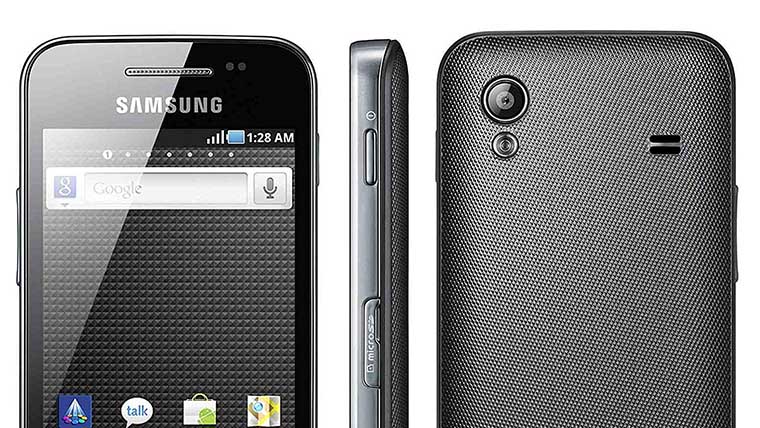
The Samsung Galaxy Ace S5830 is one of the most popular Android low-end phones which has been in the market for a long time. The device was launched in February 2011 with Android 2.3 Gingerbread which has recently been updated to Android 2.3.6 (still GB). Due to its moderate hardware specifications, the phone never saw an official update even to Android 4.04 Ice Cream Sandwich, not to talk of Android 4.1 Jelly Bean. Let’s check out the best Jelly Bean ROMs for Samsung Ace S5830.
Android being an Open Source OS, it has endless possibilities. You can always expect the unexpected with an Android phone in your hand. Thanks to the great developers who work hard day and night to give us even those updates and features that we do not get officially by a mobile phone manufacturer. These Android Devs have made our experience with the Galaxy Ace S5830 richer by cooking awesome ROMs that have made us stick to this little monster for such a long time.
One day just during a regular analysis of the web search keywords at Droidviews I noticed how desperate the Galaxy Ace users are to update and install a Jelly Bean ROM on their device. Hundreds of people coming daily for a Jelly Bean ROM for the Galaxy Ace every day! This made me write an article with a collection of some of the best Jelly Bean ROMs that helps you choose one that is most suitable for you.
Do not Forget to Read
Disclaimer
Flashing a custom ROM on your Galaxy Ace S5830 might prove a little risky for your phone. Neither Droidviews nor the developers of any of the ROMs listed here shall be responsible for any damage to your phone. All the ROMs have been tested by thousands of users worldwide but if you are not careful enough during flashing a ROM, the case might different for you. Use your own discretion and then proceed.
How to Install a Custom ROM on Galaxy Ace s5830
Getting Ready:
Well, if you ready to flash a Jelly Bean ROM on your Galaxy Ace, you need to do a few things before proceeding to flash the ROM. Since a custom ROM is directly related to modifying/replacing the system files, it requires root access and therefore you will have to root your phone before being eligible for any such action. If you have yet rooted your Galaxy Ace, head over to our handy tutorial first, then continue from the steps below: Root Samsung Galaxy Ace S5830
Among the other things you need to do before installing this ROM are:
- Get your Galaxy Ace fully charged.
- Backup all your contacts, messages and other important data. Backup your contacts, call logs, messages, APNs, bookmarks, calendar, apps & games using these nice free backup apps.
- Turn on the USB Debugging mode on your device. Go to Settings> Applications>Development> USB Debugging> check the box.
- Download the ROM you like from the links below. Do not extract the zip file and copy it to the main directory of your device’s SD Card (not in a sub-folder).
- Download Google Apps for your phone from below (do not extract) and copy it to the same location as the ROM file.
Backup EFS Partition that Contains IMEI
IMPORTANT: The EFS Partition of your phone contains your phone’s IMEI number. Sometimes when you install a custom ROM, your phone’s IMEI number might disappear and as a result, you will not be able to make a call, receive a message, and use the internet. To avoid any problem, it’ll be better if you backup your IMEI for safety purpose. In case you discover that your phones IMEI number has gone/lost, you can restore the “efs” folder back to its place and your problem will be fixed. Use an app called Galaxy ToolBox for the purpose.
Installing a ROM on Galaxy Ace
- First of all, make sure that you have done all the things mentioned above under preparations.
- Turn off your device and boot it into CWM Recovery Mode. Press and hold the Home+Power keys till the start-up screen with “Samsung Galaxy Ace GT-S5830″ logo blinks for two times and you see a screen as shown below.
- In the Recovery Mode, use Volume and Power keys to navigate between the options and select them.
- Open “backup and restore” and backup your current ROM (important). When the backup is done go back to the main menu
- In the CWM Recovery Mode, scroll to “wipe data factory reset” option and select “Yes”.
- Then come back to the main menu and select “install zip from sdcard> choose zip from sdcard”. Now browse to the ROM file and select it. Confirm your choice by selecting “yes”.
- This will start the installation process and will take a few minutes to complete.
- When it is done, go back and install the GApps using Step 8.
- Return to the main menu again and select “reboot system now”. It might take a few minutes before your device reboots, so a little patience is required.
When the phone boots up, you will be able to enjoy the newly installed Jelly Bean ROM on your phone. Cheers!
Download Google Apps
In case you have any issue with Google apps zip package, download the following Google apps apk files, copy them to your phone by connecting phone to the computer using USB cable and install them.
Looking for Galaxy Ace 5830i ROMs? Click Below:
Best Custom ROMs for Samsung Galaxy Ace S5830i
1. Unofficial CM 10 ‘Jellaxy’ ROM JB 4.1.1
Developer: lagloose
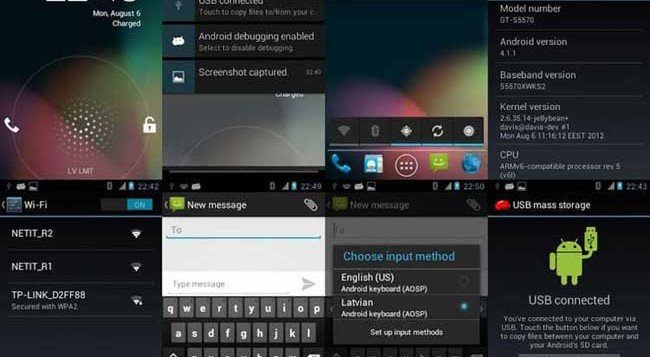
The Jellaxy ROM is a CyanogenMod 10 based custom ROM that lets you enjoy Android 4.1.1 Jelly Bean on your very Galaxy Ace S5830. Having installed this cool ROM on your phone you will get all good features like the Google Now, Project Butter, new Notifications system, lockscreen associated with Jelly Bean. Except for a few features like USB tethering, Wi-Fi tethering and Google Now (voice search) the ROM developer has been significantly successful in porting all other features in a working state.
Download ROM: Jellaxy ROM for Galaxy Ace
Download Google Apps: Gapps-jb-20121011-signed.zip [CyanogenMod 10.0.x]
How to Install: See at the beginning of the post for the installation procedure. Here are are the steps to perform in CWM Recovery:
- Boot into CWM
- Wipe Data/Factory Reset
- Go to ‘mounts and storage’ and ‘format /system’ (Double check that you have selected /system and NOT /sdcard)
Also Read:
Install iOS 5 Style ROM on your Samsung Galaxy Ace S5830
2. PAC [Paranoid + Aokp+ Cm10] ROM JB 4.2
Developer: nims11 @ xda
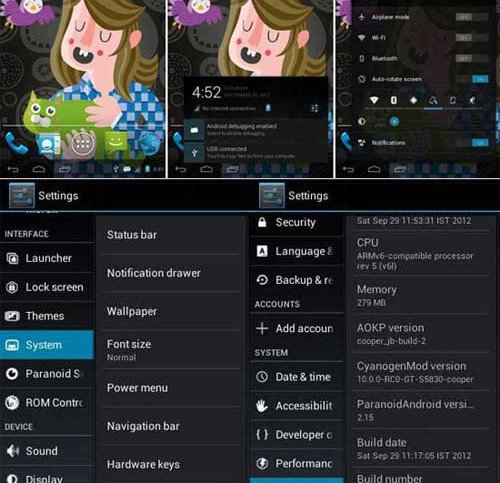
Well, I am not sure if you are familiar with the Paranoid ROMs for Android phones or not. If not, let me inform you this ROM is one of its kind. Personally, I am a fan of this one and currently enjoying it on my Galaxy S3. The ROM comes mostly for high-end devices. Thanks to Nims11 for porting it to the Galaxy Ace S55830. In fact, the Paranoid ROM is a Hybrid ROM that beautifully blend the look of a phone and a tablet layout into one whole.
Just imagine getting a tablet-style look at your Ace. With the Paranoid Android ROM installed on your phone, you can change and switch your phone’s screen layout in three modes: phone, tablet and a blend of both, phablet (phone+tablet). It a battery-friendly ROM with a fast user interface and good battery life. Another reason to go for this ROM is that it is based on the latest version of Android OS 4.2.1 Jelly Bean.
Download ROM: cooper_PAC_jb-13Dec.zip
How to Install: See at the beginning of the post for the installation procedure.
3. PAC-ROM Android 4.2.2 [the Best]
Developer: OldDroid
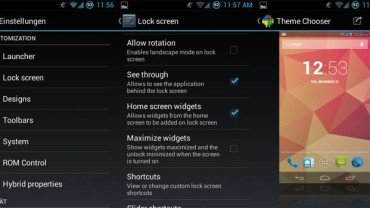
Download and Read About PAC ROM



Camera is not Working….
Bro I want Rom’s for Samsung galaxy star pro
Hi there, well my phone is Samsung Galaxy Ace GT-S5839M and I been reading about this change for jelly bean, so my question is that is OK to do this and it could it be possible this upgrade?
I CAN’T USE INTERNET AFTER UPDATION
My mobile is samsung galaxy ace gt-s5830i. I tried to install pac rom 4.2.2, but giving error.
E:error in /sdcard/cooper_PAC_JB_4.2.2-v20.1.0_03MAR2013-182544.zip
(status 7)
why it is coming. Is this version incompatible to my device. If so please give me link to download for compatible versionThanks..
Hey thanks. Works very well for me excepts some issues. gapps crashes for voice search, Icons doesn’t fit properly in home screen. Text of icons appears above scrolling/line at the bottom and icons above google search widget at top. 20mb is used by google play or something . so i have to left that space in memory cache .some guy suggest to mount cache folder to sdcard but that doesn’t worked for me. Thanks again, now I feel my ace live again.
i have installed 4.2.2 firmware u have given above but what to do now it is showing now E: Can’t mount /dev/stl12???
Revert back to stock ROM: http://droidviews.com/2012/how-to-install-the-official-stock-firmware-on-samsung-galaxy-ace-s5830-using-odin/
Hello r u there my phone is not starting pls help???
My pkone is not starting pls help
my mob is asking for E: Can’t mount /dev/stl12 what to do now ??? its not working anything
Hi, my ace is the version GT-S5830D. Will this ROM work?
I have already rooted the device.
It should install on it but you are sure to get errors and bugs. Better not try it.
Oh, thanks a lot. I’m looking for a smooth running jelly bean rom with full functionality. Everywhere I look I can’t seem to find anything for GT-S5830D. Would you know any roms that work?
i need help with this kind of phone…I tried to update exact phone
I used ..hackshak YouTube video. How to update s5830,to jellybean 4.2.2 with cynogen 10.1 …now my screens goes black n other way it goes pink n another way it says ram dump..
how do you undo this whole process??
Either restore the previous ROM or do this: http://droidviews.com/2012/how-to-install-the-official-stock-firmware-on-samsung-galaxy-ace-s5830-using-odin/
Sir can i flash this custom rom to ACE s5800i?
No.
I have updated my galaxy ace with this rom, But memory is not enough to install more applications,
can i increase memory and RAM. After installing 3-4 applications phone begins restarting
please help me sir.
Thank you.
I what memory extension script you recomend to use with pac rom?
I tried several but my phone always gets laggy after I install any script like that.
Thank you
Sorry, but I did not understand what you mean to say exactly.
If you restore the apps+data backed up on a specific ROM to another one, it will make the phone laggy. Such apps or scripts are good for restoring on the same ROM, not another.
I did a clean install and dint restore the apps+data.
My question is what script you think will work well with this rom to extend the memory?
I use a class 10 sd card
Did you try apps like Apps2SD or Links2SD?
SIR ,
plz help me with backing the /efs folder . Im not getting it anywhere , neither root explorer shows it nor EFS PRO is able to find it , plz help
Okay, I have updated the tutorial, try the Galaxy ToolBox from above and let me know.
thank you for the app , but it is saying my device aint supported by it , also the my device is not named in it , i have galaxy ace s5830 , but its not there , it says proceed on your own risk , what should i do
Leave it for now. I will look for some other method. You can proceed to installing a ROM after backing up your current ROM. If any problem occurs, restore the ROM later.
are u sure what if i am not able to call
okay if u say ill go for it and plz switch on ur phone i hv been trying it for a long time today
also sir , srry to disturb u once again but which procedure i have to follow the one listed above or the one saying THINGS TO DO BEFORE AND AFTER FLASHING THE ROM ,, ALSO PAC ROM ( THE BEST ) FINE FOR ME
The steps in “Things to do..” is common to all devices. You better follow the steps given on this page. As for PAC Man, I have tested it on a borrowed device and it worked fine.
thank you sir for ur advice , i followed THINGS TO DO steps coz ur reply hadnt come till yet , i did it to be safe from bootloop and have installed correctly , thank you again , i didnt flash google apps with it , what should i do now , flash or manually install , also plz find an alt. for backing up /efs plz ,
how can i increase my RAM and internal memory ?
could you increase your internal memory? if yes, can you please give me suggestions?
Do what suits you. It makes no difference.
sir the manual gapps are not working fine ,, google play , drive mail are not working at all , what should i do ,,, also if i install by flashing and if they dont work properly how to uninstall them
Download a root file explorer and go to System/app directory. You can delete any apps from here. You can also try uninstalling apps from Settings> Applications
sir which gapps are to be selected i hv installed PAC ROM 4.2.2
sir i have to install it in recovery mode , by first clearing dalvik cache and then installing zip from sd ,
also how much size would it consume
sir the gapps available for manual download arnt workin , play , drive and currents arnt
Also if i download stock gapps and if they dont work well how to uninstal it
i am unable to recieve a call…what to do?????
I can’t find the EFS folder in root explorer… is it possible that its not exist on SGA? (my model is GT-S5830)
Okay, it may be if you have a custom ROM installed. Anyways, MUST backup the complete ROM
Post updated, you can now backup the EFS Partition.
i can not connect the phone to kies to restore contacts and photos and music
lockscreen is not appearing:(
Dial *#06″, and check can you see your phone’s IMEI? If no, install the original firmware.
i cannot use my mobile data how can i do it?
Reboot phone a couple of times.
lockscreen is still not appearing????????
why lockscreen is not appearing??
PAC-ROM has been updated. Try the latest version.
will this update solve my problem???
sd-ext.img not found while restoring the original rom
what should i do after i restore the previous rom
wifi is not working???
will this update erase all the data on my sd card???
Yes. Read this: http://droidviews.com/2013/things-to-do-before-and-after-installing-a-rom-troubleshooter/
i have a wifi problem. even after restart it says turning on…
PAC-ROM Android 4.2.2
(status 7)
Installation aborted.
usb debugging on
CWM recovery installed
Rooted phone
wiped data and cache…
what to do?
Up date your CWM Recovery.
can you please send me a link? i’m on gt-s5830i
My friend this the wrong ROM for you. It’s only for S5830?
Why I can’t find efs?
Post updated, you can now backup the EFS Partition using the app provided above.
super one click file is empty.can you fix it?
it was abit laggy.but quite good in overall.thanks a lot
I have problem with portble hotspot, any solutions?
Does wifi and GPS work fine for anyone?
Why cannot turn on my phone by recovery mode
You are making some mistake. Try again.
Why cannot turn on recovery mode?
PAC: Can I
See this, might help you: http://droidviews.com/2013/paranoidandroid-rom-3-review-tips-and-complete-walkthrough/
i cant use google apps ..it shows downloading but nothing gets downloaded !! even iv installed the g apps you have linked ! pls help me !!! this is the only trouble iv came across and i love your os buddy…and if you want me to download any new g app ,pls tell me which one too….
Hi, I just installed Jellaxy, it works fine, very nice, but I no longer seem to be able to access the internet via mobile data. My calls and texts work fine, it’s just mobile internet. When i search for network providers under settings, i get ‘Error when searching’ returned. I’m worried that I might not be able to return my phone at the end of my contract if it’s not connected properly (I will unroot it as well of course). My provider is virgin mobile and i have a galaxy ace if that helps. Thanks
Surprise, surprise, I had to turn it off and on again. Everything’s fine, thanks for the great tutorial!
Does wifi and GPS work fine?
true . mine also having problem with the mobile data
i’ve installed the Unofficial CM 10 ‘Jellaxy’ ROM JB 4.1.1 and its opening up to the “welcome to GT-S5830 Touch the android to begin” but when i touch the android logo it says “Unfortunately, Setup Wizard has stopped”
what should i do? please help me guys
Do not spam with the same comments!
Pull out the battery, reinsert and start you phone. If it is still there, reflash the ROM.
it is still there:(
i reflashed the rom to the stock 2.3.4 GB. but when it is booting, it gets stucked in the Boot logo of “Samsung GT-S5830”
what should i do?
Read this: http://droidviews.com/2012/how-to-recover-when-your-android-device-is-caught-in-bootloop/
i’ve installed the Unofficial CM 10 ‘Jellaxy’ ROM JB 4.1.1 and its opening up to the “welcome to GT-S5830 Touch the android to begin” but when i touch the android logo it says “Unfortunately, Setup Wizard has stopped”
what should i do? please help me
i’ve installed the Unofficial CM 10 ‘Jellaxy’ ROM JB 4.1.1 and itsopeningup to the “welcome to GT-S5830 Touch the android to begin” but when i touch the android logo it says “Unfortunately, Setup Wizerd has stopped”
what should i do? please help me
whether it is currently loading CyanogenMod long?
I get a message saying ‘preparing sd card’, is this intended? if so how long do i wait?
This does not appear to be a normal behavior. Anyways, wait for a few minutes and if it does not go away, pull out the battery, wait a minute, reinsert it and try again from the beginning.
shall i re-flash the rom and google apps? I am using jellaxy rom
Yes, you should and if feel an issue, you can restore back your previous ROM.
I want to remove this ROM and want to reinstall android 2.3.6 ! what can I do?? Please help !!!!
http://droidviews.com/2012/how-to-install-the-official-stock-firmware-on-samsung-galaxy-ace-s5830-using-odin/
DO NOT USE ROM MANAGER, it will brick your galaxy ace. I’m amazed the author didnt know this, clealry they havent actually tested it.
cant open browser. cant connect usb to pc. lame
Try rebooting your phone again and again till it is fixed.
r u sure?
Such problems often get fixed with reboot. If the problem persists, reflAsh the ROM or restore the previous one.
i update my os from 2.3 to 4.1.2 but now my gemail is not working and play store also not working. it shows error like “unfortunatly stopped”. pls suggest me what to do… my mail id is “mehta.vaishalig@gmail.com”
Flash the google apps package via cwm recovery.
http://droidviews.com/2012/download-google-apps-gapps-for-your-android-device-on-gbicsjb/
how can i run temple run in my ace gts5830 even after installing jellaxy rom?????pls help
Well I have no idea about this.
work in french ?
Yes.
Does this work on S5830M ?
Should work but with what perfection, can’t say.
Do I have to install some CyanogenMode before installing the Custom Rom or it is just based on the CM10? I mean that I don’t need CM and just installing the custom rom as it is detailed? Thanks.
You need not install CM before flashing these ROMs. Anyways, if you are not an advanced user, do not try it as it can risk your device.
Hi, I am root user and I tried it but didn’t work! It went just like:
assert failed: getprop(“ro.product.device”)==”cooper” ||
getprop(ro.build.product”)==”cooper” ||
getprop(“ro.product.device”)==”GT-S5830″ ||
getprop(“ro.build.product”)==”GT-S5830″
E:Error in /sdcard/copper_PAC_jb-13Dec.zip
(Status 7 )
Installation aborted.
I used CWM 5… and did every single step and got nothing. I guess it just doesn’t work on s5830M :/
It working for S5830i ?
No. Go here: http://droidviews.com/2012/best-custom-roms-for-samsung-galaxy-ace-s5830i-2/
It Working.. Thank Q.. ^^
I cannot install rom. rom install aborted!!! Please explain me.
Update your recovery using this guide: http://droidviews.com/2012/how-to-root-samsung-galaxy-ace-s5830/
Then try again. Also check if the zip rom file is not corrupt.
Installed PAC 2 rom on my galaxy ace successfully and then switched back to original stock rom as the font size in homescreen menu was too small(i guess the DPI settings are not in accordance with Ace screen attributes)…Even after changing the font size to HUGE(from NORMAL) it was not much pleasing.
Smoothness is awesome BUT gui is too sophisticated for small screen mobile devices like galaxy ace.(personal opinion).
However i would say ,Great work by dev …keep the spirit high…:-)
How did you uninstall this Rom, im not able to get rid of this Rom at all.. phone is getting stuck at galaxy ace screen..
If you backed up the rom before installing the new, pull out the battery, boot in recovery and restore the rom vis “backup and recovery”. If not, see these-
http://droidviews.com/2012/how-to-install-the-official-stock-firmware-on-samsung-galaxy-ace-s5830-using-odin/
http://droidviews.com/2012/how-to-recover-when-your-android-device-is-caught-in-bootloop/
So i installed PAC rom, and everythings so small, i cant even see the full status bar, nothing like the tablet, cant even open play store.
and the internet, i can google stuffs but cant open websites
what about wifi tethering? it’s not working.
Yea this bug still persists.
any solution?
Hi,
Flashed my Rom successfully with PAC [Paranoid + Aokp+ Cm10] ROM JB 4.2 and its running like a charm. What i see as a drawback is the internal memory is too low and most of the apps are not able to be moved to SD card. Rest all fine.
Though i have one small issue, the messenger icon gets disappearing from the bottom menu even after i drag it to the menu many times. Other icons such as phone icon, Contacts icon, All Apps icon and the browser icon stays. any solution???
the messenger icon gets disappearing from the dock even after i drag it to the dock many times. Other icons such as phone icon, Contacts icon, All Apps icon and the browser icon stays. any solution??? Please help
I tried that already with other app 2 sd card but that didnt help for apps like Maps, Youtube, Whatsapp and many other. Lasy night i tried with Titanium Backup and able to move these apps to sd card. ANyways !! Thanks..
Hi, trying to install JB 4.2 and i get this message when i am installing cooper_PAC_jb-13Dec.zip;
assert failed: getprop(“ro.product.device”)==”cooper” ||
getprop(ro.build.product”)==”cooper” ||
getprop(“ro.product.device”)==”GT-S5830″ ||
getprop(“ro.build.product”)==”GT-S5830″
E:Error in /sdcard/copper_PAC_jb-13Dec.zip
(Status 7 )
Installation aborted.
Iam in clockWorkMod Recovery v4.0.0.9 and not able to reboot to my system.
Please help…
You need to update your CWM Recovery.
Foe now, pull out the battery and reinsert it back after 20 seconds. If you have any other custom ROM file on your PC, copy it to your memory card using a card reader or any other way. Reinsert the card to phone, reboot into recovery and flash that ROM.
Please anyone help. i have installed JB 4.2 & Gapps-jb-20121011-signed.zip [CyanogenMod 10.0.x] but i cant update any apps from market, market just shows downloading but nothing getting download. & every time i open App2sd it clear 4-5 mb cache. i dont understand wats wrong. & dont know wat to do
Flash the latest JB Gapps and wipe dalvik cache from Advanced option in CWM.
& shud i install CM 10 0r PAC JB 4.2???
Install the PAC JB ROM, it is reported to be working fine.
i have already installed ICS 4 through myth.
Another que sir shud i have to install Gapps?
yes
ok thank u sir. m much interested in this kind of creativity. my self i have completed B.tech
another thing is i have to install gapps of jellybean ROM or gingerbread?
It’s based CM 10, so install Gapps sow CM from the Google Apps page.
but you have told me to install JB ROM so why CM? m lil confused.
CM 10 is based on JellyBean and ParanoidAndroid uses CM 10 as base. So it is a CM based Jelly Bean ROM. That’s it.
m sorry m making more problem for u. plz help me more, i shud download Gapps-jb-20121011-signed.zip [CyanogenMod 10.0.x]?
yes
thank u very much sir. i m downloading it & i will install it today. i will update u when once i install it, thank u 🙂
i installed it. everything is working fine. but my whatsapp is not getting installed. what shud i do?
which one i have to download?
gapps-jb-20121212-signed.zip
gapps-jb-4.2.1-20121129-signed.zip
gapps-jb-4.2.1-extra-signed.zip
camera is working in this jelly bean ?
can i delete the zip file from the sd card after installation??
yes, you can.
Jellaxy ROM has been updated
no internet connection.. 🙁
help me..
no help from author??
okee..
Jellaxy ROM has been updated
I have a Sasung galaxy Ace GT-S5830 and it dosnt work for me. Some errors:
E:format_volume: rfs format failed on /dev/st114
Cache complete
(cm-10-20121205-un..zip)
Instaling update…
E:Eroro in /tmp/sideload/package.zip
(status 0)
Installation aborted
Please help. my phone dosnt work anymore
see this:
http://droidviews.com/2012/how-to-install-the-official-stock-firmware-on-samsung-galaxy-ace-s5830-using-odin/
Thanks a lot!!!. Its working now
i have ace s5830i and i have installed jelly been but my ear phones are not working ples help me…
You have flashed the ROM on a wrong phone. This post is only for Galaxy Ace Model number GT-S5830.
To get roms for your device, look here: http://droidviews.com/2012/best-custom-roms-for-samsung-galaxy-ace-s5830i-2/
Jellaxy is still in early stages of development and still has no working Google Play and other little things. I have tried it and it is a very nice ROM but it is not that great for every day use.
The PAC ROM is just about the best ROM I have ever sen for the Galaxy Ace and I didn’t even know it existed until I found this site. Thanks very much 🙂
Thanks Rakesh. i just updated my phone with your tutorial.
I have one doubt, how to move or install apps into sd card?
Nice to know Hsif! There are so many apps at the market that move the installed app to the external sd card. A very popular app (free) is this: https://play.google.com/store/apps/details?id=com.a0soft.gphone.app2sd