If you remember Samsung rolled out a major firmware update to the LTE (GT-I9505) variant of the Galaxy S4 about a week ago. The reasons why that was an important update are many. As we all know the Samsung has been criticized for stuffing more than half of the memory storage of the device with the so called “awesome apps” that we usually refer to as bloatware.
Due to the inapt placement of the 8 core chip jut beneath the battery the phone also got overheated. One of my friends reported that his S4 sometimes reached about 70 degree of temperature. I do not know if it is try or not but the overheating issue is there. To address all these complaints and offer a mild solution Samsung has now forwarded the XXUBMEA firmware update to the international Galaxy S4 GT-I9500.
Besides, the new changes mentioned above, you will also notice some other improvements in your device. Here are some of the discovered features brought in by the new firmware update:
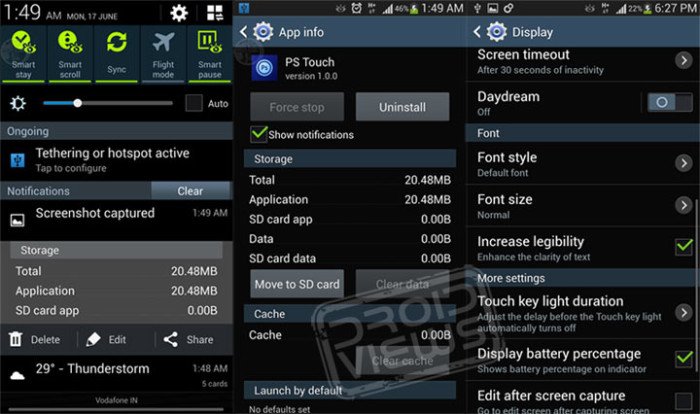
- The performance of the device is faster and more stable
- Status bar is now semi-transparent
- More free RAM
- More free space on internal SD card.
- New Apps to SD Card feature that lets you move an app to the SD Card
- Improvement in camera picture quality
- New “Increase legibility” feature that can be found under Settings> My Device> Display
- New Smart Pause toggle in Quick Settings under Notification Panel
- Improvements in the S Planner app
The new firmware with version XXUBMEA is now available for download and you can install it using the same familiar Odin method.
Download Firmwares:
Since most of the official firmwares given below are unbranded, they can be installed on any Galaxy S4 with model number GT-I9500 that is not locked to a carrier, regardless of country or region.
How to Install Official Firmware on S4:
If you have ever used Odin to flash stock ROM on your Galaxy device, you should have no problem with installing this one on your Galaxy S4. But if you are new to such things, it is recommended that you take aid of our detailed tutorial on the topic:
How to Install Firmware on Samsung Galaxy S4
Want to Root the Galaxy S4 on New Firmware?
If you are interested in rooting your Samsung Galaxy S4 on the newly installed XXUBMEA firmware, do not forget to read our step-by-step guide on rooting S4:


is there one I can use for u.s.
Which model do you have?
gt i9500 clone
There is no firmware link for France !
Should i flash any other country !
Will it void my warranty ? Secondly will i continue to receive OTA UPDATES !
Please asnwer !
Yes, try the Germain firmware instead. It will not void the warranty but might affect OTA.
Can i install any other country’s ? I mean other than Germany !
Secondly do you recommend it ? Will it cause to stop receving OTA updates ? What do you say ?
Yes, you can.
Hello when i update with kies it says your device doesnt support initilaisation i formatted the phone and tried several computers but there is no way to update any ideas please thanks
Hi i am new with android and recently got the gs4 octa and live in egypt when i connect it to kies it never updates and says device isnt ready for initialisation and the ota update says you have the latest update installed and i am sure i don’t have the latest update since i don’t have the apps 2sd and in the links above i found egypt is that the latest version the one with the apps 2sd ? Will i lose the warranty and never get ota updates again if i flash that ?
Thanks
Download and install the firmware for Egypt from above. It would not void the warranty and you will keep receiving OTA too. No worries.
For the Kies issue, uninstall the current version and install the latest Kies from official site.
Thanks! And does the last egyptian version have the apps2sd and fixed smearing etc.. ? Thanks 🙂 just curious is it still laggy ?
Yes, apps2sd is there in all firmwares listed above bug lag is still there and will be there unless Samsung does something about it.
Thanks
The latest update that is rolling is XXUBMG1. But my phone has a CSC of THR. It has been updated only to MDK. The app2sd features and many other features were available for XXUBMEA. So if I update my phone manually via ODIN to XXUBMG1, will I be able to have all the features of previous firmwares? Besides, as my phone is from Iran which has not got the latest update, is there any harm or side effect if I update it with firmware for other countries like India or Bangladesh??
Well there are 2 solutions for you.
1.Either you install the official MEA firmware for S4 Iran: http://hotfile.com/dl/230486020/1cdb943/THR-I9500XXUBMEA-20130607155412.zip.html
or
2. You could install the latest G1 version from some other country. Choosing this way has 2 disadvantages; you’ll not get OTA updates, and also your native language. If you can do with English, CHOOSE THIS WAY.
I have not got the official MEA update yet. Is there any possibilty I will get the OTA update of this??
I have already linked the MEA firmware file in my previous comment.
does app2sd feature completely move game data as well or just user game files?
Not tested it on my S4 yet but I guess it moves just the apps to SD. Try it!
Not completely on big games like gta and stuff like that only the apk i guess and not all apps are compatible