The Samsung Galaxy Grand and its double SIM variant Grand Duos were released to target a special class of consumers who wish to own a high-end device with lavish specifications at a competitive price. This huge smartphone features a 12.72cms (WVGA) TFT display, 1.2GHz Dual Core processor, 2,100 mAh Li-Ion battery, 1080p Video Playback/Recording at 30 fps, 2.0MP front and 8.0MP rear camera with flash. No wonder why this phone has gained so much popularity in a very short span of time.
If you own the dual SIM version (GT-I9082) of this gigantic smartphone from Samsung, you can now root it now. If you are new to Android and are unfamiliar to rooting, we would recommend you to read our detailed article which might help you understand what rooting is and what possibilities does it have to offer. In short, rooting is a kind of breaking into the system files of you device and gain access to modify, alter and overwrite them. Having rooted your Samsung Galaxy Grand Duos, you will not only be able to install some nice apps and useful apps that require root permissions to run but can also be able to install mods, themes, and custom ROMs, thus getting the best out of your phone.
Disclaimer:
Rooting your phone has, indeed, a lot of advantages but at the same time, there are some dangers that lay hidden and might surface up if you make a mistake in following the procedure to the letter. As soon as you root your Galaxy Grand Duos, you will lose all claims to get the warranty of your device. However, you can later get the warranty back by unrooting your phone or by flashing back the stock firmware. In any case, we shall not be held liable to any damage done to your phone. Proceed at your own risk and if you do, be careful!
Install CWM Recovery on Galaxy Grand Duos GT-I9082:
Before you do anything, please take care of the following things:
- Download the Odin flasher tool and unzip it on your desktop: Odin3_v1.85.zip
- Download and install the Samsung USB Drivers on your computer so that your phone and computer could communicate with each other.
- Download the ClockworkMod Recovery file: recovery_20120412.tar
- or, If you want to install CWM Touch Recovery, download this: recovery_k2wl.v1.tar
- Download the CWM flashable SuperUser file for root access (do not extract) and copy to your phone’s (internal or external memory by connecting it to PC using USB cable: UPDATE-SuperSU-v1.30.zip
- Charge your phone to have at least 70% of battery level.
- Usually rooting does not affect any of the files saved or installed on your phone, yet we’ll recommend you to sync and backup your contacts, messages, apps, etc. Backup your contacts, call-logs, messages, APNs, bookmarks, calendar, apps & games using these apps.
- Open phone Settings> Developer Options and turn on USB Debugging mode by checking the box.
Having made the required preparations as suggested above, you can now have some action time. If you are new to it, may be you feel a little nervous- a natural reaction! Anyways follow the following instructions to install the ClockworkMod Touch Recovery to your Galaxy Grand Duos:
- Turn off your Galaxy Grand Duos and boot it into Download/Odin mode: Press the Volume Up+Home buttons together and then hold the Power button for 3 seconds. You will see a warning screen asking you to press the Volume Up key to continue. Press it to enter the Download Mode.
- Now open the Odin folder and launch Odin3 v1.85.exe.
- Connect your phone to PC via USB cable and wait for a few seconds till Odin detects your phone and you see ID:COM port turning to light blue and “Added!!” text below at message box. If you do not see this, check you have installed the Drivers and also that Kies (if installed) is not opened during the procedure.
- Make sure that only “F Reset Time” option is ticked on Odin
- Now click on the PDA button and select the gt-i9082-recovery_20120412.tar file.
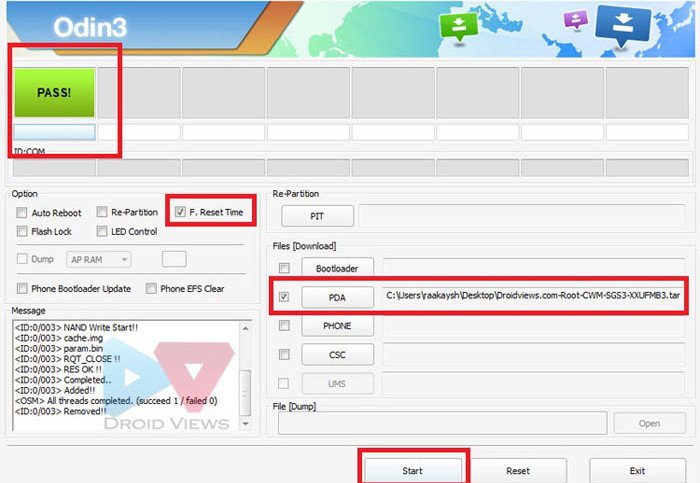
- Finally, hold you breath and hit the Start button on Odin. Let the installation finish.
- And when it is done, you will see “PASS!” message at ID:COM and your phone will reboot automatically. You can now disconnect the USB cable.
- Now pull out the battery of the device and wait for a minute. Put it back and reboot the phone in CWM Recovery mode.
When your phone boots up, it will have CWM Touch Recovery installed on it. It is time now to flash the rooting package to your Galaxy Grand Duos.
Root Galaxy Grand Duos GT-I9082:
To root your phone you will have to installed the SuperSU file to it using the CWM Touch recovery. This is how you can do it. Make sure you have copied the SuperSU zip file to your phone.
- Boot the phone into ClockworkMod Recovery: press and hold the Volume Up+Home (center) keys simultaneously and then hold the Power key. Keep the three buttons pressed till the screen turns up, the Samsung logo blinks for two times. Release the power key now but keep the other two keys pressed till you see a list of options in blue text on black background with Android bot.
- Make sure you see “ClockworkMod Recovery” written on the top of the recovery mode screen.
- Now tap “install zip from sdcard> choose zip from sdcard”, navigate to the “UPDATE-SuperSU-v1.30.zip” and select it. Tap on “yes” when asked.
- Let the installation finish. It will take just a few seconds.
- When it is complete, tap on the “Go Back” option and then select “reboot system now” option from the main menu in recovery.
Your Galaxy Grand Duos GT-I9082 will now reboot and you will see “Android is upgrading” message while it boots up. Open app drawer and tap on the SuprSU app found there and update the binary if prompted. To verify the root, you can install and run the Root Checker app from the Google Play store.
[googleplay url=”https://play.google.com/store/apps/details?id=com.jrummyapps.rootchecker”]
Did you find this tutorial helpful? If yes, do not forget to share it with your friends via Facebook, Twitter, and Google+. If you encounter any error or have any issue with rooting your Galaxy Grand Duos, let us know. Cheers!



dude Rakesh Shukla in the article you gave the wrong key combination to enter into download mode its not ” vol up + home + power ” it is “vol down + home + power ” infact.. please correct
I have the official 4.2.2 installed on my galaxy grand.. Have installed CWM recovery but cannot boot into CWM recovery mode.. An error message “No Command” is being displayed.. Please help me fix this problem
Hi I am having problem in rooting my Grand I9082. Even after successful Pass through ODIN CWM is not installing in my device. Instead Android recovery mode is showing. Please help.
i is not happing what to do with this help me what to do i have tried many times but nothing is happening.
The method is not working with the latest firmwares for Grand.
Can u tell me how to get out of safe mode
http://droidviews.com/2013/how-to-boot-android-devices-into-safe-mode/
dear,
i used samsung galaxy grand,but i have a problem.the set lite automatic
on and off.what the problem?plz help me.
llll
Hi Rakesh,
I have installed CWM successfully using odin, but when i go into recovery mode i dont see CWM on top.
Also i dont have the option of “Install zip from SD Card option” , below is the odin message log for reference. Please let me know we can fix this or install CWM properly.
Appreciate if u can reply to my email sai.vemareddy@gmail.com
Check MD5.. Do not unplug the cable..
Please wait..
CWM-touch_i9082_chotu.tar.md5 is valid.
Checking MD5 finished Sucessfully..
Leave CS..
Odin v.3 engine (ID:10)..
File analysis..
SetupConnection..
Initialzation..
Get PIT for mapping..
Firmware update start..
recovery.img
NAND Write Start!!
RQT_CLOSE !!
RES OK !!
Completed..
All threads completed. (succeed 1 / failed 0)
Removed!!
Added!!
Removed!!
Added!!
Removed!!
Just wait I am updating the post.
Sorry for the inconvenience, The method worked perfectly but now it seems not be working anymore.
Anyways I have updated it. Try again with these files:
Odin 1.85: http://d-h.st/M14
CWM: http://d-h.st/LNX
SuperSU 1.30: http://d-h.st/9WL
Please, let me know.
Still Not done with above link downloads it shows Android recovery and not cwm recovery eveny after so many tries please help
Updated the post with working CWM. Give it a shot.
for me also same problem…help me
I had already install CWM Touch using ODIN flasher and success.. but after I turn off, then when I press Volume up + Home + Power… I can’t get into CMW screen…. but get into Android System Recovery system. Did I have to change my Firmware First? my Device.. GT-I9082, Android Verion 4.1.2, Baseband Version I9082XXAME2. Can anybody help me how to get into CMW screen?
Hi Ramli, the CWM is not working on new firmwares. The guy who developed it is not responding to any query at the moment, so sorry for now. As soon as we get some workaround, we’ll inform you. Sorry for the inconvenience!
Thank you.. already solved the Problem… Just untick the Auto Reboot. Once the flash is done, Exit ODIN. Power off Galaxy Grand. Remove your battery for 5 seconds, put it back and go ono boot menu (Volume UP + Home + Power).
Then you can Install Fix Recovery. Done well for me and i had already used custom ROM GENNXT
Can I install the root zip.. Using the stock recovery ??
No, only via a custom reovery.
are by this method can change csc on the samsung galaxy grand duos?
i made a pretty big mistake today by deleting a file and not backing up, im missing the main screen, all the apps, etc. etc. is there a way to start from the beginning again?
Flash a new firmware: http://droidviews.com/2013/update-samsung-galaxy-grand-duos-gt-i9082-to-android-4-1-2-jelly-bean-firmware/
got it all working thank you for the help!
It is weird! Flash it again.
i do get that but it does not say clockworkmod recovery anywhere and cant seem to install the supersu…
Can you show me your Odin screen with the selected file?
i can get it to boot into safe mode but cant get clockworkmode recovery…any hints…
Turn off your phone and boot it into ClockworkMod Recovery: press and hold the Volume Up+Home (center) keys simultaneously and then hold the Power key. Keep the three buttons pressed till the screen turns up, the Samsung logo blinks for two times. Release the power key now but keep the other two keys pressed till you see a list of options in blue text on black background with Android bot.
its not working md5 hash file extension failed error showing
In that case try changing file extension to CWM_gt_i9082.Tar and then CWM_gt_i9082.Md5.
Then try flashing, it should work.
hi every goes..but if i press up button for cwm mode is entering in andriod mode…blue color menu is not avialble..i try in all methods..pl help to access
Try this: http://www.mediafire.com/download/vz9lq8m9d2x32as/CWM-touch_i9082_chotu.tar.zip
Hi,
Same problem, tried but not working…..can I install CWM twice….because now odin showing me following
Please wait..
CWM-touch_i9082_chotu.tar.md5 is valid.
Checking MD5 finished Sucessfully..
Leave CS..
Odin v.3 engine (ID:5)..
File analysis..
SetupConnection..
Complete(Write) operation failed.
Added!!
All threads completed. (succeed 0 / failed 1)