If you like the new weather clock widget of the upcoming Samsung Galaxy S4 and want to have it on your Galaxy S3, Note, Note 2, S2, etc., you can now have it. XDA member XdroidPerfect has come forward with his modded AccuWeather widget that will replace the original widget found in current Galaxy phones to look like that of Galaxy S4. The mod is so perfect that one cannot point out a difference
The Galaxy S4 Weather Clock Widget and Music Player are available in a CWM flashable zip file and it naturally means that you must have a rooted Galaxy device with a custom recovery like ClockworkMod or TWRP to install it. I have tested it on my Galaxy S3 and it’s working beautifully.
The widgets available below have been made by different modders and now they contain the original png files from Galaxy S3’s system dump. So they look more genuine now. Most of the S4 Weather widgets for S2 nd S3 have been modded by dr30ma so all due credits to him.
Looking for Transparent Weather for Your Galaxy S4?
Install Transparent AccuWeather Widget on Your Samsung Galaxy S4
Note:
Most of these mods work on a deodexed stock-based custom ROMs. Make sure you have it on your phone before attempting to install. To avoid any mishap, do not forget to backup your current ROM in CWM.
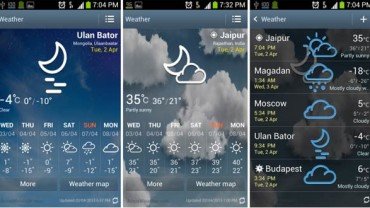
Downloads:
Download the preferred Galaxy S4 Weather Clock Widget from below and install it as directed below. Do not extract it and copy to your phone’s internal or external storage. Do not try to flash it on a non-TouchWiz phone.
For All Android Phones with Deodexed JB ROM:
Galaxy S4 Launcher and AccuWeather Widget
Updated on May 07, 2013
Galaxy S3 Only:
Make sure your phone in on latest rooted stock or a TouchWiz-based custom ROM like Omega, FoxHound, WanamLite, Neat ROM etc. If your phone has older firmware, the mods might not work on it.
The following files are for those phones on which all installed apps are found in “system/data” folder. You can check it using a root file explorer. Flash the following files using the instructions provided.
The following files are for those phones on which all installed apps are found “preload” folder and not in “system/data”. Browse your phone with a root file manager and open the prelosd folder. If your apps are there, install the files given below. You need to install both files from below.
The following files are for those phones on which all installed apps are found in “system/data” folder. Flash both files.
The following files are for those phones on which all installed apps are found “preload” folder and not in “system/data”. You need to install both files from below.
Download the app and copy/replace the original apk with this. Use only Step 7 from below.
Galaxy S4 Music Player for Galaxy Phones:
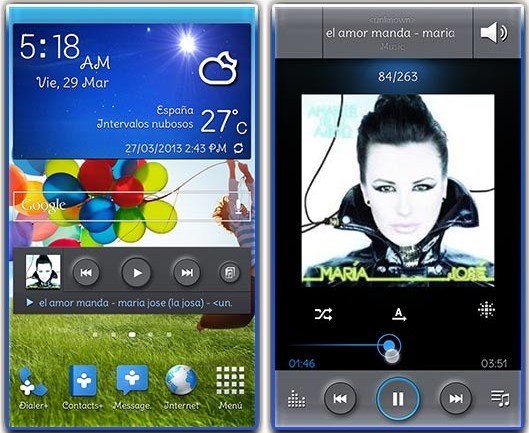
Download the zip file and flash via CWM Recovery.
How to Install:
The Galaxy S4 AccuWeather Clock Widget can be installed either on the stock rooted Jelly Bean firmware or on stock deodexed custom ROMs. Here is how you can install the widget on your Samsung Galaxy Phone.
- Copy the zip file to your phone’s internal or external SD Card storage without extracting it.
- Now boot your phone into ClockWorkMod recovery mode: press and hold Volume Up+Home+Power buttons for about 3-5 seconds.
- Needless to say, you will have to use the volume and power keys to scroll up or down and select options.
- Do not forget to backup your current ROM using “backup and restore” option in CWM.
- Go to “advanced” and “wipe dalvik cache” (do it before and after installation)
- Now scroll to “install zip from sdcard> choose zip from sdcard“, navigate to the widget file and select it.
- It will be installed in a few seconds and when it is done, reboot the phone.
- If your phone is on stock rooted firmware and you do not find the widget after flashing, install a root file explorer and navigate to the system/app folder. Here, you will find the following files: AccuWeatherWidget.odex and AccuWeatherWidget_Main.odex. Copy single/ both the files to the external storage of your device and then delete the original Odex files from the System/app folder. Finally, reboot the phone.
If you still have problem, clear app data from Settings> Application Manager> ALL> after flashing the zip:
- Settings>Application manager>All/Weather Daemon/clear data
- Settings>Application manager>All/Weather Widget /clear data
- Settings>Application manager>All/Weather Widget Main/clear data
When your phone boots up, you should have the newly installed Galaxy S4 AccuWeather Weather Clock widget installed on your Samsung Galaxy phone. Cheers and let us know if it works for you or not.
What to to Do If Doesn’t Work for Me?
Not all mods run successfully on all phones. In some cases the reason for failure in getting it to work might be some mistake made by the user him/herself. Whatever the reason, if the Galaxy S4 launcher and widgets do not work on you device and your device is caught in a bootloop or it is malfunctioning, do the following steps.
- Turn off your device, or pull out the battery (in case of a bootloop) and boot it into recovery mode.
- We presume that you would have backed up your ROM as instructed above.
- Wipe data/factory reset.
- Wipe cache partition.
- Wipe dalvik cache
- Go to “backup and restore” and restore the previous ROM.
- Finally, reboot the device.
Other Nice Download Stuff:
Stock Launcher & Widgets from Other Android Phones
Galaxy S4 Original Wallpapers and Ringtones


i have samsung GT-I9060I android kitkat 4.4.4 and it has has small weather widget!! How to install a new widget like this, S4 accuweather widget??? Plz help!!
Haw i get wather wedget s4 to s5
Try this: https://www.droidviews.com/pimp-your-android-with-beautiful-clock-and-weather-widgets-with-xwidget/
U know i whant just wid get weather change in may phone galaxys 5
Hello gus im murthy sree here im useing samsung galaxy s3 galaxy s4 weather widget working well make sure zip tha file and reboot your device and enjoy new weather widget reyle vire good
Tahnk you. …………..:-)
my phone hungs a lot after updating the software
Perform a data factory reset.
In this version the clouds are very stretched on android 4.1.2 Spain August (I9300XXEMG4 ). Version for S3 4.1.2_AccuWeather Widget S4 +Main_New.zip
Which phone do you have and which file did you install.
My phone is Samsung Galaxy s3 with android 4.1.2 (I9300XXEMG4) and file that I installed is “For Galaxy S3 on Leaked 4.1.2 the first link” but my phone doesn’t have leaked.
On my galaxy note 2 for t-mobile it won’t let me install I went to recovery n still wat do I do
Make sure your phone has a TouchWiz based custom ROM as base for this.
My rom is called tweak is that a touch wiz based rom
Yes.
So wat am I doing wrong , the tweak rom has the widgets but didn’t install can u please help
What error are you getting?
Well I downloaded the tweak rom n notice things missing , so that is why im trying to download this widget u have , I did exactly wat u said n it seems like it was going to work , but when I check my widget it’s not there n when I go to sys to try to install it says it can’t not install
Did you try the steps given under this head ”
What to to Do If Doesn’t Work for Me?” ?
My rom is fine just won’t let me install ur widget its says can’t install app
You are not able to install, or not able to see the widget? If you have done the steps given at the end of the article, the reason may be your phone’s being an US variant.
So wat do I do to get it to work
Widget is working on my s3 on leaked 4.2.2 FME7, but when touched shows error Unfortunatly, weather widget main has stopped.. I have installed 4.2.1_AccuWeather Widget S4 +Main_New.zip
It does not refresh automatically..
Try clearing data and cache from Settings> Application Manager> Accuweather
Now the widget is gone..I tried to reinstall..in app manager is shown under all apsp,but not under running apps..
I got it back by clearing accuweather data and reinstalling the widget,but the problem still exist
Does not work on my GalaxyS2Plus i9105P. Cannot boot – stuck at the boot logo. Tried to copy+paste to /system/app +Change permissions and flash.
Pull out the battery, boot in recovery and restore the previous ROM.
will it work for just simple toolkit rooted galaxy s3.
Works great with a TouchWiz based deodexed ROM. On rooted stock it might or not work.
Errr sorry but I am not able to get that ”touchwiz based deodexed rom”.
Am I needed to flash any custom rom?? Please help me out.
Currently your phone has Samsung’s official TouchWiz based ROM. The mods give above work best on custom ROMs like Omega and WanamLite, for example. What phone do you have?
I got i9300 4.1.2 running in India
Install omega from here and then try this: http://droidviews.com/2013/best-custom-roms-for-samsung-galaxy-s3-gt-i9300-2013-edition/
I have a rooted galaxy note with stock 4.1.2 XXLT5 firmware with CWM. I downloaded the .apk-file and the .zip-file from the galaxy note only-section. Where do I need to extract the zip file and how can I install this widget?
All instructions are already there above.
my stock music player force closes now. It shows nothing for like 2 seconds, then FC’s. what happened? 🙁
how to install
Galaxy S4 Music Player for Galaxy Phones
I can’t see my s3’s screen
only thing that’s working is the notification bar
nothing else is
and when I press the home screen my device rebootd
please help
Turn off your device, or pull out the battery (in case of a bootloop) and boot it into recovery mode.
We presume that you would have backed up your ROM as instructed above.
Wipe data/factory reset.
Wipe cache partition.
Wipe dalvik cache and reboot the device.
it doesn’t work
any other ideas
Restore the backed up ROM.
not workin
Sounds weird! Anyways, flash the official ROM back.
How ???
You’ve a custom recovery installed? Like CWM or TWRP
The text on the widget is out of place how can you fix this problem
This might be because you installed a wrong resolution file. Select appropriate version and it should be fixed.
What resolution should I choose ive got a Samsung galaxy s3 i9300
Try XHDPI version.
And where can i find the XHDPI version
I flashed it but instead of getting the s4 music player it deleted the stock music player.
Please help
The instructions are exceptionally badly written. Eg.: for S2 it says: flash *both* files, then follows a list of *four* files. Also for the Note I’m unable to understand what it’s telling me to do.
I do not know what makes you conclude that when “both” has been used just above each of the 2 files. Always read things carefully before you come with a judgement. Anyways, I have changed it a little and am not sure it is still “exceptionally badly written”! Please, tell us again. Thanks!
Music player “for all galaxy phones” not working on my SGS2 with CM 10.1
produces FC
It works on Galaxy phones with stock-based ROMs. Foe CM, see here: http://droidviews.com/2013/galaxy-s4-launcher-and-weather-widget-for-all-android-phones-on-jelly-bean/
will it work for my note 2 (n7100)? also, the link for the non transparent is broken, the transparent one is an mp3 file? pls help. thanks!!
Yes, it will. Links have been updated. Thanks for notifying! If you are not able to see new links, clear you browser’s cache and refresh the page.
is this music player working on ultimate rom??
Yes, it should.
I am trying to install the Samsung Music Player app but it force closes. I have the sprint GS3 with CyanogenMod 10.1 on Android 4.2.2. I all ready installed the GS4 launcher and widget and they work perfectly. However, any samsung music player I load just force closes. I installed the zip with CWM recovery and that did not work. I even went in to the system/app folder and changed permissions to rw/r/r, cleared data and cache and I even clear it on the recovery. Nothing seems to make it work. I am wondering if perhaps I need something else to make it work, another Samsung file or something?
Hi, you could flash the launcher and weather widget because they hav been ported to other Android devices using stock TW or AOSP/CM based ROMs. But the music player app works only with Galaxy phones with stock (TW) deodexed ROMs.
So you are making jut one mistake- trying to flash it on CM base.
I tried that and it also force closes. However, you are saying that the music player app will only work with a stock deodexed ROM so maybe that’s it, oh well. Thanks for your help.
what is the difference (or new) between s4 music player and galaxy note music player??
I have a rooted sch-I535 gs3 which rom can I use this with. Haven’t had much luck with carbonrom or stock 4.1.2 rom. Thanks
What problem are you facing, David? Try one of these: http://droidviews.com/2013/top-5-touchwiz-custom-roms-for-verizon-galaxy-s3-sch-i535/
Wich of d above widget’s should i try on rooted galaxy grand duos wid firmware XXAMC4?
Try this: http://www.mediafire.com/?iod868xy2silk56
i flashed d zip file. den wen i dragged d widget onto the home screen it showed problem loading widget. what do i do?
Everything is already given on the article. Just read that first before asking.
ok i got the widget after the removing the odex files and rebooting d phone. But the widget doesnt fit in the screen. I have uploaded this image for you to see. Here’s d link – http://postimg.org/image/vvo6auhsj/ . plz help !
Then try the version for Galaxy s2.
work on Galaxy Y???
Not tested but it should. Try the MDPI version and do not forget to backup the ROM before doing anything.
ok
Which of this is for the Galaxy Grand?
Try this: http://d-h.st/Hxe
and
http://droidviews.com/2013/galaxy-s4-launcher-and-weather-widget-for-all-android-phones-on-jelly-bean/
It installed, but the only thing that changed was the weather icon, the clock stayed in the center and the weather background is the normal accuweather one.
Many grand users say that it worked for them after 2-3 flashes. Also try wiping Cache partition and dalvik cache before and after install.
The mods however work best on deodexed ROMs.
this is not working on my rooted tmobile galaxy s ii for some reason i cannot delete the odex files, i follwed every step nothing changed.
it needS a deodexed ROM.
Well it works but doesnt fit the screen soo text looks disorted.
Tmo galaxy S2.
i have the jelly bean 4.1.2 and i flashit this widget with CWM and after i reboot the phone i donn’t have the weather widget i tryed the another method with root file explorer i find the Sysstem/app folder but i cann not delet the 2 odex files and i cann not renammeit i cann not move’it i cann not put in this folder nothing so what’s the problem i would to have the s4 weather widget or what i musst do to have the stock weather s3 widget??????
If you backed up the original apk and odex files or the ROM, copy the files back to their place or restore the ROM.
Same thing on my S3 , can not delete that two odex files ???!!!
Try after removing the Weather widget from the homescreen.
Stll can not delete AccuWeatherWidget.odex and AccuWeatherWidget_Main.odex and problem is that I dont have weather in Settings/Application manager/All/Weather Widget .
Nice 🙂
Trick during installation is that it is not vipe dalvik cash only erase data in App Manager and be left active weather on the lock screen, After that I was able to install all versions without any problems on stock 4.1.2 GS3 .
I have suggested all possible methods to get it to work. One might work for some and the other for someone else.
http://www.dodaj.rs/f/R/22/2MNPK7zx/screenshot2013-04-30-22-.png
Looks awesome!
Yes I agree it looks fantastic, you brighten my day DroidViews … Thank you again.
By the way, my name is Rakesh and thanks for the compliment.
Also see some more stuff: http://droidviews.com/category/downloads/
Working on my Galaxy S3 like a charm…without any issues. Thanks a lot!
Did you test the transparent version too?
Not really…I’m gonna test and then let you know for sure…
Not working on my S2 Omega :/
Added a separate version for Galaxy S2, try it and let me know. Cheers!
Now it works perfectly! Thanks man.
Looks good but not the same
Yes, it is not. We will not have to wait for it much longer. The system dump is out now and it will soon be ported.