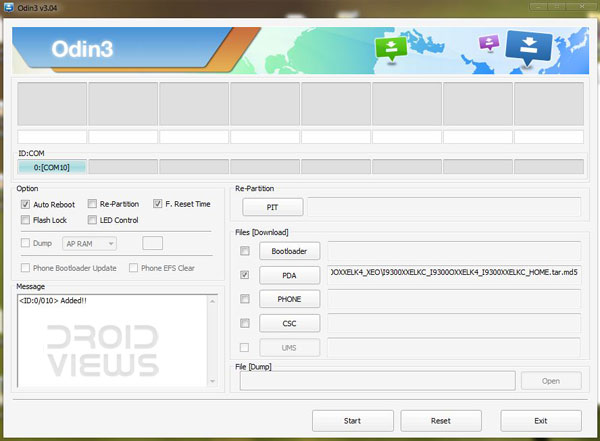
Android 4.1.2 Jelly Bean firmware update for Samsung Galaxy Note 2 GT-N7100 is out now and you can flash it manually using the old familiar Odin method. We know well that many of you must be dying to get the latest update on your Galaxy Note 2. If you do not have patience enough to wait for the update till it hits your device, you can download the firmware from our links and flash it right away manually using Odin.
If you are new to this flashing stuff, you need not worry as we have a carefully written tutorial for you that will help you through it all. All you need is to follow the steps described below carefully and your device will be upgraded to Android 4.1.2.
Recommended for You:
Steps to Install Android 4.1.2 JB Firmware on Note 2:
- Download the firmware N7100XXDLK7_N7100PRTDLK5_PRT.zip and extract the zip with a zip archiver. Inside the extracted folder, you will find N7100XXDLK7_N7100PRTDLK5_PRT_HOME.tar.md5 file.
- Download Odin3_v3.04.zip and extract it to your desktop.
- Download and install Samsung USB Drivers on your computer if you have not installed it yet.
- Charge you Note 2 to 70% battery level at least.
- Backup your contacts, call-logs, messages, APNs, bookmarks, calendar, apps & games using these nice free apps.
- Turn on USB Debugging from Settings> Developer options
- Turn off your phone and boot it into Download/Odin Mode: press and hold Volume Down and Home (center) keys simultaneously and then long press the Power key till you see a screen that prompts you to press the Volume Up key to continue.
- Press the Volume Up key to enter the Download Mode.
- Now open the Odin folder that you downloaded in Step 2 and run the .exe file present there.
- When the Odin is launched, connect your Galaxy Note 2 to the computer via USB cable and wait till the ID:COM box at Odin turns light green. It shows that your device has been detected by the program.
- Make sure that only F. Reset Time and Auto Reboot boxes are checked on Odin. Do NOT check any other item.
- Now click on the PDA button and select the N7100XXDLK7_N7100PRTDLK5_PRT_HOME.tar.md5 file.

- Take a deep sigh and click on the Start button on Odin to start the installation. It might take about 5-8 minutes for the installation to finish.
- Finally, you will get a PASS! message on the ID:COM box and then your device will reboot automatically.

- Your device will reboot with the latest Android 4.1.2 Jelly Bean firmware installed on it. Cheers!
- In case, you installed the latest stock firmware over a custom firmware, you might get a boot-loop. If it is the case with you, open the back cover of your Note 2 and pull out the battery. Wait from 10 seconds and reinsert it back to its place. Then press Volume Up+Home+Power keys to enter ASR (Android Stock Recovery) mode and wipe data/factory reset. Then reboot the device. Now it should reboot normally.
You have just installed the official Android 4.1.2 update to your Samsung Galaxy Note 2. All you can do now is to enjoy.
Related Reading:
Root Samsung Galaxy Note 2 on Android 4.1.2 Jelly Bean Firmware
when i try to move the .tar file winrar tells me that the file is corrupt.
Re-download it.
Hi! guys i need your help. i have mobile samsung note 2 and i decide to upgrade to 4.3 from 4.1.2, im disappointed to 4.3 and i want to downgrade in 4.1.2 im leave in philippines. I cannot find the 4.1.2 firmware for Philippines. please help me and please share the link. than you.
I have samsung note 2 and previously it was JB 4.1.1 what i did is i updated in to 4.3 not in my handset no netwwork if i re install JB 4.1.1 whill able to call from my moble
pls some body suggest i am from india and samsung servie centre is telling me that mother board is gone and that has to be re placeed
pls some one suggest
If the network issue has occurred after the update, I don’t think it is a mother board problem. Dial *06# and check if the IMEI is there.
Sir,
Error screen shot i have attached and about phone screen shot also attached
I have checked IMEI number is present..now i am using my samsung note 2 as a TAB every thing is working fine only issue is the calling
if u help me then it will help me a lot
even if something gone wrong while updating my cell phone i will never blame you.. 🙂
First of all, try the steps 10-14 from this guide: https://www.droidviews.com/how-to-downgrade-firmware-on-samsung-galaxy-devices/
If it does not help you, download the firmware file: http://samsung-updates.com/details/23886/Galaxy_Note_2_International/GT-N7100/INU/N7100DDUENA1.html
and install it manually using the guide above.
1st shall proceed for
Rooting Galaxy Note 2 and then i processed for Install Android 4.1.2 JB Firmware on Note 2..or install JB 4.1 and then rooting
pls guide once again
First of all, try the steps 10-14 from this guide: https://www.droidviews.com/how-to-downgrade-firmware-on-samsung-galaxy-devices/
If it doesn’t work try installing the official firmware: http://samsung-updates.com/details/23886/Galaxy_Note_2_International/GT-N7100/INU/N7100DDUENA1.html
both not working..same error .not on registered network
pls suggest
why they charge rs 10000 for the mother board
do You Guys have a 4.1.2 Jelly Bean Update For Tmobile Sgh-t999 I See It For The T989 And The Note 2 And Othe Samsung Devices But Not For The T999. Would Appreciate Your Help.
Thanks.
Hi Tony, it is really an unjust treatment with T999 users because the official 4.1.2 is not yet out. However, you can still enjoy it with custom ROMs: http://droidviews.com/2013/best-custom-roms-for-t-mobile-samsung-galaxy-s3-sgh-t999/
Thanks for your thoughts, I appreciate it.
Hi there, I have installed the UAE version and things are ok
except for one issue, when I connected the phone with Kies under the Frimware
information it reads “Your device’s current firmware version is not supported
to update firmware via Kies”. What is that mean and kindly, advice the solution
if possible? Regards
It is because Kies not recognizing the CSC for your country because you have flashed the firmware manually. Install the firmware made for your country and then you will not see this issue.
I have no problem with Eng, I would try UK version, thank you very much for your advise.
Thanks again,
since my country of residency is not shown on that list, kindly, advice of the
version I should try.
If you do not have problem with English, try the UK version or pick any country that’s nearest to yours- Iraq or Saudi, for example.
Thanks for useful info for galaxy note 2 users; I live in
Kuwait, which version would be good for this part of the world.
Check here: http://droidviews.com/2013/exynos-vulnerability-bug-fix-firmware-rolls-out-for-samsung-galaxy-note-2-n7100/
i have done all the steps on the tutorial, everything came out perfect except for one little problem, my note 2 is unlocked and with my first sim card everything is perfect, but when i insert the one from the original carrier it does not show any contacts at all, i get signal and data but i cant find my contacts, any suggestions?
thank you in advance
Go to Settings> Google and tap on your abc@gmail.com and then tap Sync Now. You contacts should be imported from Google Account.
If it still does not help you try a wipe data factory reset. Use method 1 from this tutorial: http://droidviews.com/2012/how-to-recover-when-your-android-device-is-caught-in-bootloop/
Is it available in UAE? ive been trying to upgrade my note 2, 4.1.1 but it says i have the latest firmware,
Install this one for UAE: http://www.hotfile.com/dl/197036975/1f3e459/N7100XXDMB5_N7100OJVDMB1_XSG.zip.html
Not sure but seems it is 4.1.2.
Question.. I have my Note2 with JB 4.1.2 installed and I need to connect to a Leap network and I cannot make it work, so can anyone tell me how to connect to a Wifi leap network??? which app should I use? is it already possible for the JB 4.1.2 to install a leap network?? Thanks a lot for your kind help.
Hi Marian,
In fact there are two versions of the Android 4.1.2 firmware for the Note 2. The first one that came in the beginning and had Exynos vulnerability and WiFi connectivity bug. It was later followed by another version of the 4.1.2 FW with thr fix for these bugs. If you have the first one on your Note 2, I am afraid you will be able to connect it to WiFi.
First of all make sure you have the latest 4.1.2 with the fix.
http://droidviews.com/2013/exynos-vulnerability-bug-fix-firmware-rolls-out-for-samsung-galaxy-note-2-n7100/
I assume by “leap” you mean the wireless service by Leap Wireless International, Inc.
Hi, yes that’s exactly what I meant to say… thanks a lot, i will for sure do that and come back to you… many thanks.
i buy my phone here in taiwan and the baseband is N7100XXALJ2
im here at taiwan and when i try to update via OTA is says “access to the software update service is provided to users in the order in which they request it. try later. what does this mean?
Hi, this is just a “wait” ignal for you. The servers from where the updated are pushed have certain capacity and they cannot serve the update to all at the same time. When you try to update you phone, your device ID is enqued for getting the update, and the servers are have less load, you will be able to receive the update. So keep checking and some day you will be able to download it.
This was 5months ago? How long do we wait for n7100xxalj2 to be updated?
Just updated. See here: http://goo.gl/0LNXlm
My GN2 N7100 baseband is XXALJ2, when I try to update it to 4.1.2, it says no updates available for your phone.. is it because its not an India model? How do I check from which country is it sourced and when will I get an official OTA update?
It is UK (international) with Android 4.1.1. You better install this firmware:
http://droidviews.com/2013/exynos-vulnerability-bug-fix-firmware-rolls-out-for-samsung-galaxy-note-2-n7100/
My GN2 N7100 baseband is XXALJ2, when I try to update it to 4.1.2, it says no updates available for your phone.. is it because its not an India model? How do I check from which country is it sourced and when will I get an official OTA update?
4.1.2 firmware update is now available on OTA
I followed the instructions but ID:COM box in odin doesnt change, it doesnt recognize my phone, gt-n7100. please help
Make sure that the USB drivers are installed, the cable is connected correctly.
If these are fine, restart your pc and phone and try again.
http://droidviews.com/2012/samsung-motorola-sony-lg-zte-htc/
if i update to 4.1.2, will it un-root my phone?
Yes, it will. But you can root the device again. Here is the tutorial: http://droidviews.com/2012/root-samsung-galaxy-note-2-gt-n7100-on-anddroid-4-1-2-jelly-bean-firmware/
thanks for the reply,another question here,since turkey’s 4.1.2 is available now,so which one shall i update? turkey or india?
Well, it is always better to install a firmware that has been officially released for your country.
You can download the Firmware for Turky Here: http://www.hotfile.com/dl/186384655/8a27a0e/N7100XXDLL5_N7100OJVDLL2_TUR.zip.html
BTW, updating to 4.1.2 firmware from poland will have issues with KIES. KIES will not support firmware upgrade since you will have CSC incompatibility.
First of all, you can compromise this issue since you can upgrade your firmware the same way as you updated to 4.1.2. Secondly, you can look for the firmware for your country and flash it over Poland:
http://droidviews.com/tag/samsung-galaxy-note-2/
Lastly, you can change the CSC of your device using this method:
http://droidviews.com/2012/how-to-change-csc-in-samsung-galaxy-phones/
Hey.
I updated my galaxy note II to jelly bean 4.1.2.
Now I cannot connect to any wifi.
The phone keeps trying to obtain an IP but then eventually it gives a message “Network Disabled. Poor Connection” even when the wifi signal strength is very good.
I dont know what to do as I am not an expert in this.
if anyone can help i will be very grateful.
thanks
Hi Chintan, all Android 4.1.2 updates have this WiFi connectivity bug. I faced it on my Note2 too. Fortunately, Samsung has been notified with this problem and they have promised to fix it soon. I would only suggest you to boot your device into Recovery mode and “wipe factory/data reset”. I hope your problem will be fixed. Since this action will delete your data like contacts and messages and settings, etc., do not forget to backup you data before performing the wipe.
Hey. thanks for the prompt reply. but i am afraid this did not work for me. further i cant even restore my backup as it asks for wifi.
You can backup up and restore your phone using this guide:
http://droidviews.com/2012/how-to-backup-your-android-phone-without-rooting-or-unlocking-the-bootloader/
Wifi issue fixed:
Try this one. Working fine!
http://droidviews.com/2013/exynos-vulnerability-bug-fix-firmware-rolls-out-for-samsung-galaxy-note-2-n7100/
my friend got a update of 4.1.2 but when i tried the same by my handset the alert comes that ‘your phone is modified the softwre can’t be updated…’ what should i do
Change the CSC of your device to INU. Here is the trick: http://droidviews.com/2012/how-to-change-csc-in-samsung-galaxy-phones/
mine too,.but i did root again.and fixed..it is ok though?
I live in Pakistan. First flashed the Poland version from the link you have given and it was fine but I was annoyed by the popups in the Polish language. Then I flashed the Indian version as you have recommended in your post and it too is running fine but I miss the Jelly Bean Boot Animation from the Polish version and also the Ink effect which worked fine in the Polish version, doesn’t seem to work with fingers in Indian version, only works with the S Pen. In the Polish version, there was a cool Jelly Bean Boot Animation along with the real Ink effect that worked with the fingers. Any idea what might be going wrong here ?
And yes, to be clearer, I did do the wipe each time …
To set the ink effect, go to Settings> Lockscreen> and set the ink effect from there and choose the color. If only the Polish pop ups is th problem with the Poland firmware, you can change your language from Settings> Language and Input.
Hope it works for you. By the way, I am using the Polish version on my Note 2.
Thanks for your reply. The language is already set to English, everything shows up in English but once in a while some strange popups come up in Polish. Not sure why.
Ink Effect is easy but what about the Boot Animation ? Any idea why the original JB boot animation that’s available in Polish version doesn’t show up in Indian version ? It shows the Samsung’s Official Bootani instead.
I also noticed that but can’t guess why that thing is only in the Polish version.
Hm … Can I get that Bootani in a .rar file to flash on my note 2 from somewhere on the web, any idea ? I have searched but couldn’t find any.
Thanks again for your prompt and helpful replies.
yes!!!! i just rooted my device,just now..all my apps still here,.cool..thanks a lot..kudos!
Hello, Currently I’m using three device, one is open austria(atu), United Kingdom(BTU), and another is UAE Version, Is it possible use france firmware with my devices?. and it will be factory reset state?.
Yes, you can. But I will recommend you to go with the India Version. It will work perfectly.
really Thanks!
and… several Questions
1. Is anything crash in titanium backup and official 4.1.2?
Open Austria(ATU) 4.1.1-> France 4.1.2 then it crashed and also after reboot it can’t booting just infinite samsung logo loops(I solved this problem reflash france firmware by odin)
2.Why recommend India Version?. is anything diffrence between India and France Version?
3. UAE Hardware is same as european Hardware?, I mean is it have compatible with Europe Firmware?
Thanks you.
If you get a boot loop the first thing you should try is “wipe data/factory reset” in Recovery.
I do not use the Titanium backup so can’t say about that, but when I upgraded my Note 2, all my data and apps were intact. So I hope you would not need Titanium Backup.
I recommended the India version because it generally runs on all international version of galaxy phones without issues + you do not get bloatwares.
I think all Galaxy Note 2 hardware with model N, GT-N7100 are the same world wide. Only the configuration and extra services differ. If you use a Note 2 GT-N7105 for instance, you van still install the international version firmware but do not get LTE feature and face some bugs. In such cases there are hardware differences.
I really thanks about your Kindness, Have a nice day!
When will Android jelly beans 4.1.2 will be available for Samsung S3 in india
Expect it by the first week of January, but you need not wait for that because you can install this firmware too as I have done and have been using for 20 days now. No issue and works great.
if i do this i still can do OTA updates in the future?…i mean to update to a later android version
Yes, you will but updates from Poland. If you give me your country name, may be I can suggest you the correct firmware.
Also check this: http://droidviews.com/2012/samsung-galaxy-note-2-n7100-android-4-1-2-jb-update-hits-india-france-peru-and-more/
im from costa rica so i should download the peru version right?
Yes, either Peru or India.
bro im trying to do the thing with odin but it always says get pit for mapping…what should i do?
How many files are inside the firmware zip
mmm 2 files
Then there is no reason why it should not install. Restart pc and device, check your device is properly connected to pc, usb debugging is on and try again. If it still gives error, install the indian firmware or this one: http://droidviews.com/2012/samsung-galaxy-note-2-gt-n7100-gets-android-4-1-2-jelly-bean-update/
i just did it but it have a lot of things from peru…bro can you tell me how to downgrade please
Why downgrade if you can enjoy Jelly Bean. Install the Indian firmware and you will have no problem and any Sh*t, believe me.
`nah i mean i just upgraded the phone to 4.1.2 but it have a lot of things from peru like the email it says iclaro it looks weird…the indian one doesnt have any of that carrier stuff can i install that one over this one?
I got that. Okay, download the Indian firmware, charge your device. and flash the firmware. Do not worry, I am here to help you. Nothing will go wrong.
thanks a lot bro ill download it and ill let you know if it went right
bro let me tell you something….you’re awesomeee i just flashed the indian firmware and it works great…Thanks a lot bro!!
Enjoy!
I received an automatic software update notification on my (unrooted) Note 2 this morning and proceeded to upgrade to JB 4.1.2 (Baseband version N7100XXDLK7)
It looks like everything is working fine at the moment, however I am not able to connect to any Wifi networks, only to my provider’s 3G network! When I try to connect to my office wifi (which worked fine before the upgrade) i get the message ‘Network disabled. Poor connection.’
I have tried restarting the phone and forgetting/refreshing the network but with no luck. So I am left with a Wifi-less device 🙁
Any ideas as to how to fix this?
many thanks in advance
May be that is a bug in the firmware. I would suggest you to download the firmware from the link above and flash it via Odin.
Thank you that worked like a charm (though there is an occasional popup message in Polish?). I don’t understand how Samsung can mess up their official updates, this has happened to me and to friends several times. I’ll keep my eye out on this page for future updates.
Thanks again
Nice! If you tell me what country you are from, may be I can help you again.
PS.- Try changing the language from Settings> Language and Input on your device.
Hi again
Just wanted to let you know that a few days after i installed the ROM on this page I had the same problem as before, and still do – my wifi connection gets stuck on ‘obtaining IP address’ and it ends up saying that there is poor connection, network disabled.
Any ideas as to what I can do to fix this? I am sure this issue is due to the 4.1.2 upgrade. I never had problems before.
I read on other sites that I should replace the 11 files in the etc/wifi folder of the 4.1.2 version with the 11 files in the etc/wifi folder of the earlier 4.1.1 version, however I need my device to be rooted to mess with the system files. I am not too keen on rooting at the moment, I don’t see what the big deal of rooting is (enlighten me if you can).
thanks in advance
even I am having the same issue ever since I update my galaxy note 2 to jellybean 4.1.2. my wifi network has stopped working it just keeps on telling me poor network. samsung fixes up this bug asap.
I would forward the same advice to you (install the firmware from this page), or wait till the official firmware for your country.
Backup your data, boot into recovery (Volume up+Home+Power keys), and wipe data/factory reset. Then reboot phone. Hope it works for you as it did for me.
I was hoping there was an easier fix than having to completely wipe my data and applications.. Any idea when JB 4.2 will be out? Maybe I can wait until then.
I think it will sometime in the last week of January, or may be early February.
Wifi issue fixed:
Try this one. Working fine!
http://droidviews.com/2013/exy…
thx for the assurance….i am not clear on ur quote-“but do not forget to Wipe/data factory reset in Android System Recovery”….could u elaborate on that a little….
You will need to perform wipe action while downgrading firmware form 4.1.2 to 4.1.1.
If you only need to install the 4.1.2 firmware from this post, just follow the steps given above.
Later if you think of downgrading, contact me and I will give you a detailed how to on the topic.
sure….ok…thx for ur help & responses…..will get back to u if any other doubts…
hey Rakesh….did the update and all went fine…..at the end after phone restarted it gave a message in some strange language with two buttons to click…i think i clicked the ok button…nothing happened…but i do have a few queries….apart from the ink effect on the lock screen…which looks so cool….the settings>about device page shows my android version now as 4.1.2 but nowhere does it mention jelly bean…..also i’d like to know what has changed with this update…so i can take advantage of them…..pls do help and let me know….one more thing…i saw on the net….there’s some jelly bean easter egg on the settings page….i can’t seem to find on my device…..i’m attaching a screenshot of the settings>about device page from my phone….
Hi Dell, I am more than happy that it went fine for you without glitches. The language you saw at welcome screen was Polish but that doess not matter. On all devices, with Android 4.1.1 and up you will not see the “Jelly Bean” text. 4.1.X is itself JB. The Easter Egg you say was in an Ad by Samsung to greet Christmas to US users. I was to write a Review of the new 4.1.2 update for Note 2 but did not get time. But you can get an idea of the new features, if you see my earlier reviews for Galaxy S3 because 95% of the features are the same. The only difference being the features related to S Pen. Here are the links that might be helpful for you. Read them all to understand and customize your device better:
http://droidviews.com/2012/review-android-4-1-2-jelly-bean-update-on-samsung-galaxy-s3/
http://droidviews.com/2012/review-android-4-1-1-jelly-bean-firmware-for-samsung-galaxy-s3/
http://droidviews.com/tag/tips-and-tricks/
thx again for all ur help….will sure read them all….
I’m from India, have a Galaxy Note 2 with Android 4.1.1, it shows baseband version as N7100DDALJ1, the 4.1.2 update is still not available in India….can I update as per ur instructions here….will it be a problem with my warranty or something…cos I bought it recently and its not rooted….also if i update it and face some problem can i go back to 4.1.1 using factory reset or like that….pls do help….i’m having a lot of apprehensions before taking the leap….
Hi Dell, I can well understand your concerns as an owner of a costly new device. As an owner of Note 2 and being from India, I have flashed and using this firmware for a week without any issue.. Go for it and you will have no problem. Plus, you do not need to root your Note 2 to install an official update and therefore not lose warranty.
Yes, if you wish to, you can always downgrade to Android 4.1.1 but do not forget to Wipe/data factory reset in Android System Recovery.
My current firmware is XXALJ2, is it ok for me to flash this one?
And also should I unroot my GNOTE II before flashing this?
The condition for not trying to flash this Firmware is a Branded/Locked Note 2. The present firmware can be installed on your device, and yes, you do not need to root the device to to flash an official firmware. Go for it!
You misunderstood, my NOTE II is rooted. Should I unroot it before?
No, you need not unroot the device.